AI Facebook Ads: Which Parts of Running Your Ads AI Can Handle Today and Which Still Need You
AI can create, publish and optimize Facebook ads. You still own the offer, the Meta policy check and lead quality. A step-by-step split, with a worked example.

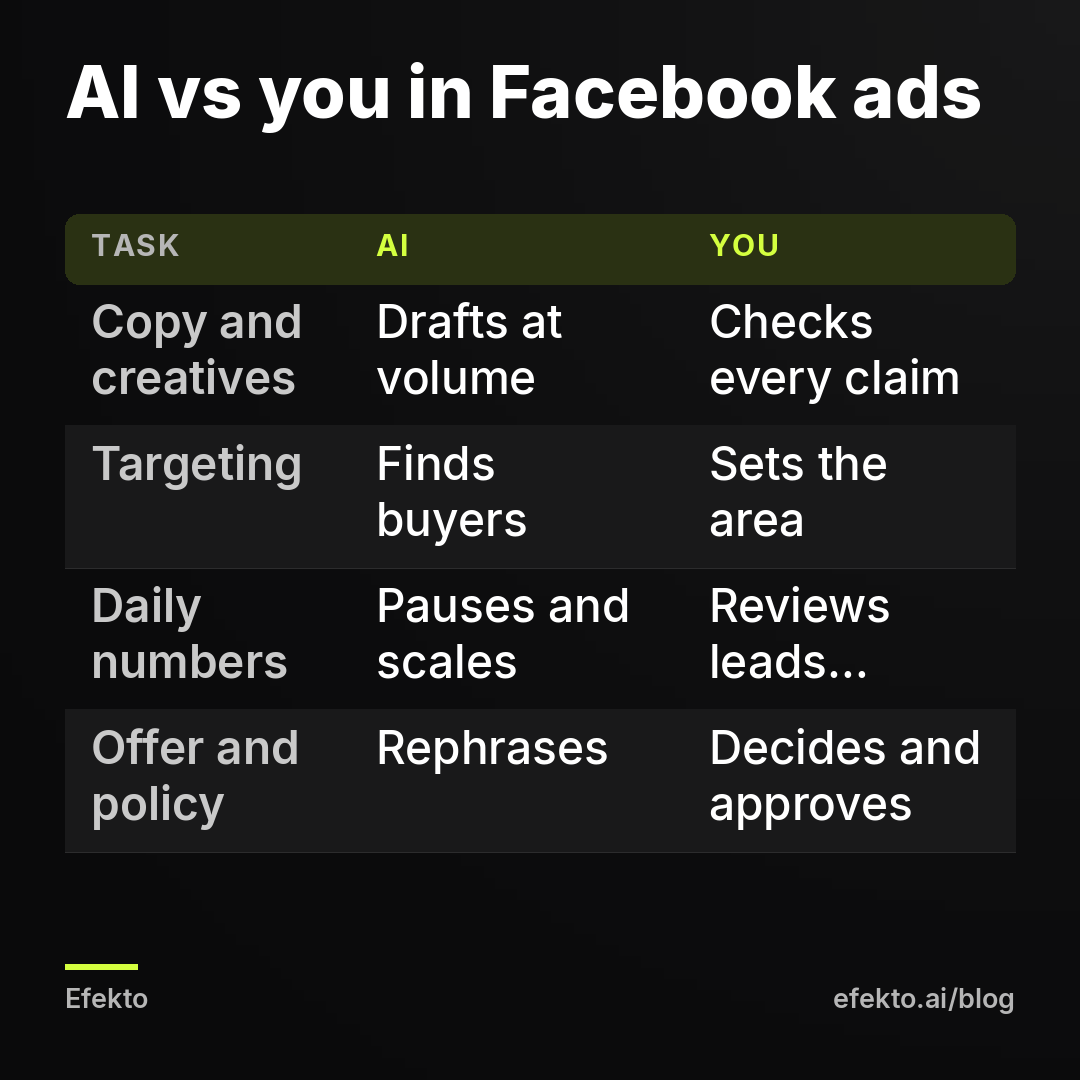
AI can handle most of the repetitive work in Facebook ads today. It can draft copy variations, produce images and short videos, find buyers inside the area you set, publish the campaign, and read the numbers every day to pause weak ads and move budget to strong ones. It cannot decide what you sell or what you charge. It cannot vouch that a claim in the ad is true, guarantee the ad stays inside Meta's advertising policies, or tell a real customer from a junk form fill. Those three checks are the offer, the policy and lead quality. They stay with the owner, and they decide whether the ads make money.
In short:
- AI does the volume work in Facebook ads well: copy and creative variations, targeting inside a set area, publishing, and daily optimization by the numbers.
- The business owner still has to own the offer, check every claim against reality and Meta's advertising policies, and judge whether leads turn into booked jobs.
- An AI that optimizes for the cheapest form fill will keep buying junk leads until someone tells it which leads actually became customers.
Here is our interest, stated plainly. We make money when businesses advertise on Meta, through Lemon Agency, which has worked with over 300 clients, and through our own app. That is why we want to be precise about where the machine stops. A month of cheap, useless leads is the fastest way to make an owner quit ads for good, and nobody wins from that.
Which parts of Facebook ads can AI handle today?
AI handles production, distribution and number-watching. You handle truth, rules and judgment about customers. This is the split we use when we hand work to software in the ad accounts we run:
| Stage | What AI does well | What you must check |
|---|---|---|
| Offer | Rephrasing an offer you already decided on | Price, what is included, how many jobs you can take |
| Ad copy | Dozens of hooks, lengths and angles in minutes | Every claim is true, no promises you cannot keep |
| Images and video | Formats, variations, captions, edits of your photos | It looks like your real work, no fake results |
| Meta policy | Catching obvious problems | Personal attributes, health claims, special ad categories |
| Targeting | Finding likely buyers inside your area | Service area, exclusions, the form questions |
| Publishing | Campaign setup, placements, formats | First batch approval, ownership of the ad account |
| Daily control | Spend, cost per form, pausing, scaling | Weekly review of lead quality |
| Pausing | Pausing by the numbers | Pausing for business reasons |
The steps below follow this order. If you only do the right-hand column, you are doing the part of the job that matters most.
Step 1: Can AI decide what offer to put in your ads?
No, and this is where most AI-run campaigns go wrong before they start. Ask an AI to make ads for a detailing business and it will write "Premium detailing that makes your car shine like new." That line has no price, no service, no place and no reason to call today. The AI did nothing wrong. It filled the gap you left.
Write your offer in one sentence before any tool touches your ads. Use this structure:
- Service: one specific job, not your whole menu. "Full interior detail for sedans," not "detailing services."
- Price or price anchor: "$189" or "from $189." Owners hate putting prices in ads. A price filters out people who were never going to pay it, and those people are your most expensive leads.
- What is included: "vacuum, shampoo, leather conditioning, done in your driveway."
- Where: the city or area. "Tampa and St. Petersburg."
- Why now: a real limit. "6 openings left in March" works only if it is true.
Then do the math that tells you what a lead is worth. The AI cannot do this for you, because it does not know your margins.
For example: say your average job is $400 and you are willing to spend $100 in ads to win one. If 1 in 3 leads books, you can pay up to about $33 per lead. That $33 is your ceiling. Write it down. In Step 7 and Step 8 it becomes the number you judge the AI's work against.
Step 2: Can AI write Facebook ad copy that actually brings calls?
Yes, for drafts and variations. AI is faster at copy than any person: 20 versions of a hook, short and long, question and statement, in under a minute. That speed is useful, because Meta needs several ads to compare before it can find the ones that work.
The risk is invented specifics. AI models fill copy with details that sound like local service ads, because that is what they learned from. We regularly see drafts that include:
- "Licensed and insured" for a business that has not told the tool anything about licensing
- "24/7 emergency service" for a company that closes at 5 p.m.
- "Same-day appointments" when the schedule is booked two weeks out
- "10-year warranty" or "lifetime guarantee" pulled from nowhere
- "#1 rated in Dallas" with no rating behind it
Each of these turns into a phone call where the customer feels misled, or a complaint, or a rejected ad.
What to do:
- Give the AI a facts sheet first. Hours, service area, licenses, warranty terms, prices, what you do not do. One paragraph is enough. Most tools that build ads from your website pull this from the site, so make sure the site itself is current.
- Read every line of the first batch out loud. If you would not say it on the phone to a customer, cut it.
- Keep 3 to 5 variations per angle. One angle can be price, another speed, another a common problem ("AC blowing warm air?"). More than that splits a small budget too thin.
- Check the call to action matches the form. If the ad says "Get a free quote in 2 minutes" and the form has 9 questions, people drop off.
If your copy brings clicks but the phone stays quiet, the problem is usually the offer or the landing step, not the wording. We go through the usual causes in why Facebook ads get clicks but no calls.
Step 3: Can AI make ad images and videos for a local service business?
Yes, and this is where AI saves the most hours. It can take photos from your website, crop them for every placement (square for the feed, vertical for Stories and Reels), add your offer as a text overlay, and cut short videos with captions. A small business used to pay a designer for this or skip it entirely.
Where it goes wrong:
- Generated scenes that are not your work. A perfect AI roof, a showroom-clean SUV, a smiling technician who does not exist. Customers notice when the person who shows up does not match the ad, and it costs you trust on the first visit.
- Fake before and after. A generated "after" image of a job you never did is misleading advertising. In med spa and cosmetic categories, before and after images also run into Meta's own restrictions.
- Text errors in images. Wrong phone number, misspelled city, a price that does not match the copy.
- Wrong equipment or details. A heat pump drawn like a window unit, a pressure washer on a job where you use a steamer. Small things, but your competitors and your customers know the difference.
The rule we follow: real photos of your work as the base, AI for layout, formats and variations. Ten decent phone photos of finished jobs beat 100 generated images. Before approving any creative, ask one question: would a customer who books from this ad recognize your business when you arrive? If not, it goes.
Step 4: Does an AI ad still need a human check for Meta policy?
Yes. Meta reviews every ad, and many AI tools catch obvious problems. The rejections we see most in service businesses come from wording that AI produces naturally, because it is the wording that sells in other places. A human who knows the rules has to read the batch before it goes live.
The patterns to watch:
| Risky line | Why it causes trouble | Safer version |
|---|---|---|
| "Tired of your stubborn belly fat?" | Implies you know something personal about the viewer (Meta's personal attributes rule) | "Body contouring in Scottsdale, consults this week" |
| "Guaranteed results in one visit" | A promise Meta and customers can hold you to | "Most clients see the change after the first session" (only if true) |
| "Bad credit? Get a new roof with no money down" | Credit offers belong in a special ad category with narrower targeting | "Roof replacement, ask about payment options" and check whether the credit category applies |
| Before and after photo for a cosmetic treatment | Restricted in health and appearance categories | Photo of the treatment room, the provider, or the device |
| "Lose 20 pounds in 30 days" | Unrealistic health claim | Describe the service, not the outcome |
Three checks before you approve a batch:
- Does any line address the viewer as having a problem? "Your back pain," "your debt," "your skin issues." Rewrite it to describe your service instead.
- Does any line promise an outcome? Remove it or soften it to something you can prove.
- Does the ad touch credit, housing or employment? Financing offers, rentals and hiring ads have their own rules in Meta. If you are not sure, ask before publishing, not after a rejection.
Med spas get hit hardest by these rules. We wrote a separate guide on promoting med spa treatments without getting ads rejected.
Step 5: Should you let AI handle Facebook targeting?
Mostly yes. In most local service campaigns we run, we stopped hand-picking interests like "home improvement" or "car enthusiasts." Meta's own delivery system decides who sees the ad based on who responds. Within a fixed local area, that usually reaches the right people as long as the ad itself says clearly who it is for. The creative now does much of the targeting: a photo of a roof with storm damage and the line "Hail damage in Plano?" selects its own audience.
What you still set, and what no AI knows unless you tell it:
- Service area. The ZIP codes or radius you actually drive to. If you serve 25 miles out but make no money past 15, set 15.
- Exclusions. Areas you will not serve, and existing customers if you have a list and the campaign is for new ones.
- Age. For most home services, the people who sign are homeowners, so a minimum age above 18 can make sense. Do not narrow it further unless you know your buyers.
- Language. If you only take calls in English, say so in the ad, not just in the settings.
- Form questions. The form is your real targeting filter. One qualifying question ("Do you own the home?" or "Which service do you need?") removes more junk than any audience setting.
When leads come from outside your area, the cause is almost always the location setting or an ad that does not mention the city. Fix those before blaming the AI.
Step 6: Can AI publish and run the campaign on its own?
Publishing, yes. Setting up campaigns, picking placements, uploading formats and connecting the form are mechanical tasks, and software does them without the mistakes people make at 11 p.m. in Ads Manager. What you keep, always:
- Approval of the first batch. Nothing goes live that you have not read. After the first batch, spot-check new ads every week.
- Ownership of the ad account and the Page. Know whose account the ads run in and who can access it. If you part ways with a tool or an agency, your Page, your history and your lead data should stay with you.
- The lead form and lead delivery. Who gets the lead, by text or email, and how fast. A lead that waits until tomorrow is often a lead that already called someone else.
- The budget ceiling. Set a daily amount you can lose for a month without stress while the campaign learns.
The form deserves 20 minutes of your time even if AI does everything else. Our guide to setting up Facebook instant forms for real customers covers the settings that cut junk leads.
This is the split we built into Efekto. It creates ads from your website, publishes them on Facebook and Instagram, and optimizes them every day: it turns off the ones that don't bring results and scales the ones that do. You approve the first batch before anything goes live, with at least 5 approved ads before the campaign starts. It runs either in your own Facebook ad account or in an Efekto ad account with the budget topped up in advance. The offer, the policy read and the lead review in this post stay yours either way. You can see the full flow on how Efekto works.
Step 7: What should AI watch every day, and what should you check every week?
AI should watch the numbers every day. You should check the leads every week. Software is better than you at noticing that one ad has spent $40 with no forms, or that frequency is climbing because the same 2,000 people keep seeing the same video. You are better than software at noticing that half of last week's leads did not answer the phone.
Daily, for the AI:
- Spend against the daily budget
- Cost per form, per ad
- Click-through rate, to spot ads people scroll past
- Frequency, to spot audience fatigue
- Ads that get no delivery at all
Weekly, for you:
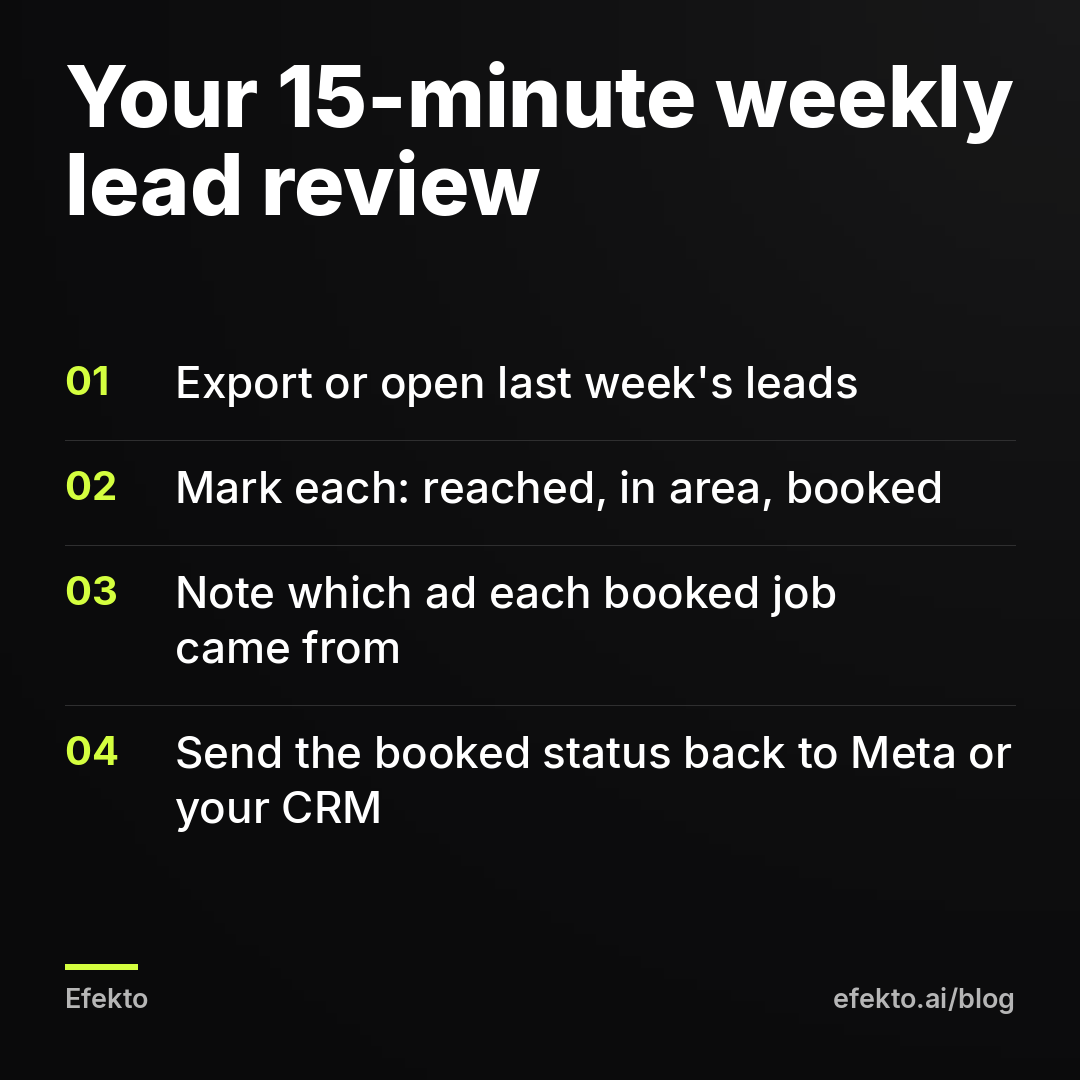
- How many leads you reached
- How many were in your area and needed your service
- How many booked, and for how much
This matters because the cost per lead Meta shows you is the cost of a submitted form, before anyone checked it. Wrong numbers, people outside the area, people who wanted a different service and people who forgot they filled anything in are all counted as leads. The cost per verified lead is always higher. The cost per booked job is the number that pays your bills.
For example, say you run $30 a day for a month:
| Line | Example number |
|---|---|
| Monthly spend | $900 |
| Forms Meta reports | 30 |
| Cost per lead according to Meta | $30 |
| Leads reached, in area, real need | 18 |
| Cost per verified lead | $50 |
| Booked jobs | 6 |
| Cost per booked job | $150 |
| Revenue at a $400 average job | $2,400 |
In this example, Meta's dashboard says $30 per lead and looks fine against the $33 ceiling from Step 1. The real cost per verified lead is $50, and the business only knows that because someone called all 30 people. AI cannot make those calls for you, and it cannot see the result unless you record it.
Step 8: Who should decide when to pause an ad: AI or you?
Both, for different reasons. AI should pause ads by the numbers, and it does this faster and more consistently than people do. You should pause for business reasons the numbers cannot see, and you should correct the AI when the cheapest ad is not the best one.
Here is the trap. Say two ads run for two weeks:
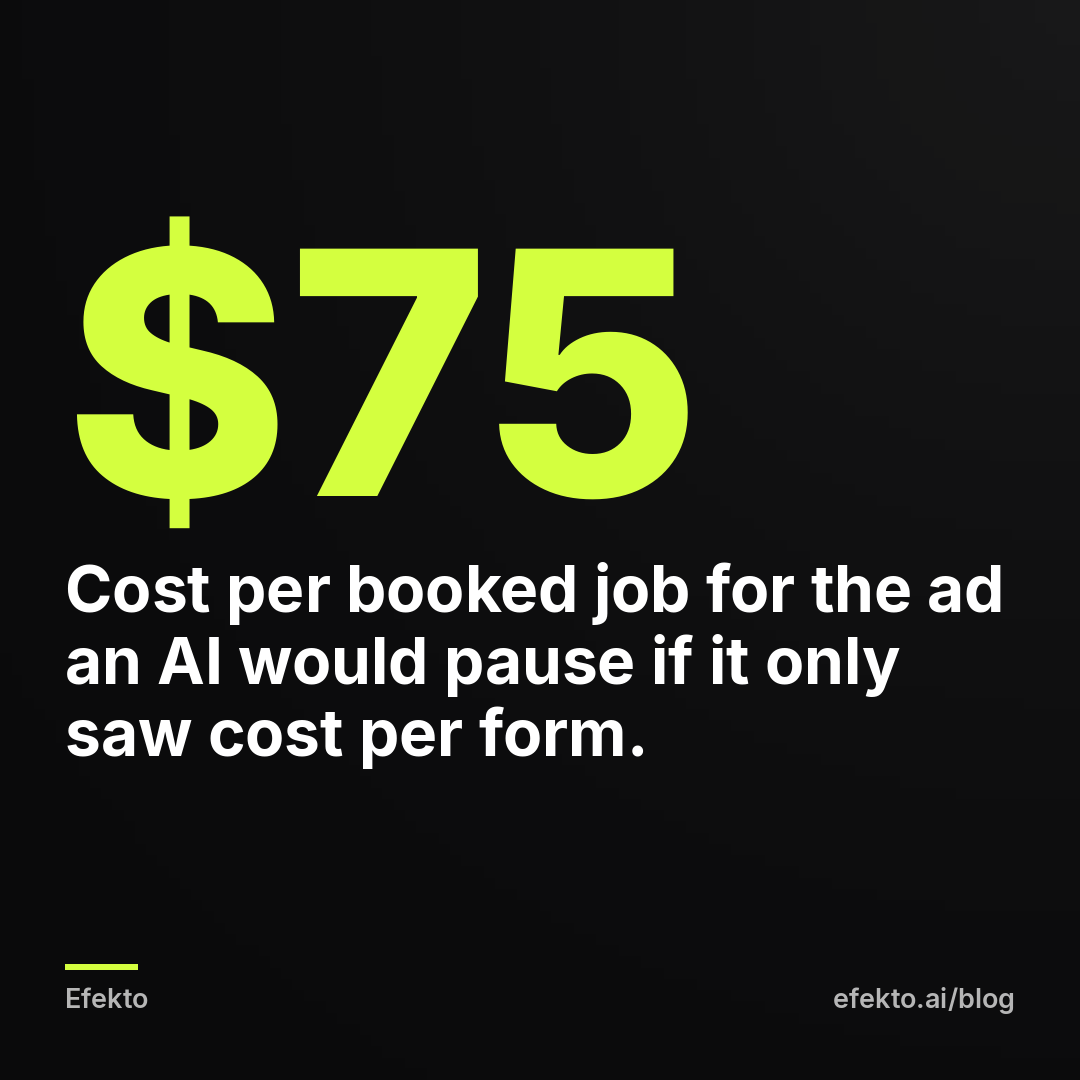
- Ad A spends $225 and brings 5 forms at $45 each. 3 of them book.
- Ad B spends $300 and brings 12 forms at $25 each. 1 of them books.
An AI looking only at cost per form pauses Ad A and scales Ad B. Count booked jobs and Ad A costs $75 per job, while Ad B costs $300 per job. Ad B is probably bringing price shoppers because its copy promises something too cheap or too vague.
How to fix it:
- Record which leads booked, every week, as in Step 7.
- Feed that back. Meta lets you send lead outcomes back from your CRM so delivery can learn which leads became customers. If your setup does not allow that, check the booked-job count per ad yourself before letting an ad scale.
- Override when needed. If an ad brings bookings at an acceptable cost, keep it on even if its cost per form is higher.
When you should pause, regardless of what the numbers say:
- Your crew is booked for the next three weeks
- The price or the offer in the ad changed
- The season ended (furnace tune-ups in May)
- Several ads got rejected and you need to fix the wording before more go out
A paused ad does not spend money, so pausing is not a cost in dollars. The cost is the leads you do not get while it is off, and the days the campaign needs to relearn after big changes. That is why we do not touch a campaign every day by hand. Turning ads on and off daily based on one morning's numbers resets the learning and makes results look worse than they are.
When does handing your Facebook ads to AI not make sense?
It does not make sense when the part only you can do is missing. Specifically:
- You cannot answer leads the same day. No AI fixes a lead that waits 30 hours for a callback. Fix the follow-up first, even if it means a part-time person answering forms.
- Your offer is not settled. If you change prices every week or cannot say what the first job costs, the AI tests ads against a moving target. Settle the offer, then advertise.
- The budget is too small to produce data. For example, at $10 a day and $40 per form, you get one form every four days. Nobody, human or software, can tell a good ad from a bad one on that much data. Either raise the budget for a test month or put the money into Google Business Profile and asking for reviews.
- Every word needs legal or medical review. In regulated areas, AI can still draft, but you approve every single ad, not just the first batch. Plan for that time.
- You are full from referrals. Ads bring more work. If you cannot take more work, spend the money on hiring first.
What are the most common mistakes when using AI for Facebook ads?
The most common mistake is treating AI as a replacement for the owner's judgment, when it replaces the owner's busywork. The specific versions we see:
- Approving the first batch without reading it. Invented warranties and 24/7 promises go live, and the first customers call expecting them.
- Judging results by Meta's cost per lead. That is the cost of a form, not a customer. Track verified leads and booked jobs, as in the table in Step 7.
- Letting the AI invent the offer. Vague offers bring vague leads. Write the one-sentence offer from Step 1 before anything else.
- Using generated people and generated results. Use your real photos. A customer who feels tricked at the door does not book twice.
- Changing everything after two days. Give a campaign at least two weeks before big changes, unless something is clearly broken (wrong area, wrong phone number, rejected ads).
- Never telling the system which leads booked. Without that feedback, any optimization, AI or human, chases the cheapest forms.
- Slow follow-up. The best ads in the world lose to a competitor who calls back in 10 minutes.
What we do in our own work follows from all of this. We let software handle creative production, publishing and daily pausing and scaling. We do not let it decide offers, approve its own claims or judge lead quality alone, and we would tell any owner to keep exactly the same three jobs.
FAQ
Will AI replace a Facebook ads agency for a small local business?
For a lot of the daily work, yes: making creatives, launching campaigns and adjusting budgets by the numbers. What an agency also did, pushing back on a weak offer and catching risky claims, still has to happen, so with AI that work moves to you. If you are not willing to spend about 15 minutes a week reviewing leads, the results will drift.
Are AI-generated images allowed in Facebook ads?
Yes, Meta allows AI-generated and AI-edited images in regular ads. Ads about social issues, elections or politics have separate disclosure rules for digitally altered content. For a service business, the bigger risk is not Meta's rules but showing work you did not do, which misleads customers.
How long should I let AI run a Facebook campaign before judging it?
We judge a new local campaign after about two weeks, or once it has produced enough forms to compare ads, whichever comes later. Before that, fix only clear errors such as a wrong service area or a broken form. Judge by booked jobs, not by cost per form.
Do I need to learn Ads Manager to use AI for Facebook ads?
No, but you should know three things: whose ad account the ads run in, where your leads arrive, and how much you spend per day. You also need to be able to read your weekly lead list and mark which leads booked. That is enough to keep the AI honest.
If you want the production and daily optimization handled while you keep the offer, the approval and the lead review, you can start a campaign at efekto.ai.
- Jakub Zwoliński
Founder, Lemon Agency · Efekto · October 23, 2026