Facebook Ad Rejected or Account Restricted? What a Local Business Can Do Next
Why Meta rejects ads from local service businesses (personal attributes, before/after photos, claims, special categories) and how to appeal and protect your ad account.

If Meta rejected one ad, the problem is almost always in that ad. The usual causes are wording that points at the viewer's health, age or money, a before-and-after photo of a body, a promise you can't back up, or an offer that belongs in a special ad category. Edit the ad or request a review in Ads Manager. If your whole ad account is restricted, stop editing ads. Open Account Quality, find out which asset is restricted, and request a review there. Do not open a new account to get around it.
In short:
- A rejected ad is a problem with one piece of content, while a restricted account is a problem with trust in you, and each needs a different fix.
- Most rejections of local service ads are self-inflicted: the ad talks about the reader's body, age or finances instead of describing the service and the place.
- When an account is restricted, the only safe path is an appeal through Account Quality, because a second account to dodge the restriction is what turns a temporary problem into a permanent ban.
Is my Facebook ad rejected, or is my account restricted?
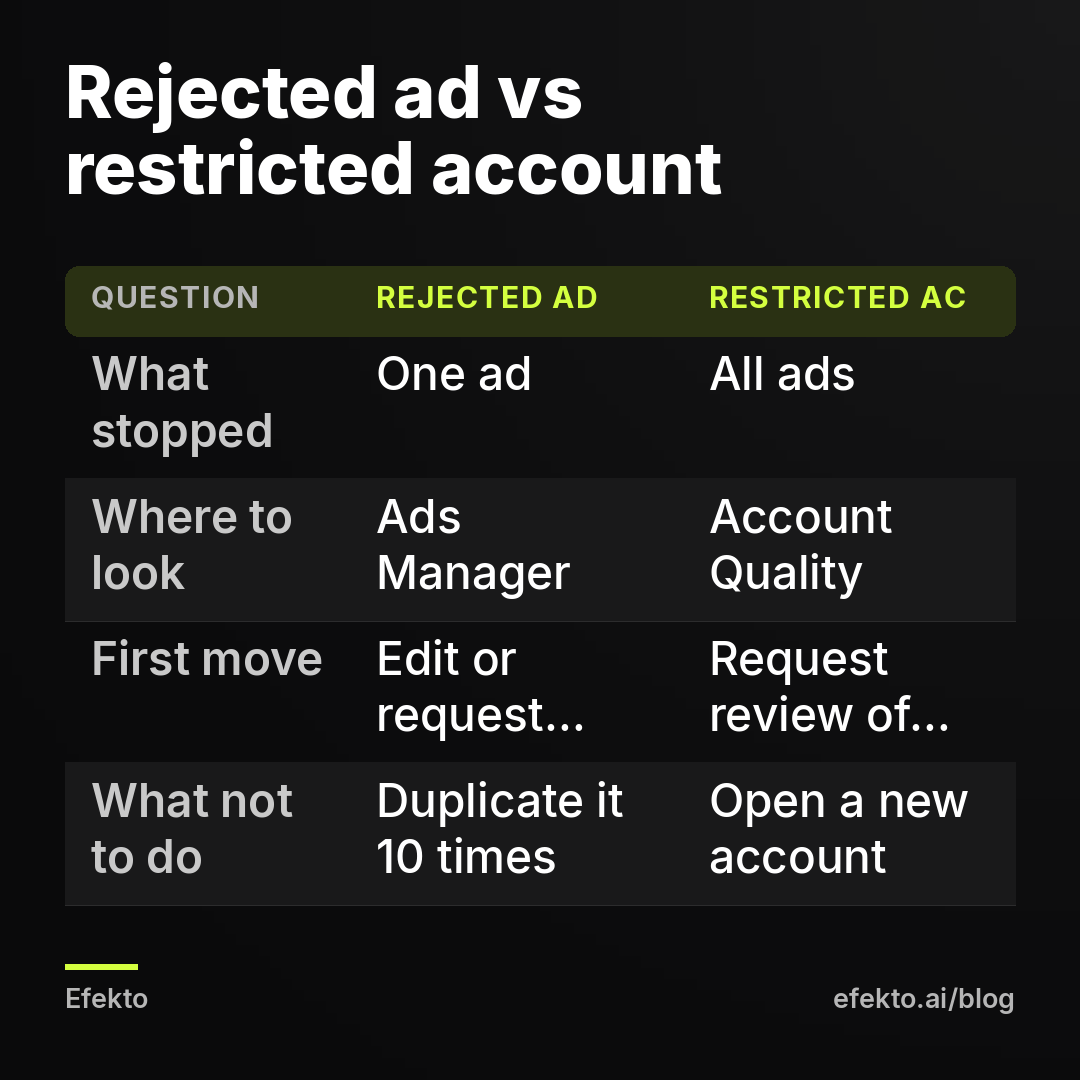
A rejected ad means one ad broke a rule. A restricted account means Meta has stopped you from running any ads at all. Mixing the two up is how business owners waste a week.
Here is how to tell them apart in two minutes:
- Open Ads Manager and look at the Delivery column. If one or a few ads show "Rejected" and the rest are running, you have an ad-level problem.
- If a red banner at the top says your ad account is restricted or disabled, or nothing can be published at all, you have an account-level problem.
- Either way, open Account Quality (in Meta Business Suite, or at business.facebook.com/accountquality). It lists every asset tied to you: your personal profile, your Facebook Page, the ad account and the business portfolio (what used to be called Business Manager).
The third step matters more than people expect. A restriction can sit on your personal profile and not on the ad account. For example, Meta might suspect your login was compromised. In that case, editing ads changes nothing. You have to verify yourself first.
We earn our money from ads on Meta, so a rejected ad or a frozen account hurts our business too. Across more than $1M in client ad spend managed at Lemon Agency, rejections are routine, and almost every restriction we have dealt with started with a pattern that could have been avoided. The sections below go from the most common cause to the least common.
Why does Meta reject ads for "personal attributes"?
Meta rejects these ads because they assert or imply something personal about the person reading them. Meta's Advertising Standards forbid that for physical or mental health, age, financial status, race or ethnicity, religion, disability, sexual orientation, gender identity and criminal record. In service businesses this is the rejection we see most often. The reason is simple: the most natural sales line is a question about the reader's problem.
Here are typical lines from local service ads, with versions that keep the meaning and pass:
- "Struggling with back pain?" fails because it implies a health condition. "Back pain treatment in Tampa, appointments this week" passes.
- "Missing teeth? We can help" fails. "Dental implants in Plano, free consultation" passes.
- "Bad credit? You can still get a new AC" fails on financial status. "Financing available on new AC systems" is fine on wording, though see the special category section below.
- "Retired homeowners: is your roof ready for winter?" fails on age. "Free roof inspections for homes in Columbus" passes.
- "Embarrassed by your dirty car?" is borderline. It isn't a protected attribute, but it reads as aimed at the person. "Interior detailing that gets out the coffee stains" passes and sells better.
How to check: read the headline, the primary text and any text inside the image. Wherever "you" or "your" is attached to a body, an illness, an age, money or a life situation, assume the ad will be rejected.
How to fix: describe the service, the place and the result for the object, not the person. Change the wording in the existing ad and save it. An edited ad goes back into review on its own. Our view: a question like "Do you suffer from..." was never good copy for a local business. A specific offer with a town name in it does more work.
Can I use before and after photos in Facebook ads?
Yes, when the photo shows an object. When it shows a human body, it is a frequent reason for rejection. This one rule splits service businesses into two groups.
Car detailing, roofing, pressure washing, landscaping, junk removal, flooring and painting can use before-and-after photos of a car, a roof, a driveway or a room. For these businesses it is often the strongest creative they have. The only risks here are heavy editing that makes the result look fake, and stock photos passed off as your own work. Use real jobs, same angle, same light.
Dental, med spa, chiropractic, weight loss, hair restoration and anything involving skin is a different story. Meta's health and wellness rules restrict before-and-after images of the body and images that imply unrealistic results, especially close-ups of body parts. Teeth whitening comparisons and skin close-ups get rejected all the time. We cover the treatment-by-treatment detail in our post on Facebook ads for med spas without getting rejected, so here is only the short version.
How to check: is the subject of the photo a person's body or face? Is any body part zoomed in? Does the image suggest a dramatic change? If yes to any of these, expect a rejection.
How to fix: show the practice, the team, the equipment, the consultation room, or a patient talking about the experience instead of showing their body. For object businesses, label the photo honestly ("same truck, 3 hours later"). Don't add arrows, circles or effects that make it look staged.
Which claims get a service business ad rejected?
Meta rejects claims it reads as misleading, unrealistic or impossible to verify. It also rejects design tricks that imitate buttons or notifications. After personal attributes and body photos, these are the next most common causes.
- Guaranteed outcomes. "Guaranteed to pass inspection", "Pain-free in one visit" and "Results guaranteed or your money back" on a health service all get flagged. A guarantee on your own workmanship that you actually offer ("10-year workmanship warranty") is a different thing, as long as the landing page states the same terms.
- Absolute claims. "Cheapest roofer in Texas" or "#1 HVAC company in Dallas" with nothing to back them up. Either show where the claim comes from on the landing page, or drop it.
- Fake interface elements. A play button on a static image, a fake red notification badge, a fake "X" close button. These are rejected and do nothing for you anyway.
- Using Meta's names and logos as if Meta endorses you. "Facebook's favorite detailer" will not pass.
- Sensational language. "Shocking", "You won't believe". These read as clickbait to the reviewer and to the customer.
The landing page is reviewed too, and it is a quiet source of rejections. The page has to load, work on a phone, show the offer from the ad, and not redirect somewhere else. If the ad says "$99 AC tune-up" and the page never mentions $99, you are inviting both a rejection and junk leads. If you use Instant Forms, Meta requires a privacy policy link. Our guide to setting up Facebook lead forms that bring real customers walks through that setup.
Our position: if a claim would get you an angry phone call when a customer holds you to it, it shouldn't be in the ad. Meta's rules here mostly line up with what a careful business would do anyway.
Does my business fall into a special ad category?
Your core service usually doesn't. But two things service businesses often advertise do: financing and hiring. Meta requires advertisers to declare a special ad category for ads about financial products and services (previously called credit), employment, housing, and social issues, elections or politics.
When you declare a category, targeting is restricted. You can't narrow by age or gender. Location targeting has to cover at least a 15-mile radius around a point instead of single ZIP codes. Detailed targeting options are limited. If you don't declare the category and Meta's system decides the ad belongs there, the ad is rejected.
Where local businesses trip over this:
- An HVAC or roofing ad that is mainly about a financing offer ("New system from $89 a month, approval in minutes") can be treated as a financial products ad.
- "We're hiring techs, $30/hour" is an employment ad, even when it runs from the same Page as your service ads.
- Real estate-adjacent offers such as home sales, rentals or home insurance fall under housing. A roof repair ad generally does not.
How to fix: split them up. Keep your service campaign as a normal campaign that mentions financing as a secondary detail. Run financing-led ads and hiring ads in separate campaigns with the category declared. Accept the wider targeting in those campaigns rather than trying to sneak them past review. Repeated rejections count against your account, which matters in the restriction section below.
How do I check an ad before I submit it?
Run every new ad through a short check before you press publish. It takes about three minutes per ad and catches most of what we see rejected in service businesses.
| Check | Gets rejected | Passes |
|---|---|---|
| Does any line say something about the reader's body, age, money or situation? | "Tired of your yellow teeth?" | "Teeth whitening in Boise, one visit" |
| Does the image show a body before and after? | Close-up of skin, teeth or waist, side by side | The team, the room, the equipment |
| Is there a promise of an outcome? | "Guaranteed results" | "10-year workmanship warranty" (if you offer it) |
| Is the offer on the landing page? | Ad says $99, page has no price | Same $99 offer above the fold |
| Is it really a financing or hiring ad? | Hiring ad run as a regular campaign | Separate campaign, category declared |
| Any fake buttons, badges or Meta logos? | Play icon on a still photo | Clean image with real text |
| Does the page work on a phone? | Broken form, endless pop-ups | Loads fast, form submits |
If an ad fails one row, fix it before it goes live. A clean first review is worth more than a fast first review.
How do I appeal a rejected Facebook ad?
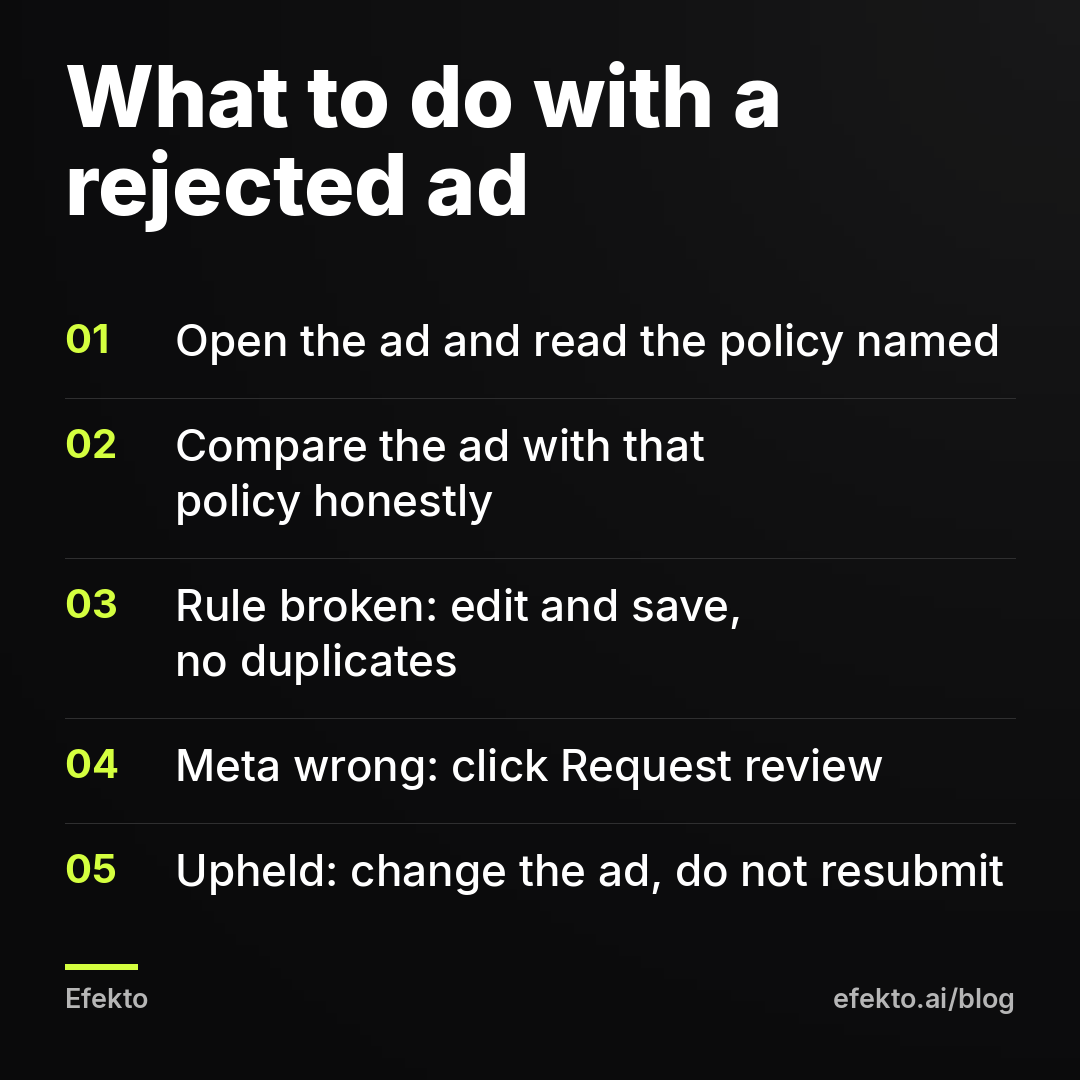
You appeal a rejected ad by clicking "Request review" on it in Ads Manager. Only do this when you believe Meta got it wrong. If the ad really breaks a rule, edit it instead. An edit sends it back to review automatically.
Step by step:
- In Ads Manager, find the ad marked "Rejected" and open it. Meta shows which policy it believes was broken.
- Read the policy name and check the ad against it honestly. Use the checklist above.
- If the ad breaks the rule, edit the text or image, save, and wait. Don't create a copy.
- If you think the ad complies, click "Request review" (you can also find it in Account Quality). Pick the reason, and keep any explanation short and factual.
- Wait for the decision. According to Meta, most ads are reviewed within 24 hours, though some take longer.
- If the review upholds the rejection, change the ad. Don't keep resubmitting the same content.
The most damaging mistake here is duplicating a rejected ad five or ten times with small tweaks, hoping one slips through. Each rejection is recorded against your account. Meta's systems treat a stream of rejected ads as a sign of a risky advertiser. That is the most common road from "one ad rejected" to "account restricted" that we see. Meta's automated review does make mistakes, and when it does, appeal without hesitation. Just appeal once, with the original ad.
Why was my ad account restricted, and how do I get it back?
Ad accounts usually get restricted for a handful of reasons:
- a run of rejected ads
- payment failures
- logins Meta considers suspicious, such as a new country, a VPN or a possible hack
- an admin's personal profile that looks fake or was recently created
- a brand-new account that jumps straight to high spend
You get the account back through a review request in Account Quality. There is no other route.
Step by step:
- Open Account Quality and check which asset carries the restriction: your profile, the Page, the ad account or the business portfolio.
- Click "Request review" on that asset. Meta may ask you to confirm your identity with an ID or a video selfie. Do it with the real account owner's documents.
- While you wait, fix what you can control: update the payment method, turn on two-factor authentication, and remove admins you don't recognize.
- If you think you were hacked, go to facebook.com/hacked first and secure the profile, then appeal.
- Submit one request and wait. Several parallel requests don't speed anything up.
- If the decision is final, read what Meta says about whether you can appeal again. Don't create new profiles or ad accounts to keep advertising. That is treated as circumventing enforcement and leads to permanent bans across every asset linked to you.
What a restriction costs in leads
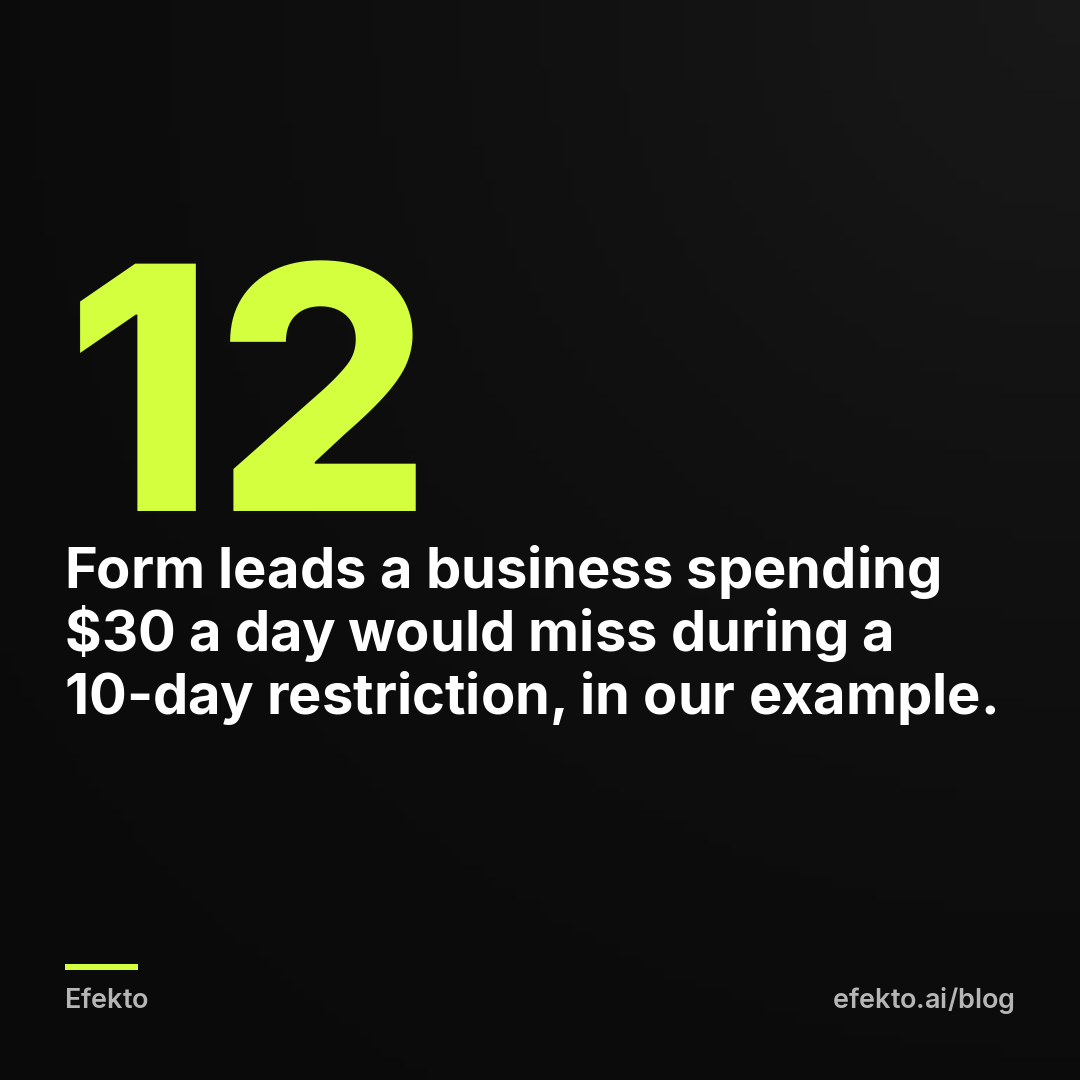
While the account is frozen, your budget isn't being spent, so the loss isn't the ad money. The loss is the leads that never arrive, plus the days the campaign needs to relearn once it is back. Here is a worked example with made-up but realistic numbers:
| For example | Value |
|---|---|
| Daily budget | $30 |
| Cost per form lead as Meta reports it | $25 |
| Days restricted | 10 |
| Form leads that never came in | about 12 |
| Of those, real people who answer and want a quote (say 60%) | about 7 |
| Booked jobs (say 40% of real leads) | about 3 |
| Revenue not booked at a $450 average job | $1,350 |
The example also shows a gap that most reports hide. Meta counts the $25 per form submission before anyone has called the person back. If only 7 of every 12 are real, the cost per real lead is about $43, not $25. Plan around the second number.
How do I protect my ad account from getting restricted?
You protect an ad account by making it look like what it is: a real business run by real, verified people who pay on time and publish ads that pass review. Go through this list once and set a reminder to repeat it every quarter:
- Two-factor authentication on every person with access to the Page, the ad account and the business portfolio.
- Two real admins in the business portfolio, for example you and a partner or office manager. That way losing one profile doesn't lock you out. This means two people on one account, not two accounts.
- Remove old access. Former employees, a freelancer from two years ago, an agency you stopped working with. Unknown admins are a common way accounts get hijacked.
- Verify the business in Business Settings with your legal name, address and phone number matching your website and documents.
- Keep payment working. Add a backup card to the same ad account so one expired card doesn't trigger a payment failure.
- Use your real profile. The admin's personal profile should be a real person with a real name and some history. A profile created yesterday to run ads is a red flag.
- Raise budgets gradually on a new account. For example, going from $15 a day to $300 a day in the first week looks unusual. Increase step by step as ads prove themselves.
- Don't buy or rent accounts or Pages. Anyone selling an "aged" or "unbannable" ad account is selling you a faster way to a permanent ban.
- Keep your rejection rate low. Use the pre-submit checklist. Fewer rejected ads means a cleaner record when a borderline case comes up.
Should I open a new ad account if mine is banned?
No. Opening a new account, borrowing a friend's or running ads through someone else's account to get around a restriction is exactly what Meta's circumvention rules prohibit. Accounts linked to the same people, cards, domains or devices tend to get caught and banned together, and then there is no appeal left. The industry advice to "just spin up a fresh account" is bad advice, whoever is giving it.
Your backup plan is a second channel, not a second account. While the appeal is pending, keep the phone ringing through a complete Google Business Profile with recent photos and replies to reviews, Google Ads if you already run them, a text or email to past customers with a seasonal offer, and asking happy customers for referrals. Put your verification documents in one folder now, so an ID request takes ten minutes instead of a lost week.
This is also where we should be clear about tools, including ours. No app fixes a restricted account, a disabled business portfolio or a profile Meta wants verified. Appeal first. Once the account is healthy, a tool can help keep it that way. Efekto creates ads from your website, publishes them, and optimizes them every day: it turns off the ones that don't bring results and scales the ones that do. You approve the first batch before anything goes live, and at least 5 approved ads are needed before a campaign starts, so nothing runs that you haven't seen. The details of that flow are on our page about how Efekto works.
If most of what you need to advertise sits in a special ad category, or your service lives on before-and-after body photos, expect slower and more careful work whoever runs the ads. Keep a person reviewing every creative against Meta's rules. Here is what we do ourselves: we check every ad against the list above before it goes out, we appeal once and only when we are right, and we tell clients to fix the account and build a second channel rather than reach for a workaround.
FAQ
How long does Facebook take to review an appeal?
For a single rejected ad, Meta says most reviews are finished within 24 hours, though some take longer. Restricted accounts and identity checks usually take longer and have no fixed timeline. Submit one request and use the waiting time to secure the account.
Should I delete a rejected ad?
Deleting it removes it from your view, but the rejection stays recorded on the account, so deleting doesn't clean your history. Either edit the ad so it complies or request a review if you think Meta got it wrong. Don't recreate the same ad under a new name.
Can I put prices in my Facebook ads?
Yes. Prices in ads are allowed and often help local service ads, as long as the same price and conditions appear on the landing page. Problems start when the ad price can't be found on the page or comes with hidden conditions.
Can a rejected ad get my whole account banned?
One rejected ad that you fix will not get your account banned. A pattern of many rejections, especially near-copies of the same violating ad, is one of the common reasons accounts get restricted. Keep your rejection count low and appeal only when you are confident.
If you want your Facebook and Instagram ads created, published and checked every day by a team that deals with these rules all the time, you can start at efekto.ai.
- Jakub Zwoliński
Founder, Lemon Agency · Efekto · October 23, 2026