Facebook Ad Payment Failed? Why Your Ads Stopped and How to Get Them Running Again
Facebook ad payment failed and your ads stopped? The 4 usual causes (declined card, billing threshold, spending limit, currency) and how to fix each one in Payment settings.

When Facebook says your ad payment failed, Meta tried to charge your payment method and the charge didn't go through. Until the outstanding balance is paid, your ads stop delivering. In most cases the fix takes under 15 minutes. Open Billing & payments, read the failed transaction, fix the cause, and click Pay now. The cause is almost always one of four things: a declined card, a charge at your billing threshold that your bank blocked, an account spending limit you hit, or a currency mismatch between your ad account and your card. None of these is a policy violation, and none of them needs an appeal.
In short:
- A failed payment pauses your ads until you pay the outstanding balance. It is a billing problem, not a ban.
- Most failed payments come from a card that is expired, over its limit or flagged by the bank, and the bank, not Meta, is usually the one saying no.
- The best prevention is a business credit card, a backup payment method and an alert that reaches your phone, because most leads arrive when nobody is watching the account.
Why did my Facebook ads stop because of a payment issue?
Your ads stopped because Meta bills after you spend, not before. When a charge fails, Meta has delivered ads it hasn't been paid for, so it stops delivering more until the balance is settled. You'll usually see a red banner in Ads Manager ("There's a problem with your payment method" or similar), your campaigns will show as not delivering, and you may get an email that is easy to miss.
First, make sure this is actually a payment problem. If Billing & payments shows a failed transaction or an outstanding balance, you're in the right place. If billing is clean and your ads still aren't running, the cause is somewhere else. Go through why a Facebook ad isn't spending its budget instead. If your account says it's restricted for violating advertising policies, that is a different process with a different fix, and we cover it separately.
Here are the four causes, from most to least common, and how to check each one:
| Cause | How to check it | How to fix it |
|---|---|---|
| Card declined (expired, insufficient funds, bank fraud block, wrong ZIP) | Billing & payments > Payment activity: a transaction marked failed | Update card details or call your bank, then click Pay now |
| Charge at billing threshold blocked by the bank | Failed charge for the exact threshold amount | Ask the bank to approve recurring Meta charges, or switch cards |
| Account spending limit reached | Payment settings > Account spending limit shows amount spent equal to the limit | Raise, reset or remove the limit |
| Currency or country mismatch | Ad account currency differs from the card currency, or the card rejects foreign transactions | Use a card that accepts the charge; changing ad account currency is a bigger move (see below) |
Why was my card declined for Facebook ads?
In most cases your bank declined it, not Meta. Meta sends the charge and the bank decides. That's why the reason in Ads Manager is often vague. Here are the usual reasons, and what to do about each:
- The card expired or was reissued. Banks reissue cards after a fraud alert or a data breach, and the old number stops working the same day. Check the last four digits in Payment settings against the card in your wallet.
- Not enough funds or credit. This happens most with debit cards. A debit card on an account that also pays rent and supplies will eventually come up short on the day Meta bills.
- Fraud block. Several charges from "FACEBK" in a short period, often in amounts that look random, are exactly what fraud systems flag. Call the number on the back of the card. Ask them to approve charges from Meta / Facebook Ads and mark them as recurring.
- Billing address or ZIP mismatch. If the ZIP code saved in Meta doesn't match the one your bank has, some banks reject the charge. Edit the card in Payment settings and re-enter the address exactly as it appears on your statement.
- Daily purchase limits. Some business debit cards cap daily spending. For example, if your card has a $200 daily cap and your threshold charge lands on the same day as a supplier payment, the Meta charge loses.
Our position here is simple. Don't run ads on a personal debit card, and don't run them on the same card that pays your payroll. A business credit card with its own limit, used mostly for ads, removes three of these five causes. It costs nothing and saves you the Saturday morning panic.
What is a Facebook billing threshold, and why does it cause failed payments?
A billing threshold is the amount you can spend before Meta charges your card. Each time your spending reaches it, Meta charges you. Meta also bills on a monthly billing date for anything below the threshold. New ad accounts typically start with a low threshold, and Meta raises it as you build a payment history.
The threshold matters for failed payments for two reasons. A low threshold means frequent charges, and frequent charges trip fraud filters. And because charges happen whenever spending crosses the line, they can land at 2 am on a Sunday, when nobody is checking email.
For example, say your daily budget is $30 and your threshold is $250. Meta charges you roughly every 8 days, and each charge is about $250. If your threshold is $25, you get charged more than once a day. To your bank, that looks like a card being tested.
To check it, go to Billing & payments > Payment settings. The threshold and your current spend toward it are listed there. Meta controls whether the threshold can be changed, and the options differ by account. If you see a choice of thresholds, a higher one means fewer charges and fewer chances for a bank to flag them. Only pick a higher threshold if your card limit comfortably covers it.
Did I hit my Facebook ad account spending limit?
If your ads stopped without any failed transaction, check the account spending limit next. The account spending limit is a cap on total spend for the whole ad account, and many owners set it once and forget it. When the amount spent reaches the limit, every campaign stops. Meta doesn't treat this as an error, so you won't see a dramatic warning.
Here's how to check and fix it:
- Go to Billing & payments > Payment settings > Account spending limit.
- If the amount spent equals the limit, you have three options: change it to a higher number, reset it (the counter goes back to zero and the same limit applies again), or remove it.
- Delivery usually resumes shortly after, without any other action.
The limit is a reasonable safety net. Just don't set it so low that it switches your ads off every few weeks. Say you spend about $900 a month. A limit of $1,000 with a calendar reminder to reset it on the 1st works. A limit of $300 that you have to remember to raise doesn't. If you want control over how much you spend, set it with the daily budget in each campaign. That's what daily budgets are for.
Campaign spending limits (set inside a campaign) work the same way, but they only stop that one campaign. If only one campaign stopped and the others are running, look there.
From our accounts: when does a failed payment cost you the most leads?
From our accounts: Of 3,733 Meta lead form leads collected in the 90 days to Nov 8, 2026 on the accounts we run, the most came in on Sunday (19.2%), the fewest on Monday (12.6%), and Saturday plus Sunday brought 32% of all leads. On Efekto users' accounts in English-speaking markets (mostly the US) (10 brands, 138 leads in the 180 days to Nov 8, 2026), 18% of leads came in after 6 pm, only 27% on weekdays between 8 am and 4 pm, and 34% on weekends.
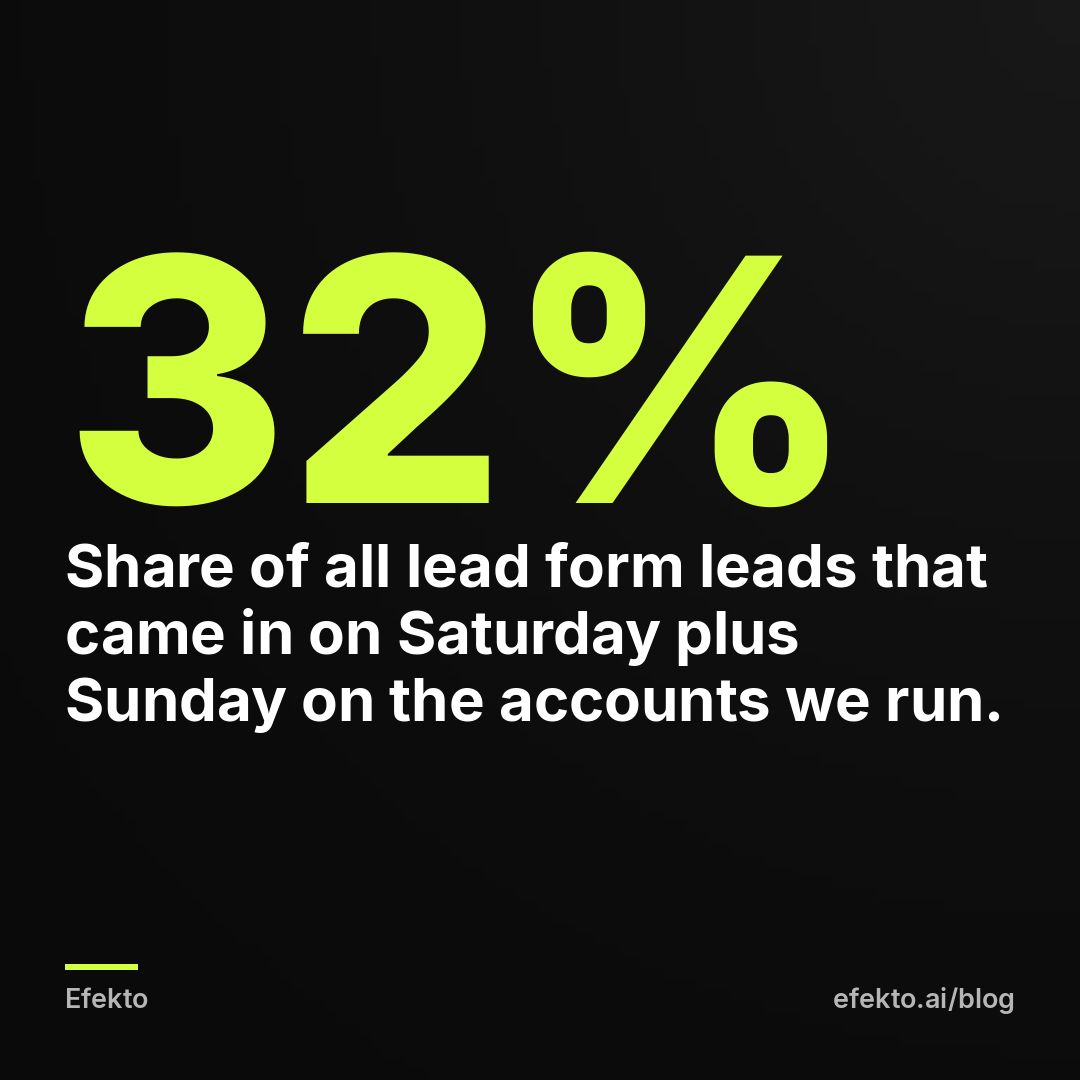
Here's why this matters for billing. A failed charge doesn't care about your office hours. If your card gets declined on Friday evening and you only open Ads Manager on Monday morning, your ads are off during the stretch that brings in about a third of leads. Monday, the day you'd catch it, is the weakest day for leads anyway.
Think of the loss in leads and days, not dollars. When ads are paused, your budget isn't being spent, so you're not paying for nothing. What you lose is the leads that would have come in. For example, say your account averages 14 leads a week. A pause from Friday night to Monday morning takes out roughly 4 to 5 of them (14 x 32% is about 4.5). That could easily be one or two booked jobs, and they go to whichever competitor's ads were running.
That's the whole case for the prevention steps further down. Most failed payments are easy to fix. The damage comes from how long the failure goes unnoticed.
Can a currency change break Facebook ad billing?
Yes, in two ways. The first is a mismatch. Your ad account is set to one currency and your card is in another, or the card is set to reject foreign transactions. Some banks decline these charges outright, and others add a foreign transaction fee to every charge. If you're a US business, your ad account should be in USD and your card should be a US card. Check the ad account currency in your ad account settings. It's listed next to the time zone.
The second is changing the currency itself. Meta doesn't let you simply switch the currency on an existing ad account. According to Meta's help pages, changing the currency or time zone replaces your ad account with a new one, and your ads have to be set up again. You also need to pay any outstanding balance first. This is Meta's own built-in process, so it's legitimate. It's a big step, though. Only do it if the currency is actually wrong, not as a fix for a declined card.
This is not a workaround for problems. If an account is stuck with an unpaid balance, or has been restricted, don't open a new ad account to get around it. Meta treats that as circumventing its systems, and it can shut down every account connected to you. Pay the balance and fix the account you have. If you're setting up from scratch, get currency, time zone and payment method right the first time. Our guide to setting up your Meta business account and ad account before your first ad walks through those settings.
How do I fix a failed Facebook ad payment step by step?
Open Billing & payments, find the failed charge, fix the cause, and pay the balance. Here's the full sequence:
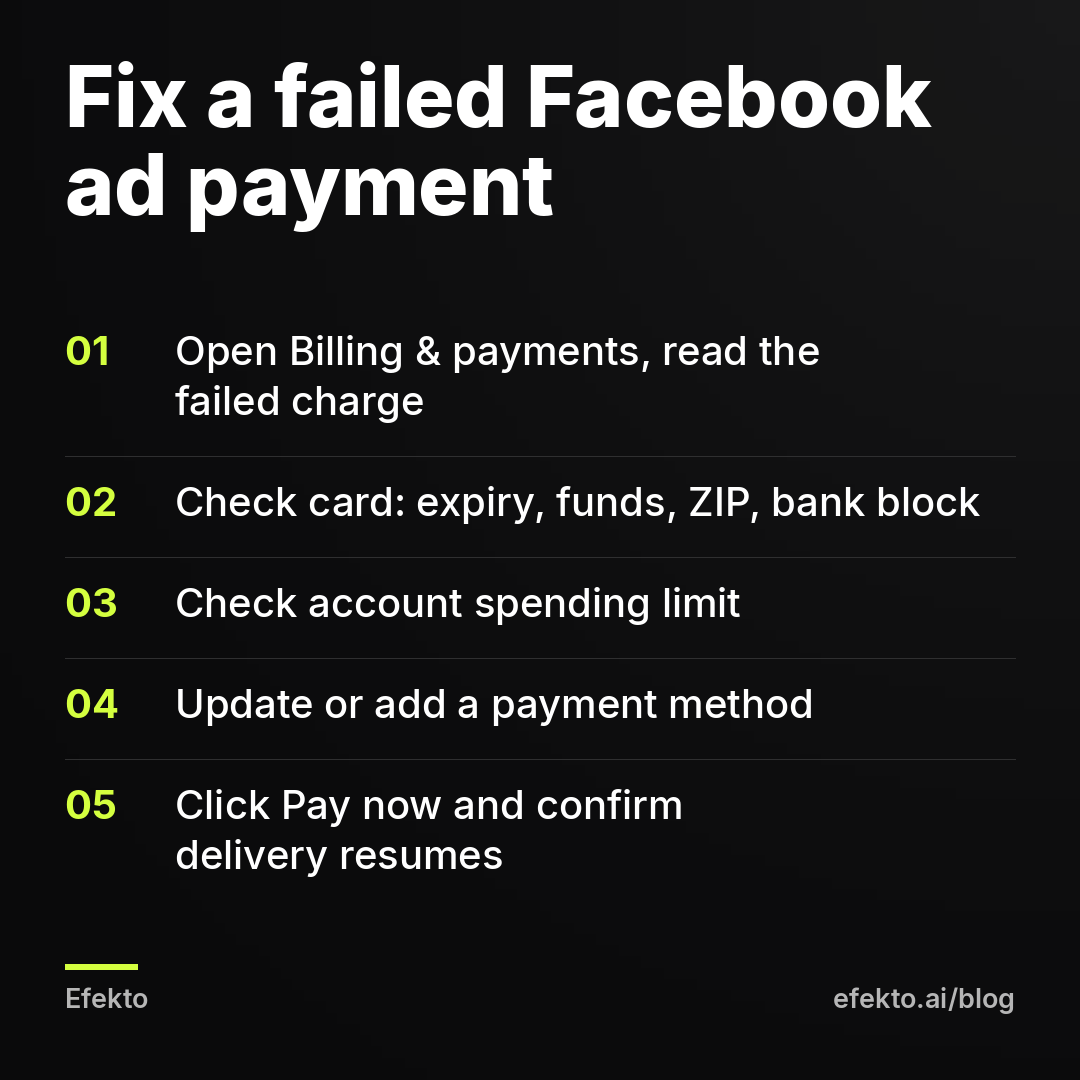
- Open Billing & payments for the right ad account. If you manage more than one, check the account ID at the top. People fix the wrong account more often than you'd think.
- Open Payment activity and click the failed transaction. Note the amount and date. If the amount equals your threshold, it was a threshold charge. If it's smaller, it was likely the monthly bill.
- Check the card. Is it expired? Has it been reissued? Are there enough funds? Does the saved ZIP match the bank's? If everything looks right, call the bank. A two-minute call where you ask them to approve Meta charges fixes most mystery declines.
- Check the account spending limit in Payment settings while you're there, so you don't fix the card and then find the ads still stopped.
- Update or add a payment method. Edit the existing card, or add a new one and make it the primary method.
- Click Pay now to settle the outstanding balance. Meta may retry the charge on its own, but don't wait for that.
- Confirm delivery. Go back to Ads Manager and check that campaigns show as active and that impressions start rising within the next hour or two.
While you're fixing this, don't change anything else. Leave the ads, audiences and budgets as they are. The campaign was working before the card failed, and editing it now just adds a second problem.
Will my Facebook ads restart automatically after I pay?
Usually, yes. Once the outstanding balance is paid, Meta lifts the payment hold and ads that were active go back to delivering. You don't need to duplicate campaigns or turn them off and on again. Sometimes this happens within minutes, and occasionally it takes longer while the payment clears.
If ads still aren't delivering a few hours after a successful payment, check three things:
- Is there still a balance? Sometimes Pay now covers one charge while a second failed charge is still open.
- Did repeated failures restrict the account? After several failed charges in a row, Meta can restrict the ad account over unpaid charges. The fix is to pay in full. If the restriction stays after that, request a review in Account Quality and say the balance is paid. This is still a billing restriction, not a policy one.
- Is something unrelated holding delivery back? For example, an ad might have been rejected during the pause, or a scheduled end date might have passed.
After a pause of a few days, delivery can be slower for the first day or so while the campaign gets going again. That's normal. Resist the urge to raise the budget to "catch up". A sudden jump can push the campaign back into learning.
How do I stop Facebook ad payments from failing again?
You can't stop every card decline. What you can control is how long a decline goes unnoticed. That's the part that costs you leads. Here's the setup we'd recommend for any local service business:
| Setting | What we'd do | Why |
|---|---|---|
| Payment card | A business credit card, used mostly for ads | No debit limits, no competing with payroll |
| Backup method | Add a second card in Payment settings | Something ready to switch to in one click |
| Bank | Tell the bank to approve recurring Meta charges | Stops fraud blocks at threshold charges |
| Spending limit | Above your real monthly spend, reset monthly | Safety net that doesn't switch ads off |
| Notifications | Billing emails to an inbox you read on your phone, plus a payment failure alert you see on weekends | Catches a Friday decline before Monday |
| Card expiry | Calendar reminder one month before expiry | Updating ahead avoids the gap |
One more option, if your ad account offers it, is prepaid funds. You add money to the account in advance and Meta draws from it. No charge at a random hour means no surprise decline. The catch is that ads stop when the balance runs out, so set a reminder to top it up.
We make money from ads on Meta's platforms, so we'd rather your ads keep running. Even so, we'll say it plainly: Meta's payment failure alerts are too easy to miss. A small banner and an email that often lands in promotions isn't enough for something that turns off your lead flow. Don't rely on it. Build your own alert.
Where does Efekto fit, and when don't you need it?
If your problem is a declined card, you don't need any tool. Fix the card and pay the balance, and you're done today. The same goes if you're happy running Ads Manager yourself and only want billing to stop breaking: the table above is enough.
Efekto is for owners who don't want to run ads themselves at all. Efekto creates ads from your website, publishes them, and optimizes them every day: it turns off the ones that don't bring results and scales the ones that do. On billing specifically, you can connect your own Facebook ad account, or use an Efekto ad account with the budget topped up in advance. If you use our account, you're not dealing with threshold charges hitting your card at random hours. The minimum daily ad budget is $15. The Starter plan is $149 per month, and you don't add a card until you launch a campaign. You can see the setup on how Efekto works.
FAQ
Why does Facebook keep charging me small random amounts?
Those are threshold charges and monthly bills. Meta charges you each time your spending reaches your billing threshold, plus a monthly charge for anything below it. On a new account with a low threshold, these charges are frequent and the amounts look odd, which is also why banks sometimes flag them.
Can I run Facebook ads with an outstanding balance?
No. While there's an unpaid balance from a failed charge, Meta won't deliver your ads. Pay the balance with Pay now in Billing & payments, and active ads normally resume without any other changes.
Does a failed payment hurt my ad account long term?
One failed charge that you fix quickly doesn't cause lasting harm. Repeated failures can lead Meta to restrict the account over unpaid charges and can keep your billing threshold low. Fix the root cause, not just the one charge.
Can I use PayPal or a debit card instead of a credit card?
Meta supports several payment methods, and which ones you see depends on your country and account. A debit card works, but daily limits and shared funds make declines more likely. If you use one, keep it separate from your operating expenses.
Who should I call, Meta or my bank?
Start with your bank. Most declines are decided by the card issuer, and they can tell you the exact reason and approve future Meta charges. Contact Meta only if the bank confirms nothing was blocked and the charge still fails.
If you'd rather not watch billing, ads and budgets yourself, you can see how we run Facebook ads for local businesses at efekto.ai.
- Jakub Zwoliński
Founder, Lemon Agency · Efekto · November 11, 2026