Why Is My Facebook Ad Not Spending Its Budget? 7 Causes and Fixes
Facebook ad not spending its budget? Check these 7 causes in Ads Manager: review, payment, small audience, weak ad, bid cap, schedule and a missing event.

A Facebook ad that doesn't spend its budget is almost always blocked by one of seven things. It is still in review or scheduled to start later. A payment problem or spending limit stopped it. The audience is too small. The ad is too weak to win auctions. A bid cap or cost cap is set too low. The schedule only lets it run a few hours a day. Or it is optimizing for an event Meta never sees. Each cause leaves a visible trace in Ads Manager, and raising the budget fixes none of them.
In short:
- An underspending Facebook ad is a delivery problem with a specific cause, and the cause shows up in the Delivery column, Billing settings or the ad set settings.
- Bid caps, narrow schedules and tiny audiences are the settings small businesses add on purpose and then forget, and each one can stop spending on its own.
- Raising the budget on an ad that won't spend does nothing, because the budget is a ceiling, not a push.
This post is about ads that are approved and allowed to run but still don't spend. If your ad was rejected or your account got restricted, that is a different problem with different fixes, covered in what to do when a Facebook ad is rejected or your account is restricted.
One line on where we stand: we make money when businesses run ads on Meta, so we have an interest in your budget getting spent. That's also why we're blunt about it. Spending is not the goal. An ad that spends $30 a day on the wrong people is worse than one that spends nothing, because the second one at least isn't lying to you. The team behind Efekto and Lemon Agency has managed over $1M in ad spend for clients, and underspending is one of the most common questions we get from owners who launched their first campaign alone.
How can you tell if a Facebook ad is really underspending?
An ad is really underspending when, over at least three full days, the amount spent is well below the daily budget times the number of days. One slow day means nothing. Meta paces spending across the week, so some days come in below your daily budget and some come in above it.
For example: say your daily budget is $30. Monday you see $14 spent, Tuesday $41, Wednesday $33. That's $88 over three days against a target of $90. Nothing is wrong. Now say Monday is $4, Tuesday $2, Wednesday $6. That's $12 against $90, and something is blocking delivery.
How to check it in Ads Manager:
- Set the date range at the top right to "Last 7 days", not "Today". "Today" in the morning always looks like underspending.
- Look at the "Amount spent" column at the campaign level and compare it with budget x days.
- Look at the "Delivery" column. It says "Active", "In review", "Scheduled", "Learning", "Learning limited" or "Not delivering". That word tells you which of the seven causes to start with.
- Check the time zone of the ad account (Ad account settings). A campaign that started at 11 p.m. in the account's time zone will show almost nothing for its first "day".
If the first two to three days after launch look low, wait. New campaigns often ramp up slowly while Meta figures out who to show them to. If you're past day three and still well under, go through the causes below.
Is my Facebook ad still in review or scheduled to start later?
If the Delivery column says "In review" or "Scheduled", the ad isn't allowed to spend yet, and that's the whole explanation. This is the first thing to check because it takes ten seconds.
How to check:
- Delivery column at the ad level (not just the campaign level). A campaign can show "Active" while every ad inside it is still in review.
- Open the ad set and look at "Budget & schedule". Check the start date and time. We regularly see campaigns set to start next month because someone picked the wrong date in the calendar.
- If you used a lifetime budget, check that the end date isn't already in the past.
How to fix it:
- If it's "Scheduled", change the start date to today, or simply wait.
- If it's been "In review" for more than two days, open Account Quality in Business Suite and look for warnings on the Page or ad account. If there are none, contact Meta support through the Business Help Center.
- Stop editing ads that are already running. Every edit to the text, image, link or targeting sends the ad back into review and can restart learning. Owners who tweak their ad every morning often have an ad that spends a few hours a day, because it's in review the rest of the time.
Can a payment problem stop Facebook ads from spending?
Yes. A failed payment, an unpaid balance or an account spending limit stops all ads in the account, and Ads Manager doesn't always make it obvious. Ads can still show "Active" for a while after the card fails.
How to check:
- Go to Billing & payments (in Ads Manager or Business Suite). Look for a red banner, a "payment failed" note or an outstanding balance.
- In Payment settings, look for "Account spending limit". This is a total cap on everything the account will ever spend until you reset it. It's often set once, years ago, by a previous agency or employee, and then forgotten.
- If you use prepaid funds, check the remaining balance.
For example: say someone set an account spending limit of $2,000 when the account was created. Two years later your total lifetime spend reaches $1,980. Your new $30/day campaign will spend $20 and then stop, with no error on the ad itself.
How to fix it:
- Update the card or pay the balance. Ads usually resume once the payment goes through.
- Raise, reset or remove the account spending limit.
- If your card issuer flags Meta charges as suspicious (it happens with new small business cards), call the bank and whitelist them. Otherwise the same failure repeats next billing cycle.
- With prepaid funds, top up before the balance runs low. The same applies if you run ads through a provider's ad account where the budget is topped up in advance: when the balance hits zero, delivery stops.
Is my Facebook audience too small to spend the budget?
An audience that's too small is the most common cause we see in local service accounts. When there aren't enough people to show the ad to, Meta runs out of reasonable placements and stops spending rather than showing the same ad to the same 3,000 people ten times a day.
The usual recipe for a too-small audience: a 5-mile radius around a small town, plus an age range of 35 to 55, plus two or three interests, plus exclusions of past customers and page followers. Each filter looks sensible. Stacked together, they leave a few thousand people.
How to check:
- Open the ad set and look at the audience size estimate on the right side of the screen.
- Look at the "Frequency" column for the last 7 days. If frequency climbs above 3 while spending stays low, Meta keeps reaching the same small group and has nobody new to show the ad to.
- Check whether you have several ad sets targeting the same area. Three ad sets aimed at the same town compete with each other and split an already small pool.
For example: say a mobile detailer targets a 5-mile radius around a town of 20,000 people, ages 30 to 55, interested in "luxury vehicles". The estimate might come out at a few thousand people. At $30/day, that's not enough room. The ad shows to the same people over and over, results get worse, and Meta pulls back.
How to fix it:
- Set the radius to the actual drive time you serve, not the town limits. If you'll drive 25 minutes for a job, target 25 minutes out.
- Remove interests first. For local services, location plus a broad age range usually beats interests, because "people interested in roofing" is not how homeowners behave on Facebook.
- Turn on Advantage+ audience or loosen targeting suggestions so Meta can go beyond your exact filters.
- Merge overlapping ad sets into one.
- Don't fix this by targeting areas you don't serve. A bigger audience of people you can't reach by truck is not a fix.
Can a weak ad stop Facebook from spending my budget?
Yes, and owners rarely suspect it. Meta runs an auction for every ad slot, and the winner isn't simply the highest bidder. Meta ranks ads by the bid, by how likely people are to react to the ad, and by the ad's quality. An ad people scroll past gets a low estimate, loses most auctions, and spends very little even when everything else is set correctly.
So a weak ad doesn't just bring fewer leads. It often doesn't get shown at all.
How to check:
- Look at "CTR (link click-through rate)" over the last 7 days.
- Add the columns "Quality ranking", "Engagement rate ranking" and "Conversion rate ranking" (Columns > Customize columns > search "ranking"). Meta only fills these in after the ad has a fair number of impressions. "Below average" in any of them is a clear signal.
- Compare ads within the same ad set. If one ad gets nearly all the spend and the others get almost none, Meta has already decided the others lose.
For example: say an ad gets 4,000 impressions and 6 link clicks over a week. That's a 0.15% link CTR. People see it and don't react, so Meta stops bidding hard for it.
How to fix it:
- Replace stock photos with real ones: your truck, your crew, a finished job, a before-and-after shot from your phone.
- Put the offer and a price or price range in the first line. "Full interior detail from $189, at your driveway" beats "Make your car shine again".
- Run 3 to 5 different ads per ad set so Meta has options. Different images and different first lines, not five versions of the same one.
- If the ad worked for two weeks and then faded, that's ad fatigue, a related but separate problem. We explain how to spot and fix it in why a Facebook ad stops working after two weeks.
Does a bid cap or cost cap limit how much Facebook spends?
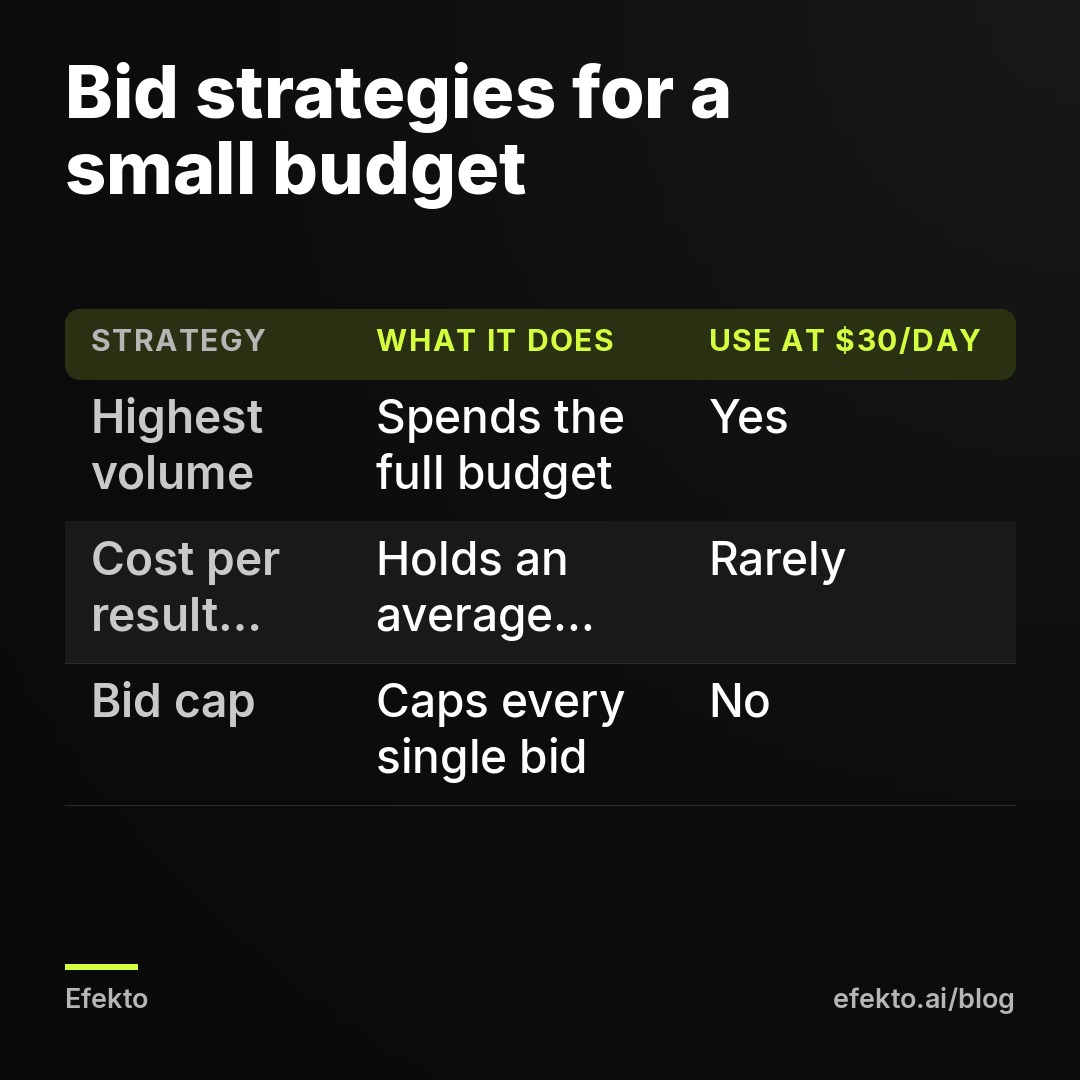
Yes, by design. A bid cap tells Meta never to bid above a set amount in any auction. A cost per result goal (often called a cost cap) tells Meta to keep your average cost per result near a target. If either number is below what results actually cost in your area, Meta skips most auctions and your budget stays unspent.
Our stance: bid caps and cost caps have no place in a small local business account spending $30/day. They're tools for accounts spending thousands a day, with months of data on what a lead is worth. In a small account, they mostly guarantee you spend nothing and learn nothing. We see them set by owners who read that "pros use cost caps", and sometimes by providers who want the reported cost per lead to look good on a monthly report, even if that means three leads a month instead of twenty.
How to check:
- Open the campaign and find "Campaign bid strategy" (or "Bid strategy" at the ad set level, depending on how the budget is set up).
- If it says "Bid cap" or "Cost per result goal", note the amount.
- Look for "Learning limited" in the Delivery column. It often appears together with a cap that's too tight.
For example: say you set a cost per result goal of $20 per lead, but leads for your service in your area realistically cost around $45. Meta can't find enough people at $20, so it enters only a small share of auctions. Your $30/day turns into $5/day of spend and maybe one lead a week.
How to fix it:
- Switch the bid strategy to "Highest volume" (the default) and run it for a week.
- Use the real cost per lead from that week as your reference point. If later you have a month of stable data and want to hold costs down, a cost goal set slightly above that real number is the most we'd consider.
- If you don't know what a reasonable cost per lead is for a local business, we cover that in what counts as a good cost per lead on Facebook.
Is my ad schedule too narrow?
A narrow schedule means your ad is only allowed to run during a small part of the week, so it can't spend a full daily budget even when everything else is fine. Ad scheduling on Facebook only works with a lifetime budget, and owners who set it up usually pick "business hours" without doing the math.
The math: Monday to Friday, 9 a.m. to 5 p.m., is 40 hours. A week has 168 hours. That's 24% of the week. You've told Meta to spend a full week's budget in less than a quarter of the time, in hours when competition for attention is highest and many of your customers are at work.
How to check:
- Open the ad set and go to "Budget & schedule".
- If you see a lifetime budget with "Run ads on a schedule" switched on, look at the selected hours.
- Check the end date. With a lifetime budget, Meta spreads the money over the days left. A campaign with a far-off end date spends slowly; one with a past end date spends nothing.
How to fix it:
- Switch to a daily budget and let the ad run all day. You can't use ad scheduling with a daily budget, which is fine.
- If your worry is leads coming in at 10 p.m. when nobody answers: a lead form filled out at 10 p.m. can be called at 8 a.m. Plenty of homeowners scroll Facebook in the evening and plan repairs then. Cutting those hours removes some of your best prospects.
- If you run call-only ads and genuinely can't answer the phone at night, that's the one case where a schedule makes sense. Then lower the budget to match the hours, so expectations are realistic.
Why does Facebook spend almost nothing when I optimize for conversions?
Because Meta can't find people likely to complete an event it never sees. If your ad set is optimized for website leads or purchases and the Meta Pixel doesn't record that event, or records it once a month, Meta has nothing to aim at. Delivery drops to a trickle, often with "Learning limited" in the Delivery column.
This is also where a small budget becomes a cause on its own. Meta's learning works best with a steady flow of results, roughly 50 per week per ad set according to its own guidance. A small daily budget combined with an expensive event gives Meta very few signals.
| Example daily budget | Example cost per result | Results per week | What Meta has to learn from |
|---|---|---|---|
| $30 | $15 (instant form lead) | about 14 | Enough to steer delivery, even if below Meta's guidance |
| $30 | $45 (website lead) | about 4 to 5 | Very little, expect "Learning limited" |
| $30 | $150 (booked appointment event) | about 1 to 2 | Almost nothing, delivery often stalls |
These are worked examples, not our results. The point is the mechanism: the further down the funnel your event is, the fewer results a small budget produces, and the less Meta can learn.
How to check:
- In the ad set, look at "Conversion location" and "Performance goal". Note which event it's optimizing for.
- Open Events Manager and find that event. Check when it was last received and how many times in the last 7 days.
- If the event shows zero or "no recent activity", that's your cause.
How to fix it:
- Switch the ad set to an event that actually happens often enough: instant form leads, calls, or a website event that fires several times a week.
- Fix the Pixel so the event fires on your thank-you page. If you're not sure whether you need the Pixel at all, read what the Meta Pixel is and whether a small service business needs it.
- Don't optimize for "Purchase" or a custom "Booked job" event until it fires at least a few times a week. Start with the event that has volume, then move down the funnel later.
In what order should you check an underspending Facebook ad?
Check the causes that stop all spending before the ones that only slow it down. Payment and review problems take seconds to rule out. Audience size and ad quality take a few minutes of reading numbers.
| Cause | Where to look | What you'll see | Fix |
|---|---|---|---|
| Payment or spending limit | Billing & payments, Payment settings | Red banner, unpaid balance, limit reached | Update card, raise or remove the limit |
| In review or scheduled | Delivery column (ad level), ad set start date | "In review", "Scheduled", past end date | Wait, fix the date, stop editing |
| Bid cap or cost cap | Campaign or ad set bid strategy | "Bid cap" or "Cost per result goal" with a low amount | Switch to "Highest volume" |
| Narrow schedule | Ad set > Budget & schedule | Lifetime budget with limited hours | Daily budget, run all day |
| Audience too small | Audience size estimate, Frequency column | Few thousand people, frequency above 3 | Wider radius, fewer interests, merge ad sets |
| Weak ad | Link CTR, ranking columns | "Below average", very low CTR | New creatives with real photos and a clear offer |
| Event Meta never sees | Ad set performance goal, Events Manager | Zero or rare events, "Learning limited" | Optimize for leads or a frequent event |
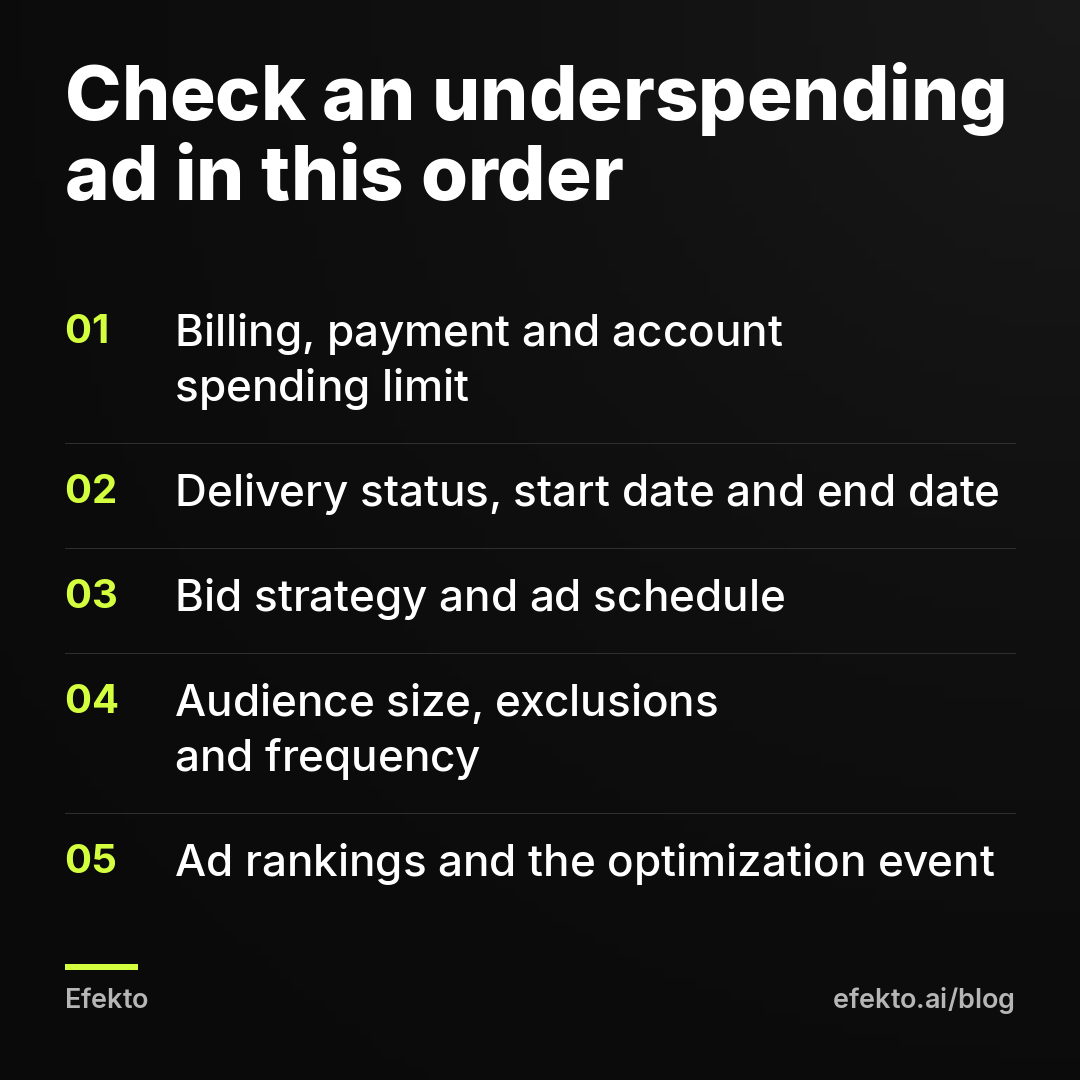
One rule while you go through the list: change one thing at a time and give it two to three days. If you fix the audience, swap the creatives and change the bid strategy on the same afternoon, you'll never know which change worked, and every edit sends the ad back to review.
Should you just raise the budget when the ad isn't spending?
No. The budget is the most an ad can spend, not an instruction to spend it. If an ad can't spend $30 a day, raising it to $60 changes nothing, because whatever is blocking delivery at $30 still blocks it at $60. The one effect you will see: when the block is finally removed, the ad suddenly spends at the higher level before you've checked whether it brings leads.
There's one exception. If you're optimizing for a reasonable event, the ad is spending its full budget, and Meta shows "Learning limited" because of too few results, a higher budget can help. That's a different situation: the ad spends, it just can't learn fast enough.
And there's one case where underspending is fine. If an ad spends 80% of its budget and brings leads at a cost you're happy with, leave it alone. A few dollars a day of unspent budget isn't a problem to solve. Owners who push Meta to spend the last 20% often end up widening targeting until the extra money goes to people outside their service area.
When does it make sense to hand this off, and when doesn't it?
If you have one campaign and an hour a week, you can run this checklist yourself. The seven causes above cover nearly every underspending case we see. What's hard isn't knowing the causes. It's catching them early, before a week of zero spend turns into a week of zero leads, and keeping a steady supply of new ads so the weak-ad problem doesn't come back every month.
That's the part we built Efekto for. Efekto creates ads from your website, publishes them on Facebook and Instagram, and optimizes them every day: it turns off the ones that don't bring results and scales the ones that do. You approve the first batch of ads, at least 5 before the campaign starts, so you're not waiting on a single ad stuck in review. The minimum daily budget is $15, and you can use your own Facebook ad account or an Efekto ad account with the budget topped up in advance (and yes, a zero balance there stops delivery just like a failed card). You can see the setup step by step in how Efekto works.
When an app like ours won't help: if your card keeps getting declined, if your account has warnings in Account Quality, or if your offer simply isn't something people in your area want. Fix the payment and the account first, and test the offer by asking your last ten customers why they picked you. If your daily budget is under $15, start with a single ad set run by hand using the checklist above.
What we do differently in our own accounts
In the accounts we run, we never set bid caps or cost caps for local service businesses. We don't use ad scheduling. We set the radius by drive time, not town limits, and we check billing before anything else when spending drops, because it's the cause that's cheapest to find and most embarrassing to miss. We keep several live ads in every ad set at all times, so a weak ad gets replaced instead of quietly dragging delivery down for a month. And when an ad underspends, the first question we ask isn't "how do we get Meta to spend more" but "what is Meta telling us about this ad".
FAQ
Why is my Facebook ad active but getting zero impressions?
Check the ad level, not just the campaign level: the ad itself may still be in review or scheduled for a later date. If the ad is truly active, look at Billing & payments for a failed payment or a reached account spending limit, since those stop delivery without changing the status right away.
Can Facebook spend more than my daily budget?
On some days, yes. Meta paces spending across the week, so one day can come in above your daily budget and another below, but over a full week the total stays in line with your daily budget times seven.
How long should I wait before changing an ad that isn't spending?
Give a new campaign two to three full days, because delivery often starts slowly. After that, if spend is still well below budget, go through the checklist and change one setting at a time, waiting another two to three days after each change.
Do I pay for the budget my ad didn't spend?
With a daily or lifetime budget, you're billed for what was actually delivered, not for the budget you set. If you use prepaid funds, the unspent balance stays in the account until it's used.
If you'd rather have the ads created, published and adjusted every day instead of checking these seven causes by hand, you can try it at efekto.ai.
- Jakub Zwoliński
Founder, Lemon Agency · Efekto · October 26, 2026