How to Decide Your Facebook Ads Daily Budget Based on the Jobs You Need
Work your Facebook ads budget backward: jobs you need, how many leads become jobs, cost per lead, then divide by 30. Worked examples for local service businesses.

From our accounts: Over the 30 days to Oct 25, 2026, Meta lead form campaigns for solar panels in the US on the accounts we run spent about $601 and collected 58 leads, an average of about $10.36 per lead. That is roughly $20 a day.
Nobody gets paid in leads, though. That $10.36 is what Meta reports for each submitted form, before anyone has picked up the phone. Some of those 58 people will not answer. Some gave a wrong number. Some will get a quote and buy somewhere else. A budget only makes sense once it is tied to the last number in that chain, which is booked jobs. So we start every budget decision from the jobs and work backward.
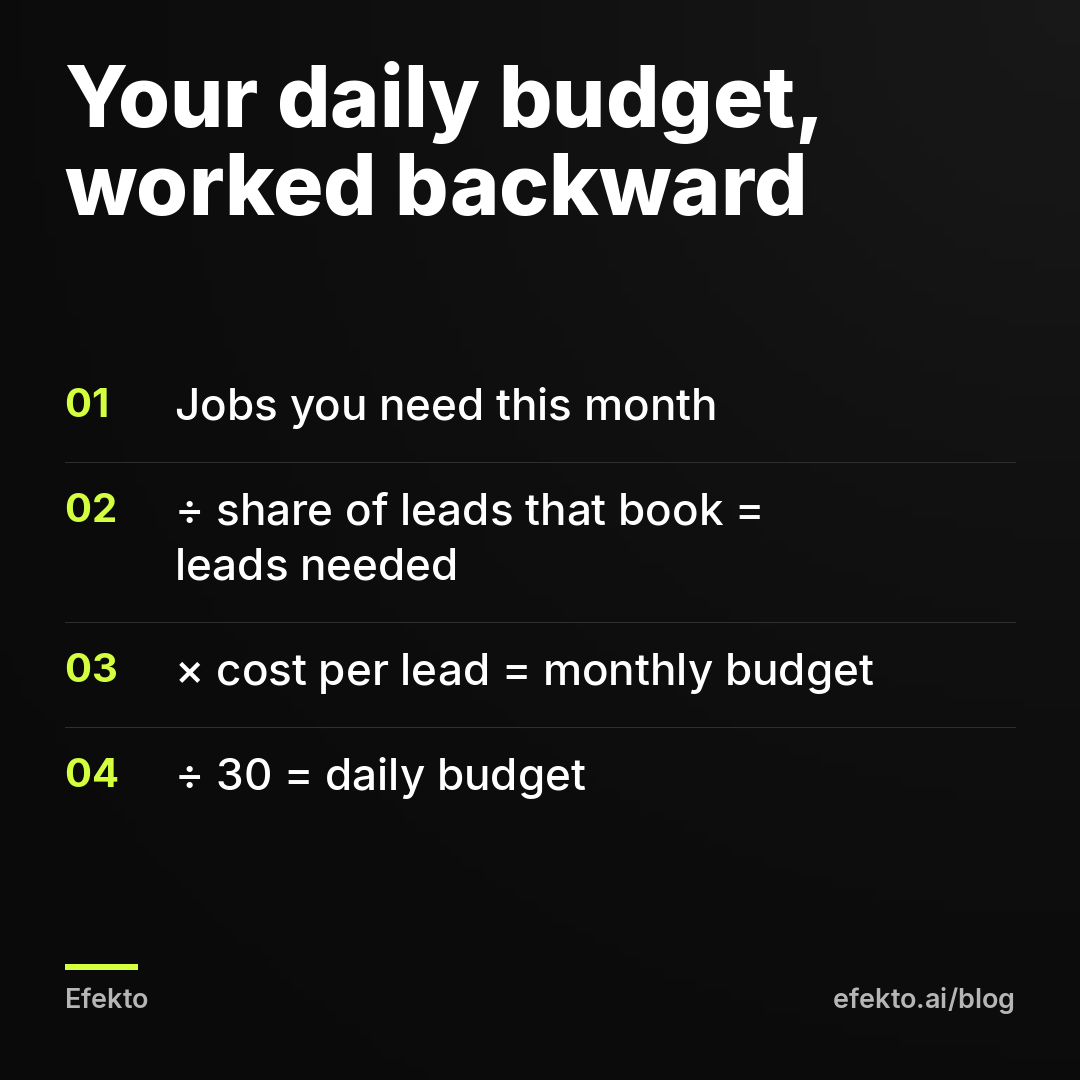
Here is the direct answer. Daily budget = (jobs you need per month ÷ share of leads that become jobs) × cost per lead ÷ 30. For example, say you need 10 jobs a month, 1 in 4 leads books (25%), and a lead costs you $25. You need 40 leads. 40 × $25 = $1,000 a month, which is about $33 a day. Every step below is about getting those three inputs close enough to reality that the answer holds.
One line on where we stand: we make money when businesses advertise on Meta, through Lemon Agency (over 300 clients, $1M+ in ad spend managed) and through Efekto. That is exactly why we would rather you spend $33 a day for a reason than $100 a day on a guess. Guessed budgets end in canceled campaigns.
Step 1: Start from the jobs you need, not the money you can spare
Most owners pick a budget the other way around. They think about what feels affordable, type in $50, and hope. That gives you a number with no connection to your calendar.
Start instead with a job target for the next 30 days. Write down:
- How many extra jobs you can actually handle. Not how many you want. If your crew can take 6 more installs a month, a budget built for 20 is wasted money and angry leads.
- How many jobs you lose each month that you need to replace. Many service businesses have a steady trickle of repeat customers and referrals. Facebook should fill the gap, not your whole calendar.
- Seasonality. An HVAC company in April and in July needs different targets. Set the target for the month you are about to run, not an annual average.
Use one number. Say 10 jobs. If you find yourself writing a range like 10 to 30, you have not decided yet, and the budget will not be decided either.
Step 2: Your close rate decides how many leads you have to buy
Close rate is the share of leads that turn into a paid job. It is the input owners know least and the one that moves the budget most.
Do not take it from a blog. Take it from your own last 20 to 30 inquiries, from any source: calls, website forms, Facebook messages. Count how many became a paid job. If 6 out of 30 booked, your close rate is 20%.
We would split it into three steps, because each one fails for a different reason:
| Stage | Example rate | What breaks it |
|---|---|---|
| Lead submitted → reached by phone | 70% | Calling back hours later, wrong numbers, no second attempt |
| Reached → quote or estimate given | 60% | Lead outside your service area, wrong service, price shock |
| Quote → booked job | 50% | Slow quote, no follow-up, a competitor came first |
| Lead → booked job (overall) | 21% | 0.70 × 0.60 × 0.50 |
Those rates are an example, not a benchmark. The point is the multiplication. Three decent-looking steps produce a 21% overall close rate, which means you buy about 5 leads for every job.
If you have no history at all, plan with a conservative 15% to 20% for higher-ticket services (roofing, solar, remodeling) and 30% to 40% for quick, cheaper jobs (detailing, cleaning). Treat these as placeholders you replace after the first month, not as facts.
Step 3: Use a cost per lead you can defend, then pad it for bad leads
The cost per lead Meta shows is the cost of a submitted form. A verified lead, meaning a real person in your area who wants your service, always costs more, because some forms are junk. Plan with the second number.
Our own figures give you a sense of scale, not a forecast for your business:
- Solar panels, US: about $601 spent, 58 leads, about $10.36 per lead (30 days to Oct 25, 2026).
- Home batteries, Poland: about $830 spent, 77 leads, about $10.77 per lead (same period).
- Mortgages, Poland: about $1,098 spent, 62 leads, about $17.71 per lead (same period).
These are lead form campaigns on accounts we run, averaged per industry. Your trade, city and offer will land somewhere else. For how to judge what counts as reasonable in your trade, see our post on what a good cost per lead on Facebook looks like for a local business. We are not repeating that here.
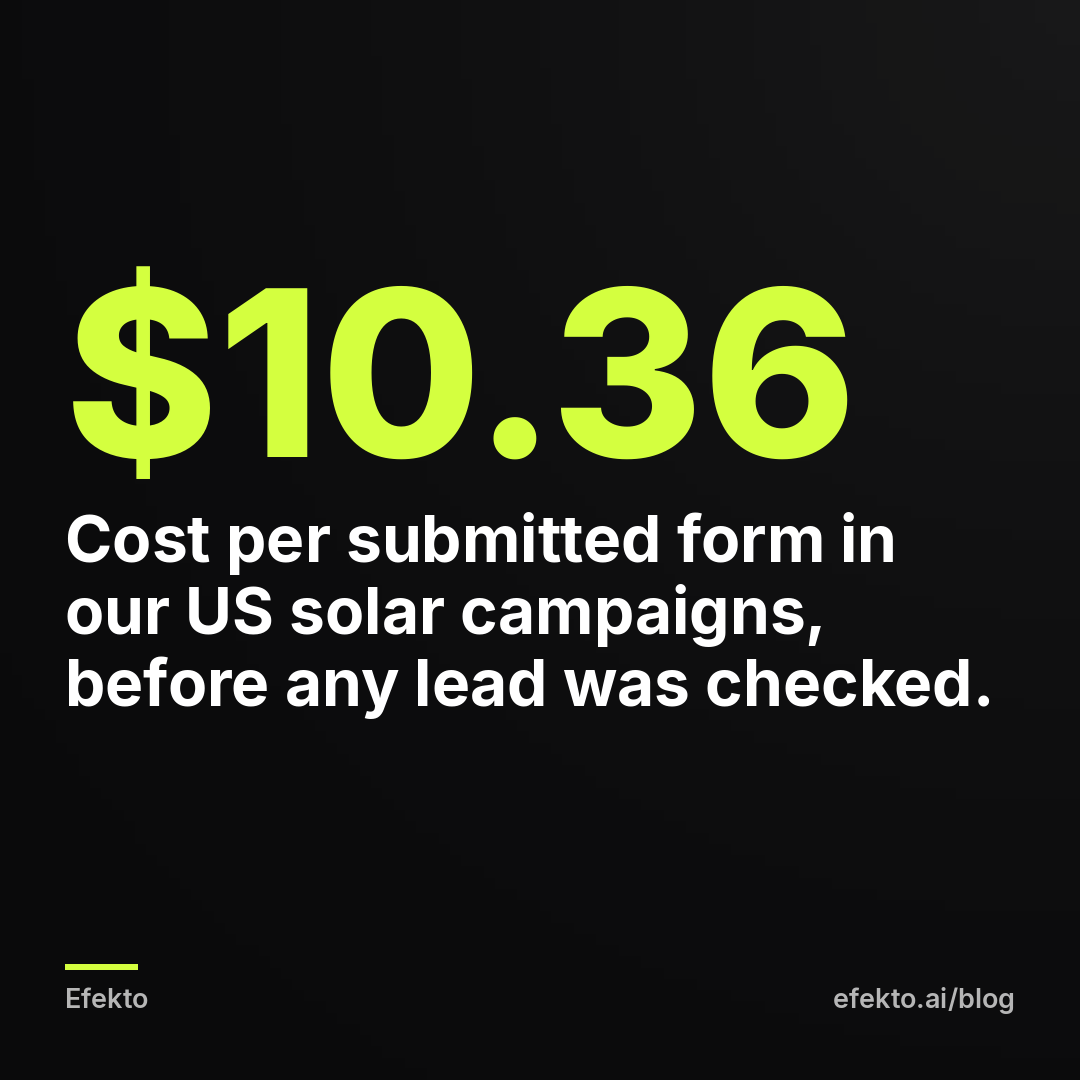
Now the padding. Decide what share of form leads you expect to be unusable: unreachable, fake, outside the area. For example, if you assume 25% are unusable, divide the Meta number by 0.75. On the solar figure that is $10.36 ÷ 0.75 = $13.81 per usable lead. That $13.81 is the number that belongs in your budget formula, not the $10.36.
If you have no cost per lead of your own yet, pick a planning number on the high side. Overestimating means you hit your job target early and can cut spend. Underestimating means you decide Facebook does not work after two weeks, when the real problem was arithmetic.
Step 4: Divide by 30 and check the result against the floor
Put the three inputs together:
- Leads needed = jobs ÷ close rate.
- Monthly budget = leads needed × padded cost per lead.
- Daily budget = monthly budget ÷ 30.
Then run two checks before you type anything into Ads Manager.
The floor. We would not run a lead campaign below $15 a day. Under that, leads arrive so slowly that you cannot tell a good ad from a bad one for weeks, and Meta's delivery system has too few results to learn from. If your ad set keeps showing a warning about this, our post on ad sets stuck in Learning Limited on a small budget explains what it means. If your formula says $9 a day, the honest answer is not to run Facebook at $9. See the section on when the math does not work.
The weekly view. Convert the daily budget to leads per week. For example, at $33 a day and a $25 lead, you get about 9 leads a week. Ask yourself whether you can call 9 people back within an hour of each form. If not, the budget is not your bottleneck.
Step 5: Run the numbers for your own business, like these three examples
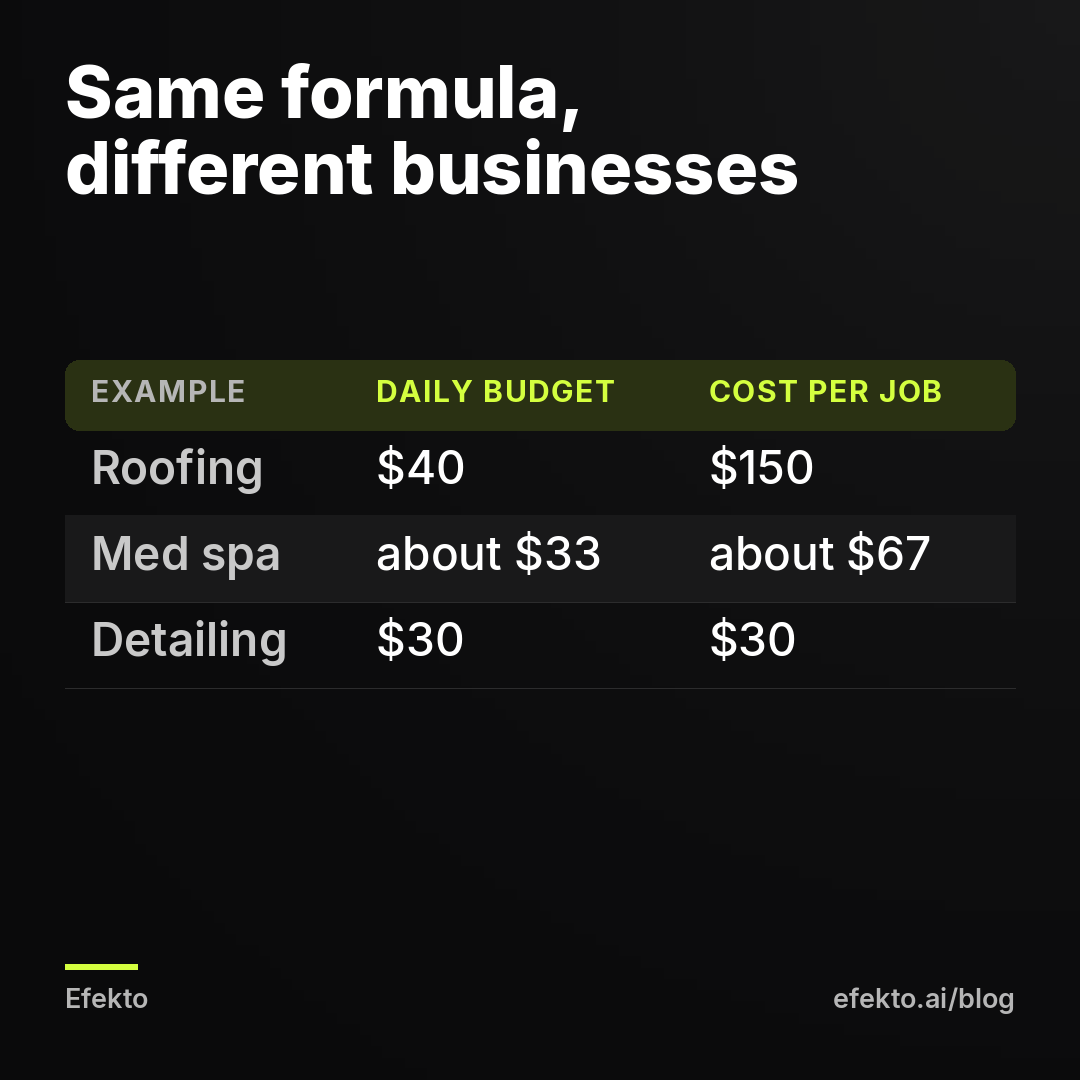
The table below shows the full calculation for three made-up businesses. Every number is an example to show the mechanism.
| Example business | Jobs needed | Close rate | Leads needed | Padded cost per lead | Monthly budget | Daily budget | Avg. job value | Revenue from ads | Cost per booked job |
|---|---|---|---|---|---|---|---|---|---|
| Roofing company | 8 | 20% | 40 | $30 | $1,200 | $40 | $9,000 | $72,000 | $150 |
| Med spa (new clients) | 15 | 30% | 50 | $20 | $1,000 | about $33 | $400 | $6,000 | about $67 |
| Car detailing | 30 | 40% | 75 | $12 | $900 | $30 | $250 | $7,500 | $30 |
Look at how different the logic is. The roofer pays $150 for a job worth $9,000, so the budget is easy to justify even if the real cost per lead comes in at double. The detailer pays $30 for a $250 job, which sounds fine until you look at margin in the next step.
Where the roofer's $30 comes from: say Meta reports $24 per form and the roofer assumes 20% are unusable. $24 ÷ 0.80 = $30. That is the padding from Step 3 in practice.
Step 6: Check the answer against what one job is worth to you
A budget can hit the job target and still lose money. So set a ceiling: the most you will pay to book one job.
For example:
- Roofing job $9,000, gross margin 30% = $2,700 profit. If you are willing to spend 20% of profit to get the job, your ceiling is $540 per booked job. The plan says $150. You have plenty of room.
- Detailing job $250, margin 50% = $125 profit. At 25% of profit, your ceiling is about $31. The plan says $30. You are right at the line.
The detailer's math only works if a share of those customers come back. A first job that breaks even and a customer who returns four times a year is a good deal. A one-off customer at $30 is not. For low-ticket services, decide before you launch whether you are buying jobs or buying customers, and set the ceiling accordingly. Our post on cost per booked job instead of ROAS covers how to track this.
If the planned cost per job is above your ceiling, do not raise the budget and hope. Fix an input: a stronger offer, a better close rate, or a different job target.
Step 7: Run it for 30 days, then recalculate with your own numbers
Your first budget is built on assumptions. After 30 days you have real ones. Replace them.
For example, say you planned for 10 jobs with a 25% close rate and a $25 lead. After a month, the real lead cost is $31 and only 18% booked. Recalculated: 10 ÷ 0.18 = about 56 leads, × $31 = $1,736 a month, about $58 a day. The budget nearly doubled.
Before you pay that, look at the close rate instead. If faster callbacks lift it from 18% back to 25%, you need 40 leads: 40 × $31 = $1,240, about $41 a day. Fixing follow-up saved about $17 a day without touching the ads. In our experience, owners almost always reach for the budget first and the phone last, and it should be the other way around.
Your 30-day checklist:
- Total spent and number of leads, so you get your real cost per lead.
- How many leads you reached by phone, and how fast.
- How many quotes you sent, and how many booked.
- Revenue from those jobs.
- The new daily budget from the same formula.
Change the budget once, by a clear amount, and leave it for another two to four weeks. Small daily tweaks just reset what the campaign has learned.
The math sometimes says Facebook ads are not the right move yet
The formula is useful precisely because it can say no. Do not run Facebook lead ads, or pause the plan, when:
- The daily budget comes out under $15. Your job target is too small for paid ads to produce readable results. Referrals, Google Business Profile reviews and repeat-customer offers will do more for that money.
- The planned cost per job is above your ceiling and no input can move. If your ticket is small, your margin is thin and customers rarely return, paid social will not fix that.
- Nobody can answer leads the same day. You will pay for leads that go cold. Sort out who calls back, and when, before spending a dollar.
- Your calendar is already full. Buying leads you cannot serve trains people to see your name as the company that never called back.
- People search for your service in an emergency. Burst pipes and dead AC units get searched on Google, not discovered in a feed. There, Google Local Services Ads usually fit better than Facebook.
Common mistakes when setting a daily budget
Treating Meta's cost per lead as cost per job. A $20 lead with a 20% close rate is a $100 job before you count unusable forms. Budget on the job number.
Splitting a small budget across many ad sets. $40 a day across four ad sets is $10 each, below the floor in every one. At small budgets, run one campaign, one ad set, several ads.
Copying a competitor's budget. You do not know their close rate, their ticket size or whether their campaign makes money. Their $100 a day tells you nothing about your $40.
Judging the budget after 5 days. At $33 a day and a $25 lead, 5 days is about 6 or 7 leads and maybe 1 job. That is not enough to decide anything. Judge after 30 days.
Raising the budget when the close rate is the problem. See Step 7: improving follow-up often does more than adding spend.
Forgetting the season. A budget built for your busy month will overshoot in a slow one, and the other way around. Recalculate when your job target changes.
An app can manage the spend, but only you can set the job target
Once the daily budget is decided, someone still has to create the ads, check results and move money toward the ads that work. That is what Efekto does: Efekto creates ads from your website, publishes them, and optimizes them every day: it turns off the ones that don't bring results and scales the ones that do. You approve the first batch of at least 5 ads before the campaign starts, and the minimum daily budget is $15, which matches the floor above.
The tool cost sits on top of ad spend, so include it in your math. Details are on the pricing page. The free trial lasts 7 days from the launch of your first campaign, and no card is needed at sign-up. What no app can do is tell you how many jobs your crew can take or how many leads you close. That part of the formula stays yours.
What to take from this
- Write down one job target for the next 30 days and work the budget backward from it: jobs ÷ close rate × cost per lead ÷ 30.
- Measure your close rate from your last 20 to 30 inquiries, and plan with a padded cost per lead, not the number Meta reports.
- Check the result twice: at least $15 a day, and a cost per booked job below what one job is worth to you.
- After 30 days, swap every assumption for real numbers and fix the close rate before you raise the budget.
- If the formula says no, believe it, and put the money into referrals or Google until the numbers change.
If you want the ads created and adjusted every day while you focus on the job target and the callbacks, you can start a campaign at efekto.ai.
- Jakub Zwoliński
Founder, Lemon Agency · Efekto · November 1, 2026