What Is Cost per Lead on Facebook, and What Counts as Good for a Local Business?
Cost per lead on Facebook is ad spend divided by leads. Here is how to calculate the maximum your local business can afford from job value and close rate.

Cost per lead (CPL) on Facebook is the amount you spent on ads divided by the number of leads those ads brought in. A lead is a person who left their name and phone number or email through a form. A good cost per lead for a local business does not come from an industry chart. It is any cost below the maximum your job value and your close rate can pay for, and you can calculate that maximum yourself from three numbers you already have.
In short:
- Cost per lead is ad spend divided by leads, and the figure in Ads Manager counts every form submission before anyone has checked whether it is real.
- Your maximum cost per lead equals gross profit per job, times the share of that profit you are willing to pay for a new customer, times the share of Facebook leads that become paying jobs.
- A cheap lead that never books costs more than a pricier lead that does, so judge campaigns on cost per booked job and not on cost per lead alone.
How do you calculate cost per lead on Facebook?
Divide what you spent by how many leads you got in the same period: cost per lead = ad spend / leads. For example, if you spent $450 over 30 days and got 18 form submissions, your cost per lead is $25.
To find the numbers in Ads Manager:
- Open Ads Manager and go to the Campaigns tab.
- Set the date range in the top right. Use a full period, like the last 30 days, not today or yesterday.
- Look at three columns: Amount spent, Results and Cost per result. In a campaign with the Leads objective and an instant form, one result is one form submission, and Cost per result is your cost per lead as Meta sees it.
- If those columns are missing, click Columns, then Customize columns, search for Leads and Cost per lead, and add them.
Check two things before you trust the number.
First, if your leads come from a form on your website rather than an instant form, Meta counts a lead every time your pixel fires the Lead event. If the pixel fires when the thank-you page loads, and that page can be opened without filling in the form, your lead count is inflated. Fill in your own form once and check that exactly one lead appears in Ads Manager.
Second, a campaign optimized for messages counts conversations started, not leads. Someone who sends one word and never replies is a result. A messages campaign's cost per result and a lead form campaign's cost per lead measure different things, so don't compare them directly.
Why is the cost per lead in Ads Manager lower than what you really pay?
Ads Manager counts every form submission. Some of them are fake names, wrong numbers, people outside your service area or people who tapped submit by accident. Meta doesn't know which leads turned into a phone call. You do. That gives you three different numbers, and only the last one tells you whether the ads pay off.
| Number | What it counts | Example: $600 spent in a month |
|---|---|---|
| Cost per lead in Ads Manager | Every form submission | $600 / 30 submissions = $20 |
| Cost per verified lead | Real people you reached, in your area, who want the service | $600 / 21 verified leads = $28.57 |
| Cost per booked job | Leads that became paying jobs | $600 / 6 jobs = $100 |
In this example the campaign looks like it costs $20 a lead. In reality, every real conversation costs $28.57 and every job costs $100. If you only watch the first number, you can't tell a campaign that fills your calendar from one that fills your inbox with junk.
You can get the second and third numbers without any software. Open a spreadsheet and add one row per lead with these columns: date, name, phone, reached (yes/no), real need (yes/no), inside service area (yes/no), booked (yes/no), job value. Fill it in the same day each lead arrives. At the end of the month, divide ad spend by the number of yes answers in the real need column, and then by the number of yes answers in the booked column. It takes a couple of minutes a day, and no other report will tell you as much about your ad budget.
If many rows end up fake or unreachable, the problem usually sits in the form, not in the ads. We cover the form settings that filter out junk in our guide to setting up Facebook lead ads that bring real customers.
How do you work out the maximum cost per lead your business can afford?
Multiply three numbers: max cost per lead = gross profit per job × share of that profit you will pay for a new customer × lead-to-job rate from Facebook leads. This is your break-even point. Above it, every job that comes from Facebook costs more than you decided to pay.
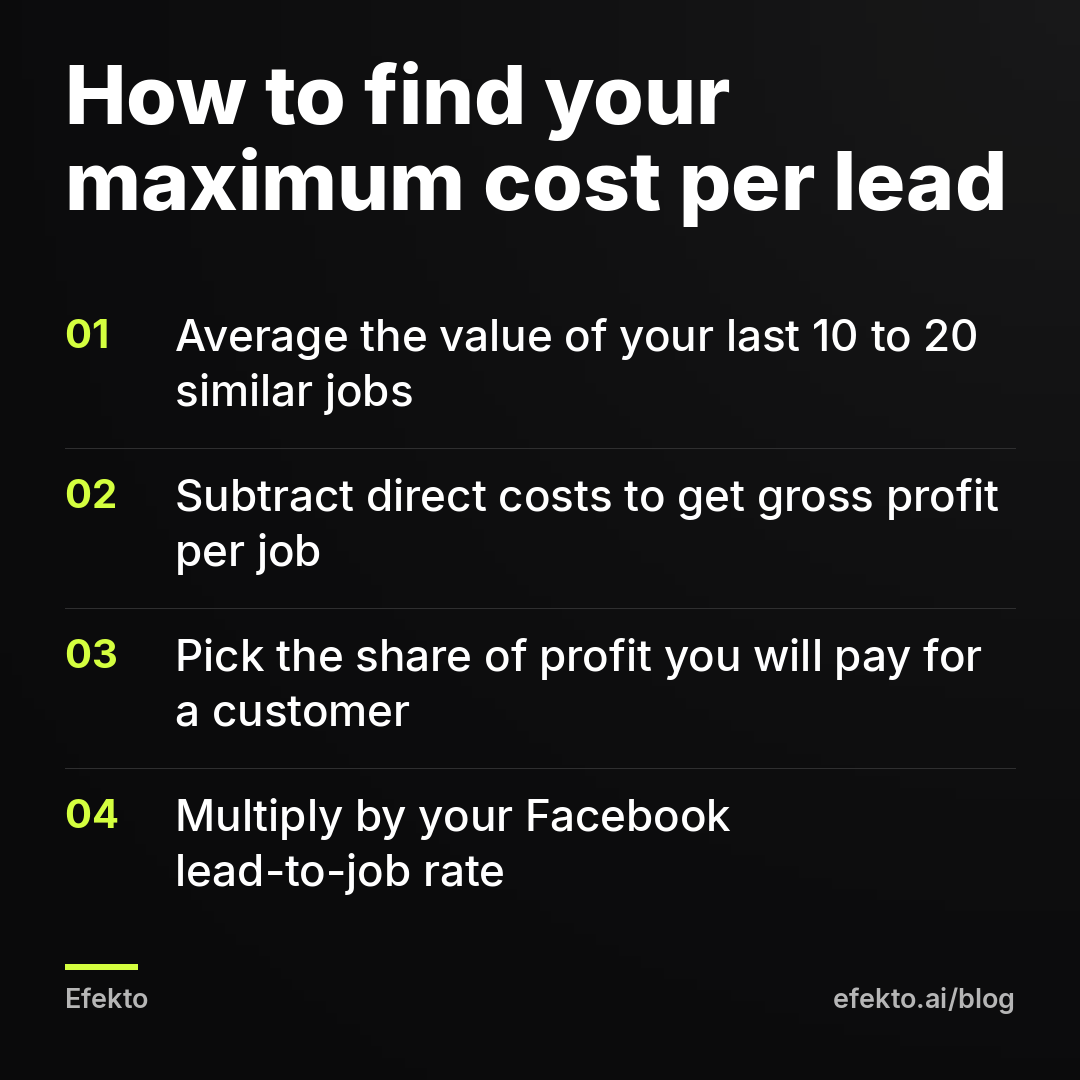
- Find your average job value. Take your last 10 to 20 jobs of the type you want to advertise, not your whole revenue. If you advertise ceramic coating, don't average it with small interior cleanings.
- Turn it into gross profit. Subtract materials, the labor you pay for, card fees and anything else the job directly costs. Never use revenue here. A $12,000 roof does not leave you $12,000 to spend on ads.
- Decide how much of that profit you will pay to get a new customer. This is a business decision, not a marketing one. A business with many repeat customers can pay more for the first job. For a first test, we'd start lower, somewhere between 20% and 30% of the gross profit on one job, and raise it once you see how many of those customers come back.
- Measure your lead-to-job rate from Facebook leads only. Referrals and Google calls close better because those people already chose you. Facebook leads are earlier in their decision. If you have no data yet, use a conservative guess and replace it with your real rate after the first 30 leads.
- Multiply the three numbers.
Then set a target below that maximum. We work with a target of roughly 70% of the maximum. That leaves room for a slow week, an ad that stops working or a season when fewer people book. A campaign above 100% of the maximum is losing money on the terms you set yourself, no matter how cheap the leads look.
What is a good cost per lead for car detailing, roofing and med spas?
In the three example businesses below, a good target cost per lead ranges from $21 to $50. The same lead price that is excellent for one of them loses money for another. These figures are an example built from made-up inputs. They are not industry averages and not results of our clients. Replace them with your own numbers.
| Example business | Job value | Gross profit | Share paid for the customer | Max cost per job | Lead-to-job rate | Max CPL | Target CPL (70%) |
|---|---|---|---|---|---|---|---|
| Detailing, ceramic coating | $800 | $400 | 30% | $120 | 25% | $30 | $21 |
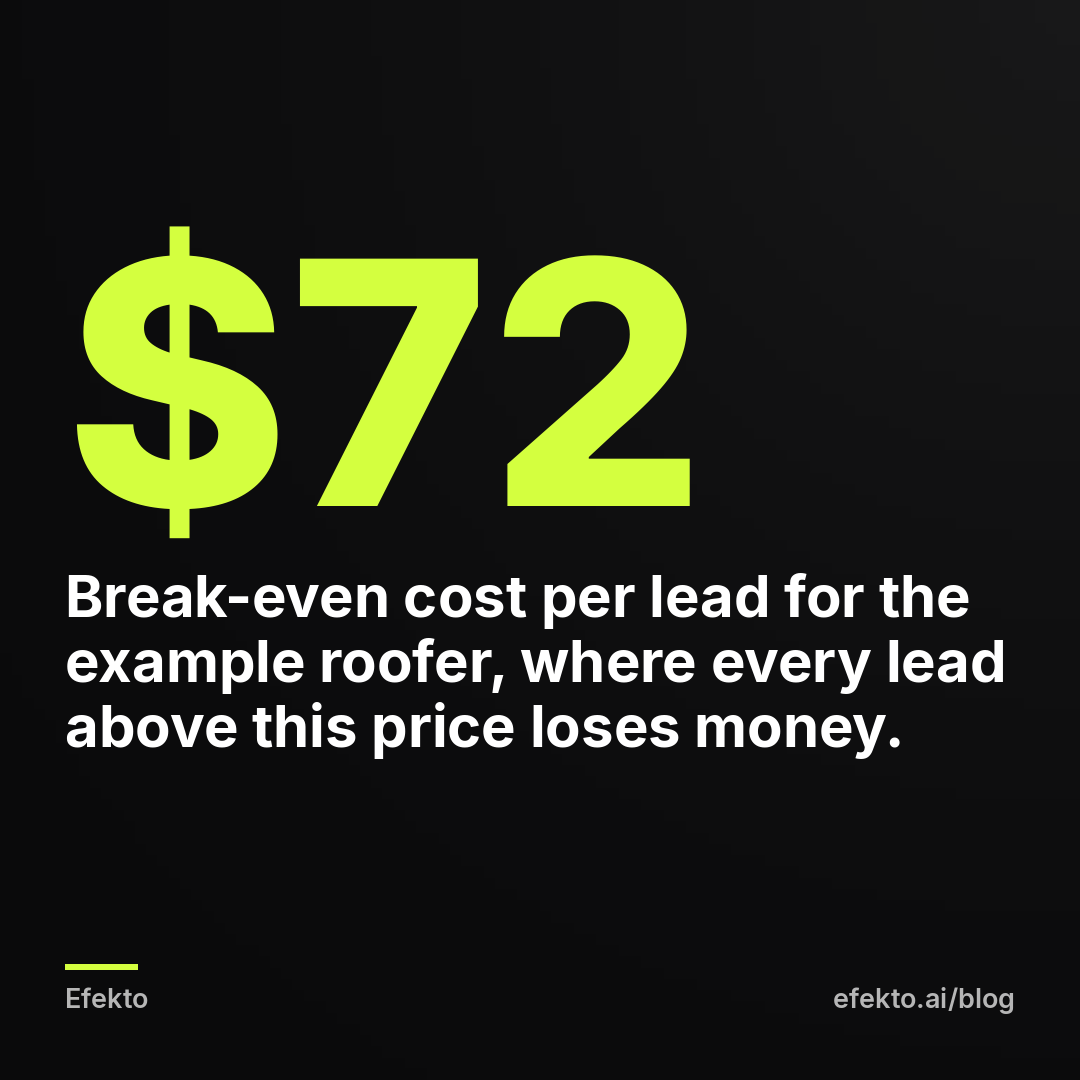
| Roofing, full replacement | $12,000 | $3,600 | 20% | $720 | 10% | $72 | $50 |
| Med spa, new patient, first year | $1,000 | $600 | 25% | $150 | 30% | $45 | $32 |
Target values are rounded to whole dollars.
Car detailing example. Say a ceramic coating package averages $800 and leaves $400 after product and labor. You decide to pay up to 30% of that, $120, for a new customer. One in four Facebook leads books. $120 × 0.25 = $30. At $21 per lead or less, you have breathing room. Detailing leads book within days, so you'll know your real rate in two to three weeks. If many coating customers come back for maintenance washes, you can raise the share later and the maximum goes up with it.
Roofing example. A full replacement averages $12,000 with $3,600 gross profit. You'll pay 20% of that, $720, per signed job. One in ten Facebook leads signs a contract after the inspection. $720 × 0.10 = $72. A roofer paying $50 per lead is on target here, even though that price would sink a detailer. Roofing sales take weeks, so judge the close rate only on leads that are at least 30 to 60 days old. We go deeper into roofing in our page on Facebook ads for roofing companies.
Med spa example. A new patient's first treatment may be small. Say that over her first year she spends $1,000 across several visits, which leaves $600 gross profit. You'll pay 25% of that, $150, to get her. Three in ten leads book and show up. $150 × 0.30 = $45. If you ran the math on the first visit alone, you'd get a much lower maximum and turn off campaigns that make money. First-year value only counts if you actually track whether patients return. A guess is not a number.
Put the table side by side and the point is clear. A $50 lead is on target for the roofer, above the $45 maximum for the med spa and far above the $30 maximum for the detailer. Asking whether $50 is a good cost per lead without your own numbers has no answer.
Why are industry average cost per lead numbers misleading?
Industry averages mix businesses with different offers, areas, form settings and close rates, and almost none of them say whether the leads were checked. We have an interest here: we make money when businesses run ads on Facebook and Instagram, and the team behind Efekto and Lemon Agency has managed over $1M in ad spend for clients. Even so, we don't publish an average cost per lead for roofing or detailing. Here is why that number would mislead you:
- Offer. A free roof inspection and a 10% discount on a replacement attract different people at different prices.
- Area. A dense metro and a rural county with three competing contractors behave nothing alike.
- Form type. A form set for more volume brings cheaper leads than one set for higher intent, and fewer of them answer the phone.
- Counting. One business reports raw submissions, another reports verified leads. Averaging them produces a number nobody actually paid.
- Who reports. Published figures tend to come from accounts someone wanted to show off.
Our stance is simple. If someone promises you a specific cost per lead before they've seen your offer, your area and how fast you call back, they are guessing, and you pay for the guess. The factors that move the price of the ads themselves, such as season and audience size, we covered in how much Facebook ads cost for a small business. This post is about what you can afford to pay, which is a separate question.
How many leads do you need before you judge your cost per lead?
Our rule of thumb is 20 to 30 leads before you trust the cost per lead, and at least 30 leads plus one full sales cycle before you trust the lead-to-job rate. Anything earlier is noise.
For example, say your budget is $20 per day and your leads cost $25. Over 30 days you spend $600 and get 24 leads. On a small budget, an honest test takes a month, not a weekend.
The common mistake is turning a campaign off after three days because the first leads cost $40, when the target is $50 and the campaign is still in Meta's learning phase. The opposite mistake is editing every day. Big budget changes, new audiences and swapped ads can each reset learning, so the campaign never settles long enough to show what it can do.
If after 30 leads your cost per lead sits at twice your maximum, small tweaks won't close the gap. Change the offer, the form or the ads. Narrowing the audience by a few miles rarely fixes a lead that costs double.
Should you aim for the lowest possible cost per lead?
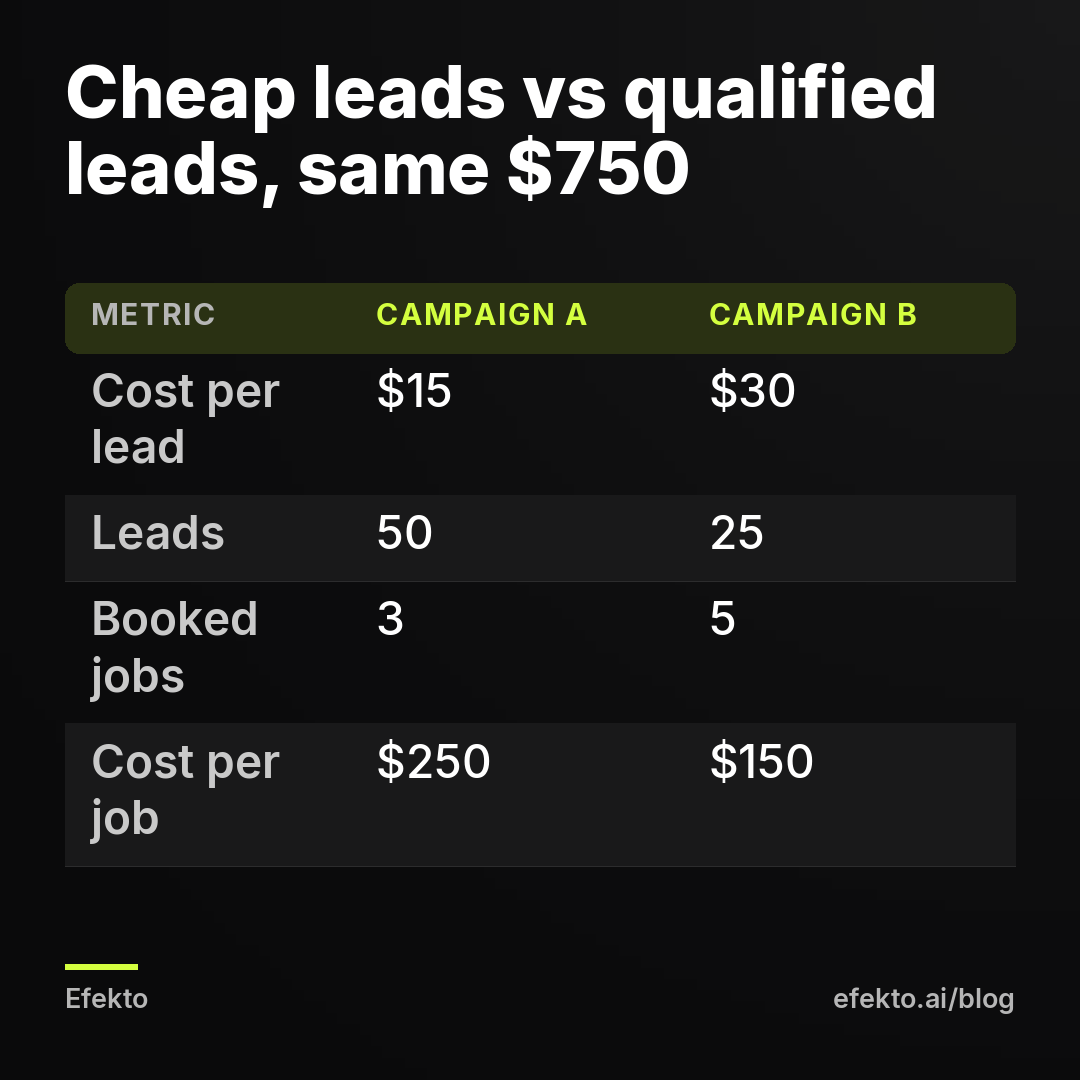
No. The lowest cost per lead often brings the most expensive customers. For example, two campaigns each spend $750 in a month:
- Campaign A uses a form set for volume with no questions. It brings 50 leads at $15 each, and 3 of them book. Cost per job: $250.
- Campaign B uses a form set for higher intent with one question about ZIP code and timeline. It brings 25 leads at $30 each, and 5 of them book. Cost per job: $150.
If you judge by cost per lead, you keep A and turn off B. If you judge by cost per job, you do the opposite and get two more jobs for the same money.
The settings that make leads cheap and useless are predictable: forms with every field prefilled and no questions, giveaways and contests, and discounts so deep they attract people who will never pay full price. The fixes that raise cost per lead and, in our experience, usually lower cost per job are just as predictable:
- switch the instant form to higher intent, which adds a review screen before submitting,
- add one qualifying question, such as ZIP code, type of service or when they want the job done,
- show a starting price or price range in the ad, so people who can't afford it skip the form,
- use real photos of your own work instead of stock images.
How does slow follow-up change your real cost per lead?
Every hour you wait to call back raises the cost of each lead you actually reach. For example, 10 leads at $25 cost you $250. If you call within an hour and reach 7 people, each real conversation costs $35.71. If you call the next day and reach 4, each one costs $62.50. The ads didn't change. Your phone habit did.
A follow-up routine that works without extra staff:
- Turn on lead notifications on your phone in the Meta Business Suite app, or send leads to your email or CRM.
- Call within one hour during business hours.
- If nobody answers, send a text right away with your name, company and a question they can reply to.
- Try a second call the next day at a different time.
- Mark the result in your lead sheet the same day.
If you skip this, your campaign can look expensive when the real issue is that half the leads went cold before anyone called them. Cutting the ad budget won't fix that.
What should your real cost per lead include besides ad spend?
Your real cost per lead includes everything you pay to run the ads, not only what goes to Meta. Agencies often report cost per lead based on ad spend alone, which leaves out their own fee. For example, say you spend $1,500 a month on ads and get 60 leads:
| Setup (example) | Monthly cost | Real cost per lead |
|---|---|---|
| Ad spend only, as Ads Manager shows it | $1,500 | $25 |
| Ads plus an agency fee of $1,000 per month | $2,500 | $41.67 |
| Ads plus 5 hours of your own time valued at $60 per hour | $1,800 | $30 |
Plug the real cost per lead, not the Ads Manager figure, into the formula from earlier. If the agency fee pushes you above your maximum, the agency is costing you jobs even when its reports look green.
One of the options on that list is Efekto, the app our team built from the work we do by hand in ad accounts. Efekto creates ads from your website, publishes them, and optimizes them every day: it turns off the ones that don't bring results and scales the ones that do. You approve at least 5 ads before anything goes live. The Starter plan is $149 per month, the minimum daily ad budget is $15, and the 7-day free trial is counted from the launch of your first campaign, with no card needed at sign-up. You can see how Efekto works step by step.
Efekto won't fix the math from the earlier sections, and neither will an agency. If your maximum cost per lead comes out at a few dollars, if nobody can call leads back the same day, or if your calendar is full for the next two months, don't start paid ads yet, with us or anyone else. Fix the offer, the follow-up or the capacity first.
When is cost per lead the wrong number to watch?
Cost per lead stops being useful when the math can never work, when people don't decide through forms, or when you can't take more jobs. Four situations where we'd tell you to look elsewhere:
- Low-ticket jobs with no repeat business. For example, a $40 basic wash that leaves $15 profit. Even if you pay 50% of the profit and 30% of leads book, the maximum is $15 × 0.5 × 0.3 = $2.25 per lead. Facebook will not deliver real leads at that price. Sell packages or memberships first, or put the effort into your Google Business Profile and reviews.
- Emergency services. A burst pipe, a dead AC in July or a roof leaking during a storm sends people to Google search, not to their Facebook feed. Facebook works better for planned jobs: system replacements, maintenance plans, coatings, cosmetic treatments.
- Calls instead of forms. If your ads use a call button, cost per lead in Ads Manager doesn't capture what happened. Use a tracking number or ask every caller where they found you, then calculate cost per call and cost per job.
- A full calendar. If you're booked out, a lower cost per lead won't earn you anything. Cut the budget to what keeps a short waitlist and spend the rest when there's room.
How do you start tracking cost per lead the right way?
Start with your own numbers and a lead sheet, not with a target from the internet. If we were setting up your account tomorrow, this is the order we'd follow:
- Calculate your maximum and target cost per lead from your last 10 to 20 jobs of the type you'll advertise.
- Create the lead sheet before the first ad goes live, so the first lead already gets a row.
- Run for at least a month or 30 leads, whichever comes later, without daily edits.
- Judge the campaign on cost per booked job and real cost per lead, including any fees.
- When numbers are off, change the offer and the form before the audience or the budget.
We would stop arguing about whether a cost per lead is high or low and ask one question instead: does this number fit under the maximum your jobs can pay for. If it does, scale. If it doesn't after 30 leads, change the offer, not the bid.
FAQ
Is $50 per lead good on Facebook?
It depends on what your jobs are worth and how many leads close. In the roofing example above, $50 is right on target, while in the detailing example it is far above the $30 maximum and loses money on every booked job. Run the formula with your own numbers before calling any lead price good or bad.
What is the difference between cost per lead and cost per acquisition?
Cost per lead is what you pay for a contact, and cost per acquisition is what you pay for a paying customer. Acquisition cost equals cost per lead divided by your lead-to-job rate, so at $25 per lead with one in five leads booking, each customer costs $125.
Why did my cost per lead suddenly go up?
Most often the same people have seen the ad too many times and stopped responding, or a season or a competitor pushed prices up. Check how long the current ads have run and whether frequency has climbed before you touch the budget or the audience. If cost per lead rose but cost per booked job didn't, you may not have a problem at all.
Should Messenger conversations count as leads?
Only the ones that end with a phone number, an address or a booked appointment. Keep conversations as a separate number and mark in your lead sheet which ones became real leads, or a campaign full of one-word replies will look cheaper than it is.
How do I lower my cost per lead without getting junk leads?
Change the ads and the offer first: a clear price range, a specific service and real photos of your work. Keep the form filters in place, because removing qualifying questions usually lowers cost per lead and raises cost per booked job.
If you'd rather have the ads created and optimized for you while you watch the numbers that matter, you can start at efekto.ai.
- Jakub Zwoliński
Founder, Lemon Agency · Efekto · October 24, 2026