How to Run Facebook Call Ads So Customers Phone Your Business Directly
Set up Facebook call ads step by step: the right objective, a dedicated number, ad hours matched to when you answer, and how to measure answered calls and booked jobs.

To run Facebook call ads, create a Leads campaign with Calls as the conversion location, put a phone number in the ad that a real person answers, run the ads only during the hours that person is available, and count answered calls and booked jobs instead of the button taps Meta reports. Most owners get the setup right. Where they lose money is what happens after someone taps the button.
1. Is a call ad the right choice for your business?
A call ad fits when the job is urgent or the price depends on a conversation, and someone at your business picks up most of the time the ad runs. It is a Facebook or Instagram ad with a "Call now" button. On a phone, one tap opens the dialer with your number already filled in. No form and no website visit.
When it makes sense: a leaking roof, an AC that quit in July, a same-week car detail, a toothache, a clogged drain. The customer wants an answer today and expects to talk to someone. Call ads also suit jobs where the quote depends on two or three questions you can ask in a minute.
When it does NOT make sense: you're a one-person crew on a roof all day and calls go to voicemail. You sell something people research late at night and aren't ready to talk about yet, like a med spa package or a full kitchen remodel. Then a form lets them reach out on their schedule and lets you call back on yours.
Our rule: if you can't answer at least 8 out of 10 calls during the hours the ad runs, don't start with call ads. Fix who picks up first. An unanswered call from an ad costs you the same as an answered one, and that customer won't wait for a callback. They'll tap the next ad.
2. How do you set up a phone number for Facebook ads?
Use a number that appears only in your ads. That is the only reliable way to know which calls came from Facebook and which came from your truck wrap, your Google profile or a referral.
Two ways to get one:
- A second line from your phone provider, routed to the phone that answers.
- A call tracking service that gives you a local number, forwards calls to your main line and logs every call with time and duration.
Whichever you pick, set it up like this:
- Local area code. People pick up and call back local numbers more readily than toll-free ones.
- Ring time of 25 to 30 seconds before voicemail, not 15. Someone grabbing the phone from a ladder needs the extra rings.
- A voicemail greeting that names the business and promises a callback time you can keep, for example "within 15 minutes."
- A whisper message, if your service supports it. It plays a short note like "Facebook ad call" to you before connecting the caller, so whoever answers knows the person just saw an ad and may mention an offer.
When you can skip it: if your business gets two or three calls a week in total, a jump after launch is clearly the ad. Even then, a dedicated number saves you from guessing later, when other channels pick up.
3. How do you create a call campaign in Ads Manager?
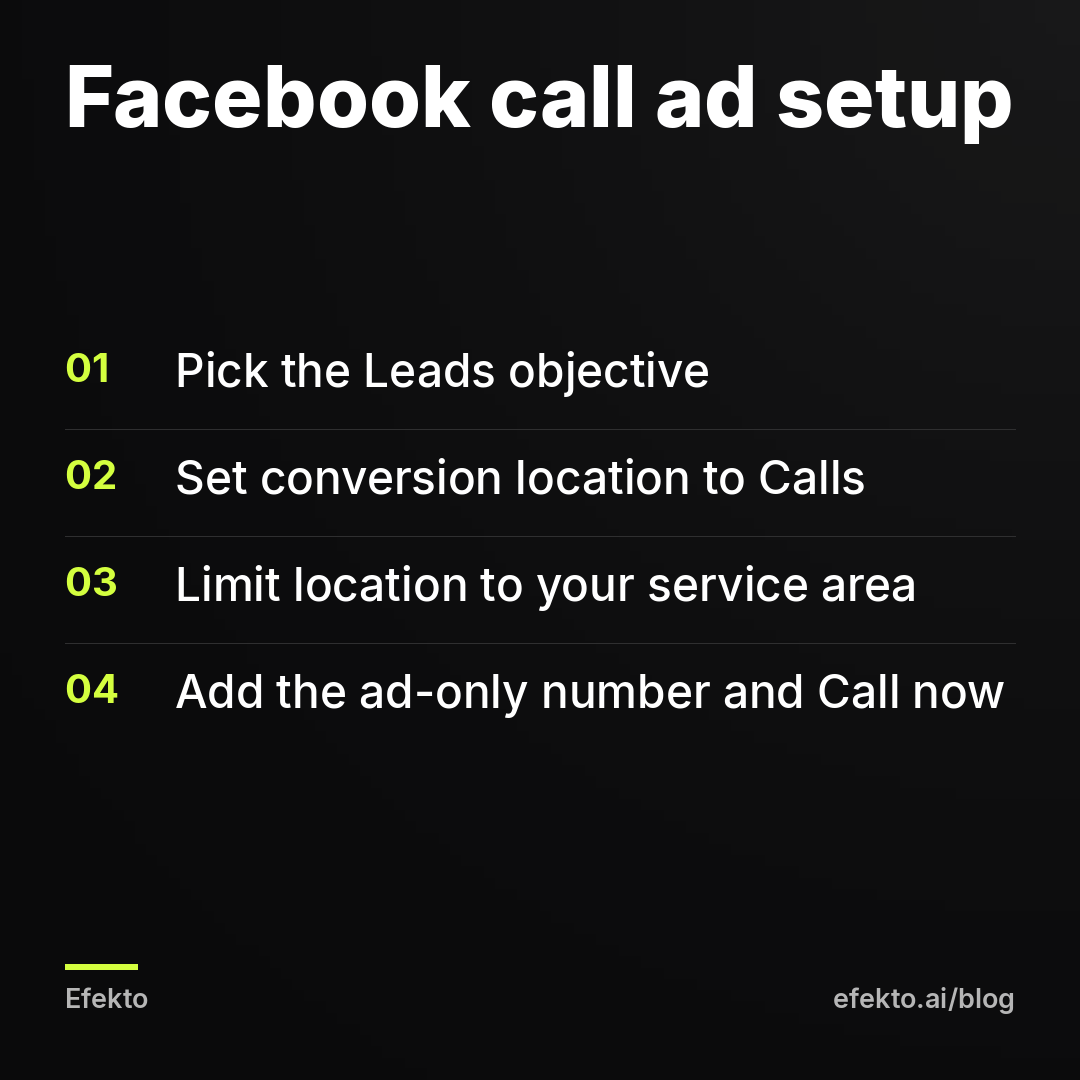
Use the Leads objective with Calls as the conversion location. That tells Meta to find people likely to tap and call, not people who like posts. Step by step:
- Campaign: create a new campaign and pick Leads as the objective.
- Ad set, conversion location: choose Calls.
- Performance goal: maximize the number of calls.
- Location: your service area as a radius around your shop or a list of ZIP codes. Don't go wider than you'd actually drive for a job.
- Placements: call ads are built for phones. On a computer the button can't dial anything, so make sure delivery is going to mobile placements on Facebook and Instagram.
- Ad: pick your Facebook Page, upload the image or video, write the text, and enter the dedicated number with the country code. The button is "Call now."
When this setup is wrong: don't use a boosted post with a call button and don't pick the Traffic objective. Boosts and Traffic campaigns optimize for engagement or clicks, and you'll pay for people who scroll past or never dial. We'd always use Leads plus Calls for call ads.
4. How do you schedule Facebook ads to run only when you answer the phone?
Run the ad set on a schedule that matches the hours someone picks up, and stop it 15 minutes before they leave. In Ads Manager, scheduling ads for certain hours is available when the ad set uses a lifetime budget instead of a daily one:
- In the ad set, switch the budget to Lifetime budget and set a start and end date (for example, 30 days).
- Under the budget settings, choose Run ads on a schedule.
- Mark the hours and days your phone is answered, for example Monday to Friday 8:00 to 5:45 if the office closes at 6.
- Choose the viewer's time zone, which for a local business is your time zone anyway.
If you prefer a daily budget, use an automated rule in Ads Manager that turns the ad set off at closing time and on again in the morning. A second option is two ad sets: calls during office hours, an instant form for evenings and weekends, so people who show up after hours can still reach you.
From our accounts: of 3,490 Meta lead form leads collected in the 90 days to Nov 1, 2026 on the accounts we run, the most came in on Sunday (19.2%), the fewest on Monday (12.5%), and Saturday plus Sunday brought 33% of all leads. Those are form submissions, not calls. But they show when people are willing to reach out to a business, and a third of it happens on the two days most local offices don't pick up the phone.
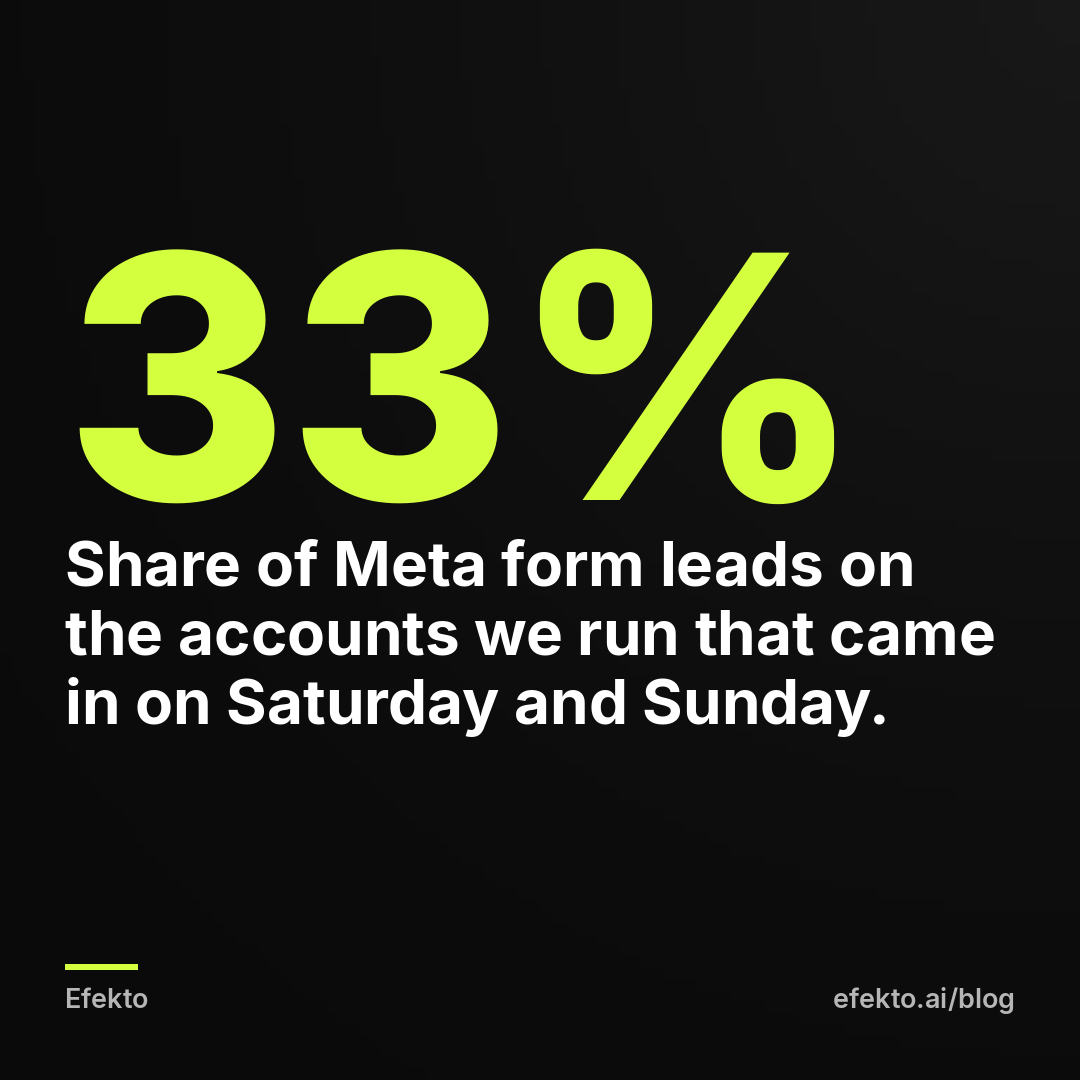
What that means for you: a Monday to Friday call schedule skips the days people are most ready to act. Either have someone answer Saturday and Sunday for a few hours (9 to 1 is enough to catch a good part of it), or keep a form ad running on weekends and call those people back first thing Monday.
When scheduling doesn't make sense: if you have a live answering service 24/7 that can actually book jobs, let the ads run around the clock. A service that only takes messages doesn't count.
5. How much should you spend on call ads per day?
Set the budget by how many calls your team can handle, not by what's left at the end of the month. Too many calls you can't answer are as wasteful as too few.
For example, say you run $30 a day for 30 days. Here's how that might play out:
| Step | Example number | How it's calculated |
|---|---|---|
| Monthly spend | $900 | $30 x 30 days |
| Call taps reported by Meta | 45 | from Ads Manager |
| Cost per tap | $20 | $900 / 45 |
| Calls that actually connected | 30 | from the ad number's call log |
| Cost per connected call | $30 | $900 / 30 |
| Booked jobs | 10 | from your calendar or CRM |
| Cost per booked job | $90 | $900 / 10 |
| Revenue at $400 average job | $4,000 | 10 x $400 |
The same $900 looks like $20 per lead in Meta's report and $90 per customer on your calendar. Both numbers are real. Only the second tells you whether the ad pays.
Now check capacity. 30 connected calls over about 22 business days is one or two calls a day, which one office person can handle. If your schedule is already full for three weeks, more budget just produces calls you'll have to turn down. Working backward from the jobs you need is covered in our post on setting your Facebook ads daily budget based on the jobs you need.
When a bigger budget doesn't help: if fewer than 2 out of 3 taps turn into connected calls, the problem is answering, not reach. Fix that before you add a dollar.
6. What should a Facebook call ad say?
The ad should tell people to call, who will answer, and what they'll get out of a two-minute call. People hesitate to call a stranger. Take away the uncertainty.
What to put in:
- Headline: service + area + reason to call now. "AC not cooling? Same-day repair in Mesa." "Roof leak? Free inspection this week."
- First line of text: who picks up. "You'll talk to Mike, not a call center." A name lowers the barrier more than any adjective.
- Hours. "We answer 8 to 6, Mon to Sat." This also cuts down on calls outside your schedule.
- What happens on the call. "Three quick questions and we'll give you a price range and the first open slot."
- A price anchor if you can give one. "Most tune-ups are $89 to $129." A rough range makes the call feel safe.
- Image or video: your real truck, your real face, a real job. A stock photo of a smiling technician tells people they'll reach a stock company.
When to leave things out: don't write "24/7" unless someone actually answers at 2 am. Don't promise a price on the call that you then won't honor on site. Both turn a paid call into a bad review.
7. Who should answer, and what should they say in the first 10 seconds?
A live person who knows the ad exists, with no phone menu in front of them. Callers from an ad decide in seconds whether to stay on the line.
From our accounts: our AI voice assistant called new users after sign-up; in the first days 4 of 6 calls ended with a hang-up after 4-8 seconds. That was us calling people, not people calling a business. But it shows how little time you get before someone decides they're talking to a machine and hangs up. A "press 1 for service" menu or a slow automated greeting on your ad number puts callers in exactly that spot.
So on the number you use in ads:
- No menu. Route straight to a person.
- Opening line in one breath: "Thanks for calling [business], this is Maria. Are you calling about the AC tune-up?" Mentioning the offer tells the caller they reached the right place.
- Three questions, then a booking: where are you (ZIP or street), what's going on, when works for you. Book the slot on the call. "We'll get back to you with a time" loses jobs.
- Missed call: call back within 5 minutes and text right away if you can't. "Sorry we missed you, this is Maria from [business], calling you back in a few minutes." More on this in our guide on following up on Facebook leads fast enough to book the job.
When AI or a menu might be fine: after hours, as a way to take a name and number for the morning. Never as the first thing a caller hears while the ad is running in your business hours.
8. How do you measure calls from Facebook ads?
Track four numbers every week: taps, connected calls, calls longer than a minute, and booked jobs. Meta only gives you the first one.
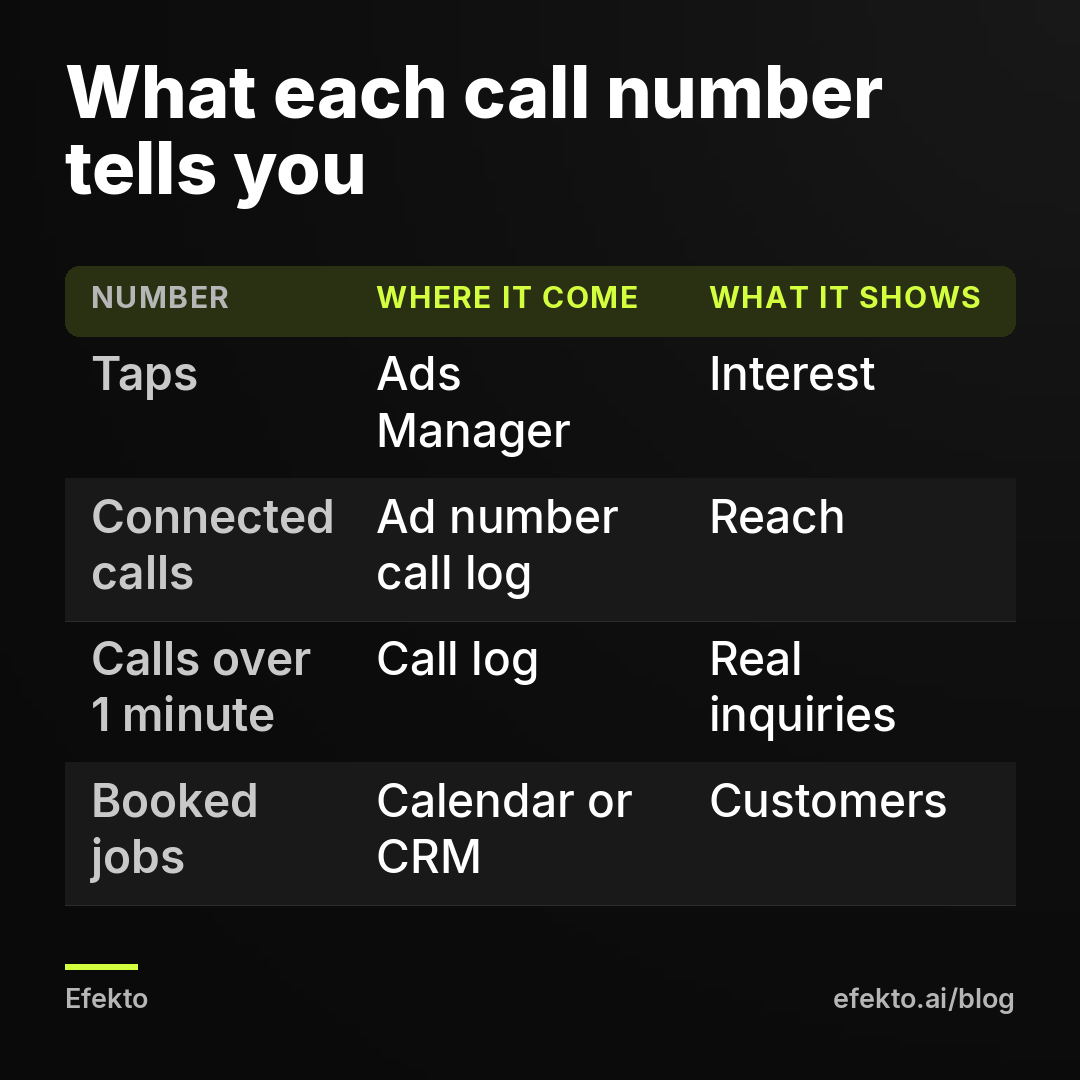
What Ads Manager counts as a call result is a tap on the button. It doesn't know if the call connected, how long it lasted or whether anyone booked. Someone can tap, see the dialer and change their mind, and Meta still counts it. We make money running ads on Meta, and we'd still tell you not to judge call ads by Meta's own numbers. After running campaigns for more than 300 clients, the gap between reported results and booked customers is the thing we'd check first in any account.
How to do it in about 10 minutes a week:
- Ads Manager: spend and call taps for the last 7 days.
- Call log of the ad-only number: number of connected calls and how many lasted over 60 seconds. Short calls are often wrong numbers, sales pitches or hang-ups.
- Calendar or CRM: how many of those callers booked. If your office person writes "FB" next to each booking from the ad number, this takes one minute.
- Divide spend by each number: cost per tap, cost per connected call, cost per booked job.
When to act, as we'd set it: after 20 connected calls, if fewer than 1 in 5 books, look at the call itself (who answers, what they say, whether the price surprises people) before touching the ad. If taps are high but connected calls are under two thirds, look at hours and ring time. If taps are low, the ad or the offer is the problem.
9. Which mistakes waste the most money on call ads?
The expensive mistakes almost all happen off Facebook. The ones we'd check before anything else:
- Ads running when nobody answers. Evenings, lunch, weekends. Fix: schedule or an automated rule, plus a form for off-hours.
- The ad number goes to voicemail after 4 rings. Fix: 25 to 30 seconds of ringing and a callback promise in the greeting.
- A phone menu on the ad number. Fix: straight to a person.
- The same number on the ad, the website and the van. Fix: a number used only in ads, or you'll never know what the ads did.
- Judging the campaign by cost per tap. Fix: cost per booked job.
- A radius wider than your drive. Calls from 40 miles out that you turn down still cost money. Fix: ZIP codes you actually serve.
- Turning the ad off after 3 days with few calls. At $30 a day, 3 days is $90, too little to judge. Fix: wait for at least 20 connected calls or two full weeks, whichever comes first.
Summary: call ad setup at a glance
| Step | What to set | How to check it works |
|---|---|---|
| 1. Fit | Urgent or quote-by-conversation jobs | You answer 8 of 10 calls in ad hours |
| 2. Number | Ad-only local number, 25 to 30 s ring | Every ad call shows in its own log |
| 3. Campaign | Leads objective, Calls location, mobile | Results column shows call taps |
| 4. Schedule | Ad hours = answering hours, weekends covered | No taps outside answered hours |
| 5. Budget | Calls your team can handle | Connected calls are 2 of 3 taps or more |
| 6. Ad | Who answers, hours, price range | Callers mention the offer |
| 7. Answering | Live person, no menu, book on the call | Missed calls returned within 5 minutes |
| 8. Measuring | Taps, connected, over 1 minute, booked | Cost per booked job known every week |
If you'd rather not build and adjust ads yourself, Efekto is one option: it creates ads from your website, publishes them on Facebook and Instagram, and optimizes them every day: it turns off the ones that don't bring results and scales the ones that do. The minimum budget is $15 a day, and you approve the first batch of ads before anything goes live. You can see the full flow on how Efekto works.
No app or agency fixes a phone nobody answers. If your crew is on jobs all day and there's no one in the office, start with a form and a fast callback routine. Get call ads only once someone can pick up.
FAQ
Can I see the caller's phone number in Facebook Ads Manager?
No. Ads Manager shows how many people tapped the call button, not who they are or whether the call connected. The caller's number shows up in your phone's call log or in your call tracking service, which is one more reason to use a number that appears only in ads.
Should I run call ads and form ads at the same time?
Yes, if you split them by time. Call ads during the hours someone answers, a form ad in the evenings and on weekends if your phone is off then. Running both at the same hours to the same people mostly makes them compete for the same budget.
How long should I run a call ad before deciding if it works?
We'd wait for about 20 connected calls or two full weeks, whichever comes first. Before that, a single good or bad day swings the numbers too much. Judge by cost per booked job, not by the first few taps.
Do Facebook call ads work on Instagram too?
Yes, the same ad can run on Instagram placements, and the call button works the same way on a phone. Check the call log by placement only if your volume is high enough to compare. At one or two calls a day, judge the campaign as a whole.
If you want ads that are created and optimized every day while your team focuses on answering the phone, you can start with Efekto.
- Jakub Zwoliński
Founder, Lemon Agency · Efekto · November 2, 2026