Facebook Ads for Small Business: Why First Campaigns Often Fail and How to Fix Yours
Most first Facebook campaigns fail for five fixable reasons: boosted posts, no clear offer, the wrong audience size, ads judged too early and tracking likes. Here is how to fix each one.

Most first Facebook campaigns for small businesses fail for five fixable reasons. The owner boosts a post instead of running a lead campaign, the ad has no clear offer, the audience is too wide or too narrow, ads get turned off before they have spent enough to judge, and success is measured in likes instead of calls and form fills. None of these means Facebook doesn't work for your business. Each one has a specific fix you can make yourself in Ads Manager in an afternoon. Below are the fixes in the order we check them when we audit a new account.
In short:
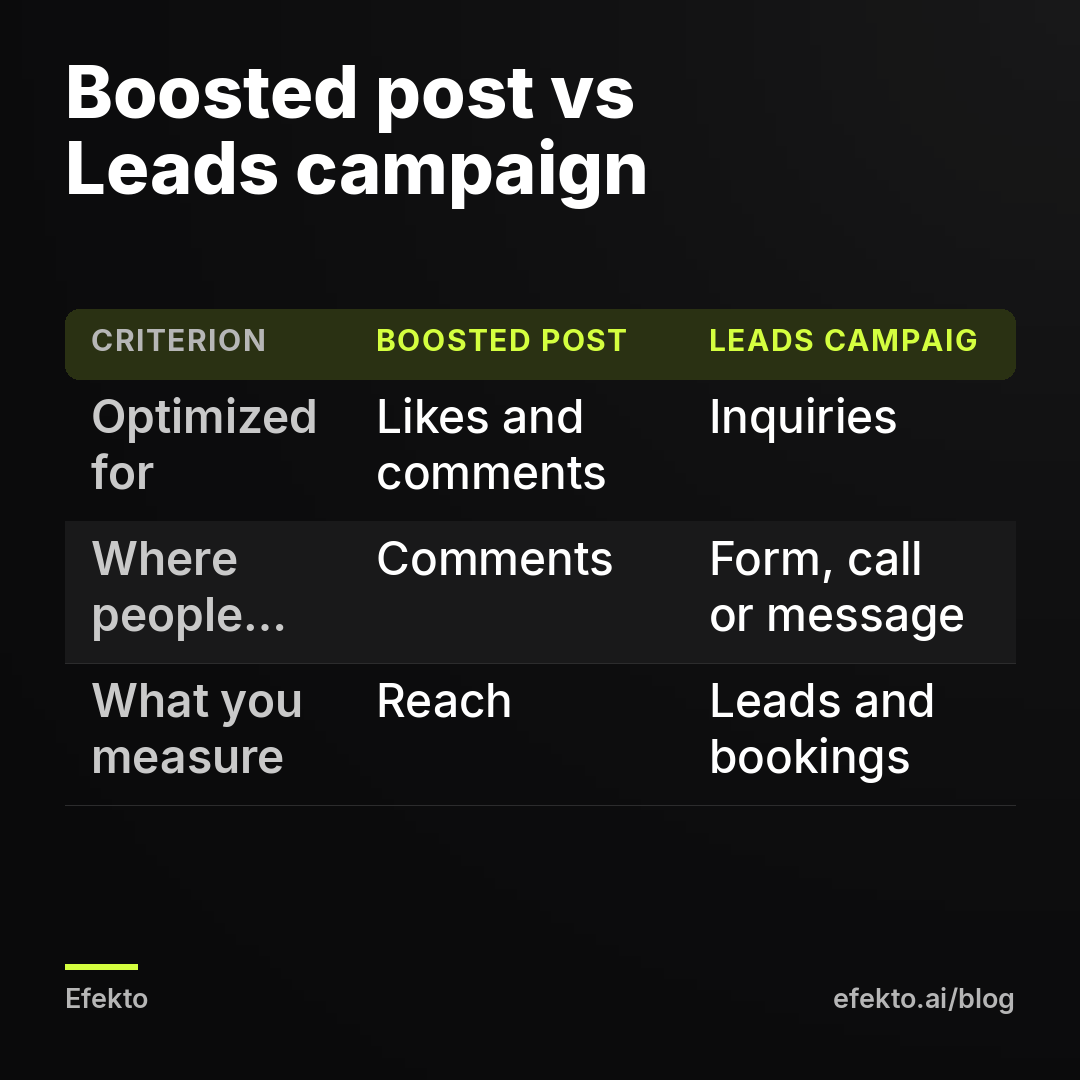
- A boosted post is optimized for engagement, so it brings likes and comments, while a Leads campaign is optimized for people who fill out forms or contact you.
- An ad without a specific service, price and reason to act now gets curiosity clicks and price shoppers, not booked jobs.
- Decide the cost per lead you can afford before launch, and judge each ad only after it has spent about twice that amount.
Which mistake is killing your first campaign?
Start with the symptom. You can usually tell what went wrong from what you saw in the first week, and fixing the wrong thing wastes another week of budget. Find your symptom in the table and go straight to that step.
| What you saw | Most likely cause | Fix |
|---|---|---|
| Plenty of likes and comments, no calls | Boosted post or an engagement goal | Step 1 |
| Leads arrive but say they are just looking or only want a price | Vague offer, nothing to commit to | Step 2 |
| Leads from towns you don't serve | Audience too wide or wrong location setting | Step 3 |
| Ad barely spends or shows to the same people over and over | Audience too narrow | Step 3 |
| You turned ads off after two or three days | Judged before the ads had enough data | Step 4 |
| You can't say how many jobs came from Facebook | No tracking of inquiries and bookings | Step 5 |
If you saw two or three of these at once, fix them in order. Step 1 comes first for a reason. If the campaign is set up for engagement, nothing you change in the offer or the audience will make it bring inquiries.
Step 1: Are you boosting posts instead of running a real campaign?
If you clicked the blue Boost button on your page, you didn't run a campaign built to bring customers. A boosted post tells Facebook to show your post to people who are likely to like, comment or share. Those are often not the same people who call a roofer or book a detail. You end up paying for applause.
We see this in a large share of first accounts we look at, and we have a full write-up on why boosted posts don't bring customers. The fix takes about 20 minutes.
How to set up a Leads campaign instead
Open Ads Manager (business.facebook.com, then Ads Manager), click Create and use these settings for a first campaign:
| Setting | What to choose | Why |
|---|---|---|
| Campaign objective | Leads | Facebook looks for people who submit their details, not people who react |
| Conversion location | Instant forms (or Website, if your site has the Meta pixel and a form) | Instant forms work without touching your website |
| Performance goal | Maximize number of leads | Simplest goal for a first campaign |
| Budget | One daily budget at campaign level | Lets Facebook move money to the ads that work |
| Location | Your real service area (see Step 3) | Stops leads from outside your area |
| Placements | Advantage+ placements | Fine for a start, no need to hand-pick |
| Number of ads | 3 to 5 in one ad set | Enough to compare, not so many that each gets no budget |
If the Leads objective with instant forms is new to you, our guide on setting up instant forms so you get real customers, not junk leads covers the form questions, which matter as much as the ad. And if Ads Manager itself is new, the step-by-step guide to your first campaign in Ads Manager walks through every screen.
Keep the boosted post if you like it. It just shouldn't be the thing you judge Facebook by.
Step 2: Does your ad have an offer, or just a description of your business?
If your ad says who you are but not what someone gets, when, and for how much, it has no offer. Most first ads we see read like a business card: quality work, family owned, satisfaction guaranteed, call today. Nobody stops scrolling for that, and the few who respond are curious, not ready.
An offer answers five questions in the first two lines:
- What exactly is the service? One service, not your whole menu.
- For whom and where? The type of customer and the area you serve.
- How much? A price, a starting price or a clear price range.
- Why now? Limited slots, a season, a deadline that is real.
- What happens next? What the person gets after they fill out the form.
Here are before and after versions. The prices are examples, not recommendations for your market.
Car detailing. Before: Premium detailing, we treat your car like our own. After, for example: Interior deep clean for sedans and small SUVs, $189, done in your driveway anywhere in [your town]. Six slots open next week. Leave your number and we text you times.
Roofing. Before: Trusted local roofers with years of experience. After, for example: Free roof inspection for homeowners in [your county], with photos of every problem we find. Written quote within two business days, no pressure to book.
HVAC. Before: Heating and cooling experts you can count on. After, for example: AC tune-up for $89 before the summer rush, for homes in [your area]. We check refrigerant, clean the coils and tell you honestly if the unit has another season in it.
Should you put the price in the ad?
Yes, put a price or a starting price in the ad whenever your service allows it. Hiding the price is the most common way first campaigns attract people who only want to know the price. They fill out the form, you call, they hear the number and they're gone. You paid for that lead and spent 10 minutes on the phone. A price in the ad filters those people out before they cost you anything.
If your jobs vary too much for one number (a full roof replacement, for example), offer something with a fixed price or a fixed outcome: a free inspection, a written quote by a date, a range for a typical house in your area.
How to test whether the offer is the problem
Write two versions of the offer and run them as separate ads in the same ad set, with the same image. Change only the first two lines of text. If one gets leads and the other doesn't, you have your answer, and you didn't need to change the audience or the budget to get it.
Step 3: Is your audience too wide or too narrow?
Your audience should match the area you can actually drive to, and almost nothing else at the start. First campaigns go wrong in both directions. Some owners target the whole state when they serve one county. Others stack a 10-mile radius, an age band, homeowners only and six interests until there is nobody left to show the ad to.
How to fix an audience that is too wide
Signs: leads from towns you don't serve, people asking if you come to them, cheap leads that go nowhere.
- Remove the state or region and add your service area as specific cities, ZIP codes or a pin with a radius.
- Draw the radius by drive time, not by miles on a map. If you won't drive 40 minutes for a $150 job, the radius shouldn't reach places 40 minutes away.
- If your Ads Manager shows a choice of location type, pick people living in the area, not people traveling through it.
- Add one question to the form: which city or ZIP code is the job in. It costs you a little volume and saves you a lot of calls.
How to fix an audience that is too narrow
Signs: the ad spends less than the daily budget, Facebook warns that the audience is small, and frequency (how many times the same person saw your ad) climbs quickly in the first week. We start worrying when frequency passes 3 in the first week of a local campaign. At that point the same few thousand people are seeing your ad again and again.
- Remove all interests. For local services they rarely help at the start, because the people who need a roof repair this month don't share one interest.
- Keep age limits only if they are real. A med spa may not want under-21s. A gutter cleaner has no reason to exclude anyone who owns a home.
- Turn on Advantage+ audience if Ads Manager offers it, and keep only the location as a hard limit.
- Let the offer do the targeting. An ad that says interior detail for sedans, $189, in your town already filters for the right person far better than an interest list.
This feels counterintuitive. Owners know their customer well and want to describe them to Facebook. But with a local radius, the audience is already small, and your knowledge works better in the ad text than in the targeting settings.
Step 4: Did you turn your ads off too early?
If you judged your ads after two or three days, you probably judged them too early. Facebook needs time and some spend to figure out who responds to each ad. Meta calls this the learning phase. During it, results jump around and costs often look high. Owners see an expensive first lead, panic, and switch everything off right before it would have settled.
The fix is to decide your rules before launch, when you're calm, and then follow them.
How to set a turn-off rule before you launch
Work backwards from what a customer is worth to you. For example:
- Say a typical repair job brings you $1,200 in revenue and you're comfortable spending $150 in ads to win one job.
- Say you book about 1 in 3 of the leads you actually speak to.
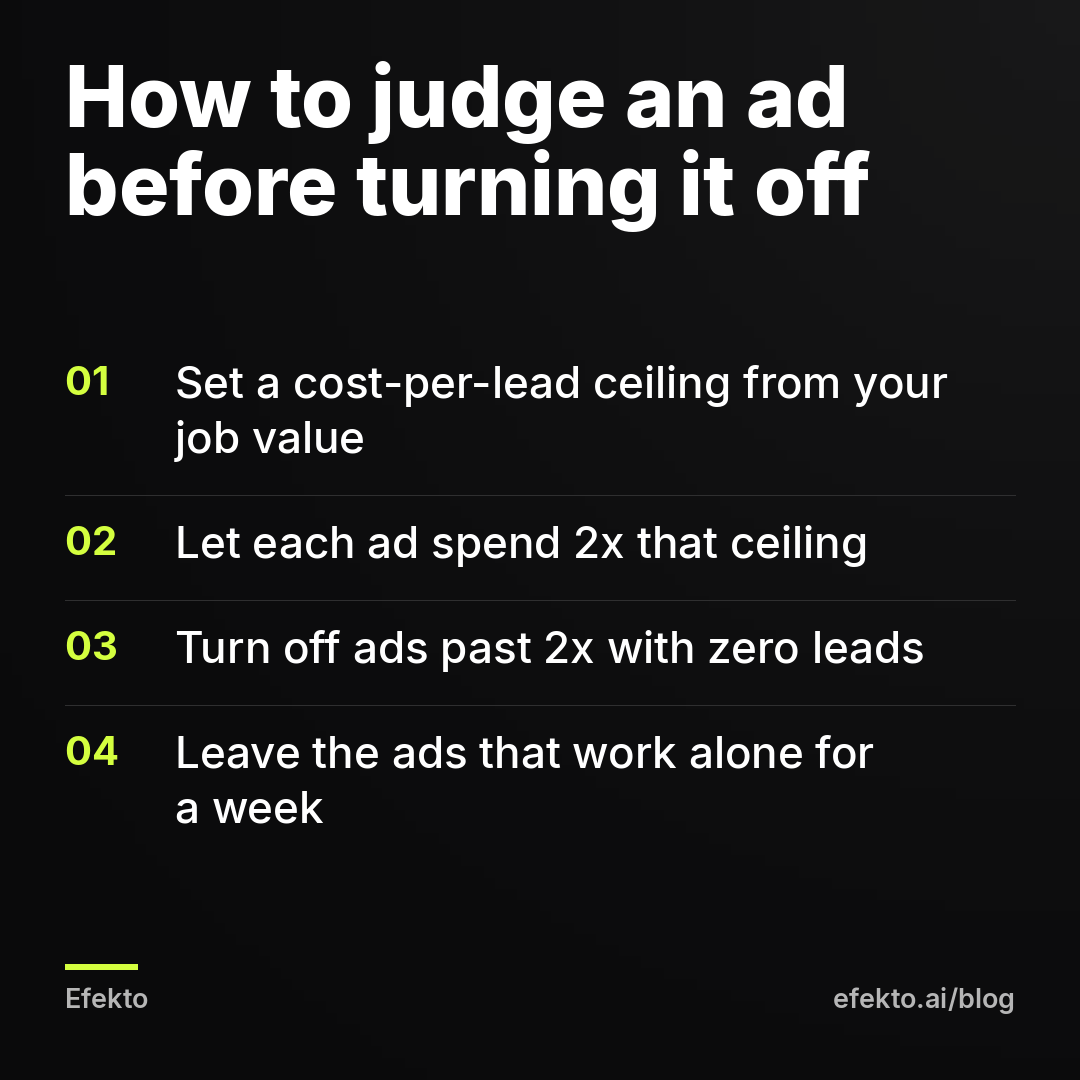
- Then you can afford up to $50 per lead ($150 divided by 3). That's your cost-per-lead ceiling.
- Give each ad room to spend 2x that ceiling, so $100 in this example, before you judge it.
- At $100 spent: an ad with zero leads goes off. An ad with two leads at $45 each stays on. An ad with one lead at $95 gets another $50 before you decide.
These numbers are an illustration. Use your own job value and your own booking rate. The method is the same whatever your numbers are.
What counts as touching the campaign too much?
Editing the budget, the audience or the ads every day counts as too much. Each significant edit can send the ad set back into learning, which resets the clock. In practice:
- Check results once a day if you need to, but act at most twice a week.
- Change one thing at a time: turn off one losing ad, or adjust the budget, not both on the same day.
- When you raise the budget on something that works, raise it in steps, not by doubling it overnight.
- Don't delete ads. Turn them off, so you keep the history.
Also check the opposite problem. Ads that worked for two or three weeks and then got expensive aren't a sign you started too early. They are often tired creative. We explain that pattern in why Facebook ads stop working after two weeks.
Step 5: Are you measuring likes instead of inquiries and booked jobs?
If the number you look at is reach, likes or link clicks, you're measuring the wrong thing. The only numbers that matter for a local service business are inquiries, the inquiries that were real, and the jobs you booked from them. Everything else is a step on the way.
The tool for this is not complicated. A spreadsheet with one row per lead is enough:
| Column | What to write | Why it matters |
|---|---|---|
| Date | When the lead came in | Shows which week and which ads produced it |
| Name and contact | From the form or call | So you can follow up |
| Source | Facebook form, call, message, other | Separates Facebook from word of mouth |
| Reached? | Yes / no | Shows how many leads you never spoke to |
| Qualified? | Yes / no, with a short reason | In area, real need, accepts the price range |
| Quoted | Amount, if quoted | Shows the pipeline |
| Booked | Yes / no | The number that pays your bills |
| Job value | Amount | Lets you compare ad spend to revenue |
For calls, ask every caller one question: how did you hear about us? Write the answer in the Source column. It isn't perfect, but it beats guessing.
Why the cost per lead in Ads Manager isn't your real cost
The cost per lead Facebook shows you is the cost of a form submission, counted before anyone checked it. Some submissions have a wrong phone number. Some are outside your area. Some people filled out the form by accident or don't remember doing it. Your real cost per qualified lead is always higher than what Ads Manager shows, and your cost per booked job is higher still.
For example: say you spend $420 in a week and Ads Manager shows 14 leads, so $30 per lead. You reach 10 of them. 6 are real jobs in your area. You book 2.
- Cost per lead according to Facebook: $420 / 14 = $30
- Cost per qualified lead: $420 / 6 = $70
- Cost per booked job: $420 / 2 = $210
If those 2 jobs are worth $1,200 each, that week made money even though $70 per real lead sounds expensive. If they are worth $150 each, the week lost money even though $30 per lead sounds cheap. You only know which one is true if you fill in the sheet. This is why we never judge a campaign by the Ads Manager number alone.
What should you check before you relaunch?
Go through this list before you turn the fixed campaign back on. Every item is something we've seen sink a first campaign on its own.
- Campaign objective is Leads (or Sales with a working pixel), not Engagement, Traffic or a boost.
- Each ad has one service, a price or starting price, a reason to act now and what happens after the form.
- Location is your real service area, drawn by drive time.
- No interests stacked on top of the location, age limits only where they are real.
- The form asks for the city or ZIP code of the job.
- 3 to 5 ads in one ad set, with at least two different offers or angles.
- You have written down your cost-per-lead ceiling and the 2x turn-off rule.
- Leads go to a phone or inbox someone checks during working hours.
- The lead spreadsheet exists and someone owns it.
- You have blocked out two moments a week to review, not seven.
If you can't tick the phone item, fix that before spending anything. A lead that waits until tomorrow for a call is often a lead that already booked someone else.
When are Facebook ads the wrong fix?
Sometimes the honest answer is that a better campaign won't solve your problem. Don't relaunch if any of these apply:
- You can't take more work. If your calendar is full for the next month, more leads mean more people you disappoint. Raise prices or hire first.
- Nobody can answer the phone. If leads would sit for a day, the money is wasted no matter how good the ad is. Sort out who calls back and when before you spend.
- Your job value is too low for paid leads. If one job brings $60 and you book 1 in 4 leads, you can only afford $15 per lead in that example, which is hard to reach in most markets. Package services into a higher-value offer first.
- Your service needs an emergency search. Burst pipes and lockouts are searched for on Google at the moment of need. Facebook reaches people who aren't searching yet, so it works better for planned services like detailing, roofing inspections, tune-ups or treatments.
- Your ad account is restricted. Appeal through Meta and fix what was flagged. Don't open a second account to get around it, because Meta treats that as circumvention and can ban the business for good. Our guide on rejected ads and restricted accounts covers the steps.
Where does Efekto fit, and where do we have an interest?
If you would rather not run the 2x rule and the weekly cleanup by hand, that part is what Efekto does. Efekto creates ads from your website, publishes them, and optimizes them every day: it turns off the ones that don't bring results and scales the ones that do. You approve the first batch, at least 5 ads, before the campaign starts. It runs on your own Facebook ad account or on an Efekto ad account with the budget topped up in advance. The details are on the page explaining how Efekto works.
We have an interest here: we make money when small businesses run ads on Facebook and Instagram, and the team behind Efekto has run lead generation campaigns for over 300 Lemon Agency clients. That's also why we'll say what an app can't do. It won't make an unclear offer clear, and it won't call your leads back. Steps 2 and 5 stay your job either way.
What mistakes do people make while fixing a failed campaign?
The fix itself has its own traps. These are the ones we see most often after an owner decides to give Facebook a second try.
Changing everything at once. New objective, new offer, new audience and new images on the same day. If it works, you don't know why. If it fails, you don't know what to undo. Fix Step 1 first, then change one thing at a time.
Duplicating the campaign over and over. Copying a struggling campaign five times with small tweaks splits the budget into pieces too small to learn from. Keep one campaign, one ad set and a few ads until you have a winner.
Copying a competitor's ad word for word. Their offer works for their prices, their reviews and their area. Borrow the structure (service, price, reason now) and fill it with your own numbers.
Using a stock photo when you have real ones. A phone photo of your own truck, your own team or a real before and after almost always says more than a polished stock image. People are scrolling past ads all day. Something that looks like a real local business makes them stop.
Judging the second attempt by the first week. The second campaign also has a learning phase. Use the same written rule from Step 4, not your memory of how the first one disappointed you.
Raising the budget to fix a bad ad. More money on an ad with no offer just gets you more of the wrong leads faster. Fix the offer, then scale what works.
FAQ
How long should a first Facebook ad campaign run before I decide it doesn't work?
Decide by spend, not by days. Set a cost-per-lead ceiling from your job value, let each ad spend about twice that, and judge only after that point. For most small budgets that means at least one to two weeks, longer if your daily budget is small.
Is it better to send people to my website or use a Facebook instant form?
For a first campaign, an instant form is usually simpler because it doesn't depend on your website working well on a phone. A website works if your site loads fast, has a clear form and has the Meta pixel installed. Whatever you choose, ask for the job location so you can filter out leads you can't serve.
Should I target homeowners only for a home service business?
Usually not at the start. Detailed targeting options shrink an already small local audience and are often less accurate than they look. Say it in the ad instead, for example by writing for homeowners in your county, and let the offer filter the audience.
Why are my Facebook leads so cheap but none of them book?
Cheap leads that don't book usually point to a vague offer or a form that is too easy to submit. Add a price or starting price to the ad, add a question about the job location or timing to the form, and track who you actually reach and book. A higher cost per lead with more booked jobs is the better deal.
If you want to see what a first batch of ads built from your own website looks like, and approve them before anything goes live, you can start at efekto.ai.
- Jakub Zwoliński
Founder, Lemon Agency · Efekto · October 24, 2026