How to Make Facebook Ad Images and Videos From Your Website and Phone Photos
A step-by-step guide for local service businesses: which job photos to use, how to shoot before/after shots, add text, record a phone video, and size it for Feed and Reels.

You can make Facebook ad images and videos from material you already have. Pull 15 to 30 real job photos from your website and your phone. Pick the ones that show a clear result or a real person. Crop them to 4:5 for the Feed and 9:16 for Reels and Stories. Add five to seven words of text that name the service and the town. Then record one 20 to 30 second phone video of a job in progress. You don't need a photographer, a studio or design software. What you need is a camera roll with real work in it and about two hours to sort it.
In short:
- Real photos of your own jobs, your own van and your own face almost always beat stock photos and polished graphics in local service ads, because people are deciding whether to trust you, not admiring design.
- Shoot vertical at 9:16 and crop to 4:5 for the Feed, and you can make every placement from one set of files.
- Launch with several different images and at least one video, then let the results tell you which one to keep, instead of guessing in advance.
Step 1: What photos do you already have that can work as Facebook ads?
You probably have more usable ad material than you think. It's spread across three places: your website, your phone and your Google Business Profile.
Spend 30 minutes collecting everything into one folder before you edit anything. Here is where to look:
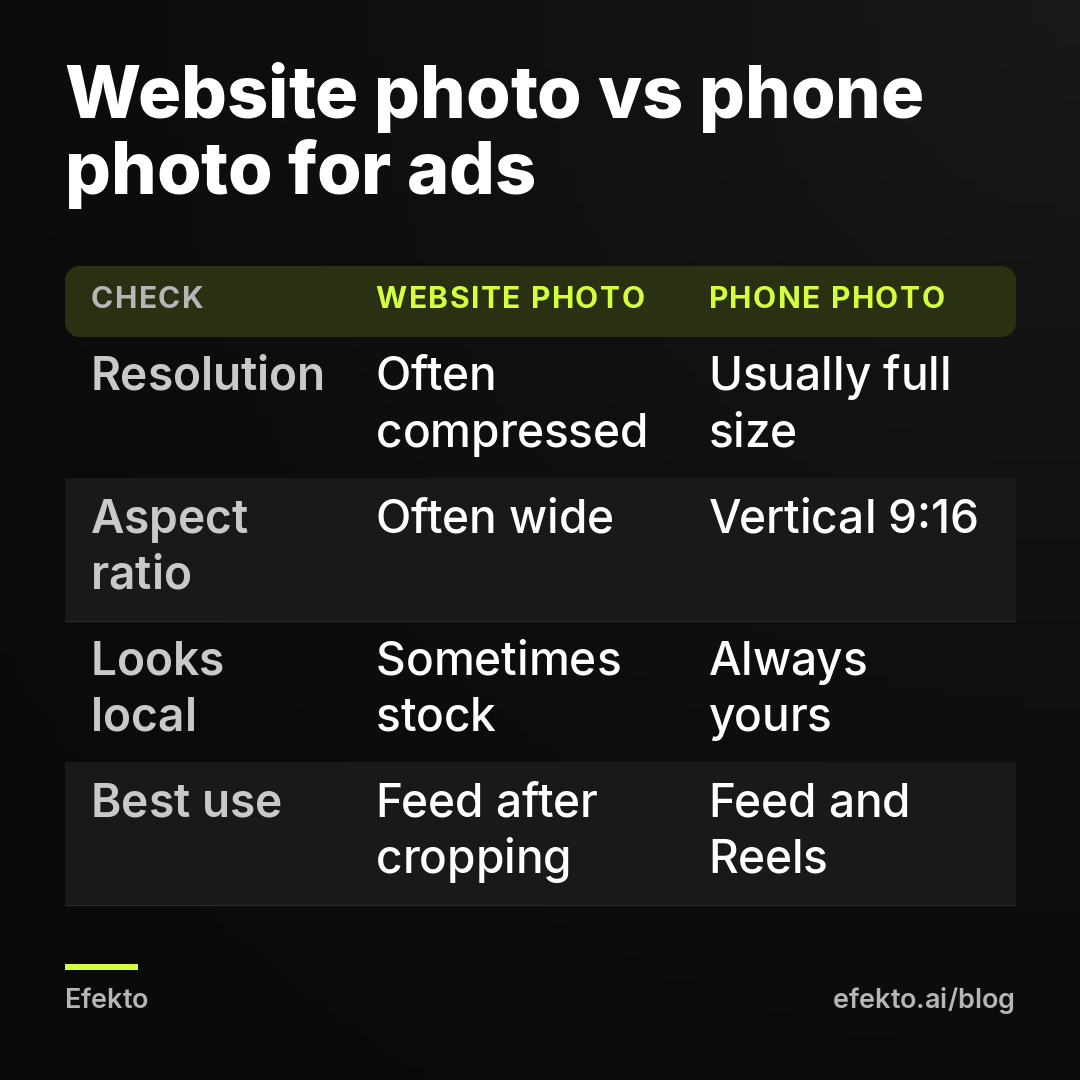
- Your website. Gallery pages, the "Our work" section, the About page and service pages. Right-click and save the largest version, or ask whoever built the site for the original files. Website images are often compressed to load fast, so a photo that looks fine on your homepage may be blurry at ad size. Anything narrower than 1080 pixels goes into a "maybe" pile.
- Your phone. Search your camera roll for the obvious: "car", "roof", "kitchen", "truck". Most phones also let you search by place, so typing your town name brings up job sites. Look back 12 to 18 months. Seasonal work matters too: snow photos for a winter campaign, AC units for June.
- Your crew's phones. Technicians take photos for the job file all the time. Ask them to send anything from the last six months. These are usually the most honest shots you'll find.
- Google Business Profile and customer messages. Customers sometimes post photos of finished jobs. Only use them with written permission, and never use a photo where a customer's face, license plate or house number is visible without asking first.
The goal of this step is volume. Aim for 30 to 60 candidates. Most of them won't make it, and that's fine.
Step 2: Which job photos make the best Facebook ads?
The best ad photos show one clear result that a stranger understands in under two seconds while scrolling. If a photo needs a caption to make sense, it's a weak ad photo.
Run every candidate through this checklist. A photo should pass at least four of the six:
- One subject. One car, one roof, one smile, one unit. Not a wide shot of a messy job site.
- The result is visible at thumbnail size. Shrink the photo on your screen to the size of a stamp. If you can still see what's good about it, keep it.
- Natural light. Daylight beats flash and garage fluorescents every time. Overcast days are ideal for exteriors because there are no harsh shadows.
- It looks local. A recognizable street type, your branded van, a house style typical for your area. People respond to "that looks like my neighborhood."
- No clutter. Trash cans, hoses, tools on the ground and other cars in the frame all pull the eye away.
- It's yours. Stock photos are the first thing we remove when we look at a new account. Homeowners can spot them, and they signal "this company doesn't have its own work to show."
Then sort the survivors into four groups, because each one does a different job in an ad account:
| Photo type | What it proves | Best for | How many to aim for |
|---|---|---|---|
| Finished result (single photo) | You do good work | Main Feed ads | 4 to 6 |
| Before and after | The size of the change | Feed, carousel | 2 to 4 pairs |
| Owner or crew with face visible | A real person shows up | Feed, Reels cover | 2 to 3 |
| Work in progress | You know the process | Video clips, Stories | 5 to 10 clips |
If one group is empty, that's your shooting list for the next two weeks. Most businesses we work with have plenty of finished results and almost no photos of themselves.
Step 3: How do you shoot before-and-after photos that people actually believe?
A believable before-and-after uses the same angle, the same distance and the same light in both shots. Change any of the three and people assume you staged it.
This is the most persuasive format for detailing, roofing, landscaping, pressure washing, painting and remodeling. It's also the easiest one to get wrong. Here's how to do it on a job:
- Mark your spot. Before you start work, pick where you're standing. Use a tile line on the floor, a fence post or a crack in the driveway as a reference. If you have a cheap phone tripod ($15 to $25 in most stores is enough), set it there.
- Shoot the "before" vertical, at chest height. Hold the phone straight, not tilted down. Take three shots so you have options.
- Note the time. Light changes a lot in two hours. If the job takes all day, the "after" shot will have different shadows. When you can, come back the next morning at the same time for the "after."
- Shoot the "after" from the same mark. Open the "before" photo on your phone and match the framing by eye. Some camera apps have a grid overlay. Turn it on and line up the horizon or roofline on the same grid line.
- Don't edit one more than the other. If you brighten the "after", brighten the "before" the same amount. Over-edited "after" shots are the main reason before-and-after ads read as fake.
To put them together, use a free collage layout in Canva or your phone's built-in editor. Side by side works for the 1:1 and 4:5 Feed sizes. Top and bottom works for 9:16 Reels and Stories. Add a small "BEFORE" and "AFTER" label in plain white or black text. Nothing else.
One exception matters a lot. For med spas, dental, weight loss and anything touching personal health or appearance, Meta's advertising policies restrict before-and-after images, and those ads get rejected often. If that's your business, read our guide on promoting med spa treatments without getting ads rejected before you shoot anything.
Step 4: Should the business owner's face be in the ad?
Yes, in at least one or two of your ads. The owner's face is the one thing no competitor can copy, and for a service where a stranger comes to someone's home, it answers the question "who's going to show up?"
Most owners resist this. They feel awkward on camera, or they think it looks unprofessional. We disagree. For a local service business, a slightly awkward owner standing next to their truck builds more trust than a perfect stock photo of a smiling model in a hard hat. People are hiring a person, not a logo.
How to shoot it without a photographer:
- Use the back camera, not the selfie camera. Hand the phone to someone on the crew. The back camera is much sharper.
- Stand in open shade. The shady side of a building or under a garage door gives soft, even light on the face. Direct midday sun makes people squint.
- Hold something real. A tool, a clipboard, a product you install. It gives your hands something to do and tells the viewer what you do.
- Wear what you wear on jobs. A branded shirt or jacket if you have one. A suit is wrong for an HVAC ad.
- Look at the lens and stop smiling for one shot. Take a few smiling and a few with a neutral, friendly face. Neutral often looks more confident in ads.
- Shoot both vertical and horizontal. Vertical becomes your Reels cover, horizontal can be cropped for the Feed.
A crew photo works too, especially for larger companies. Keep it to three or four people so faces stay visible at small sizes.
Step 5: What sizes and aspect ratios do Facebook and Instagram ads need?
Use 4:5 (1080 x 1350 pixels) for Feed images and videos, and 9:16 (1080 x 1920 pixels) for Reels and Stories. A 1:1 square (1080 x 1080) works everywhere as a fallback, but it wastes space in both places.
The practical rule we follow: shoot everything vertical on the phone, which gives you 9:16, then crop a 4:5 version from the middle. One photo, two files, every placement covered.
| Placement | Aspect ratio | Size in pixels | Notes |
|---|---|---|---|
| Facebook and Instagram Feed (image) | 4:5 | 1080 x 1350 | Takes up the most screen space in the Feed |
| Facebook and Instagram Feed (video) | 4:5 | 1080 x 1350 | Same as images; 1:1 also accepted |
| Reels | 9:16 | 1080 x 1920 | Keep text out of the top and bottom zones |
| Stories | 9:16 | 1080 x 1920 | Same file as Reels works |
| Right column, some Marketplace slots | 1:1 | 1080 x 1080 | Meta crops 4:5 to square in some placements, so keep the subject centered |
| Carousel cards | 1:1 | 1080 x 1080 | Each card is a separate image |
The safe zone on Reels and Stories is where most people mess up. The top of the screen has your account name and the bottom has the caption, buttons and the call-to-action. As a working rule, keep text and faces out of roughly the top 15% and the bottom 35% of a 9:16 frame. On a 1920-pixel-tall image that means nothing important above about 290 pixels from the top or below about 1250 pixels from the top. If your text sits at the bottom of the frame, it will be hidden behind the "Learn more" button.
File types: JPG or PNG for images, MP4 or MOV for video. Phone files are fine as they are. If Canva asks, export at the highest quality.
Step 6: How do you add text to an ad image without making it look like a flyer?
Put five to seven words on the image: the service, the place, and optionally the offer. Everything else belongs in the ad text above the image, not on it.
Meta no longer rejects images for having too much text the way it used to. Ads with a wall of text on the image still tend to look like flyers, though, and people scroll past flyers. The image's job is to stop the scroll. The words above and below it do the selling.
What works on the image:
- "Roof replacement in Plano. Free inspection."
- "Full interior detail. We come to you."
- "AC not cooling? Same-week repair in Tampa."
What doesn't:
- A list of eight services.
- Your phone number, address, website and hours all at once.
- "Quality. Integrity. Excellence." These words say nothing to a homeowner deciding in two seconds.
The offer itself deserves more thought than the font. If you're not sure what to put on the image, start with our guide on how to write a Facebook ad offer for a local service business, then come back and put the shortest version of it on the photo.
Practical settings in Canva or any phone editor:
- One font, bold, sans serif. Montserrat, Inter or Roboto are all free in Canva.
- Text size large enough to read on a phone at arm's length. On a 1080-pixel-wide image, headlines should be at least 70 to 90 pixels tall.
- White text with a soft dark shadow, or black text on a solid white strip. Never text directly on a busy part of the photo.
- Place it where the photo is calm. Sky, a blank wall, the driveway. Not across the car or the face.
- Logo small, in a corner, or not at all. Your Page name and profile picture already appear above every ad.
- Make two versions of each image: one with text, one with none. Clean photos sometimes win, especially before-and-after pairs. You won't know until both run.
Step 7: How do you record a simple Facebook ad video with your phone?
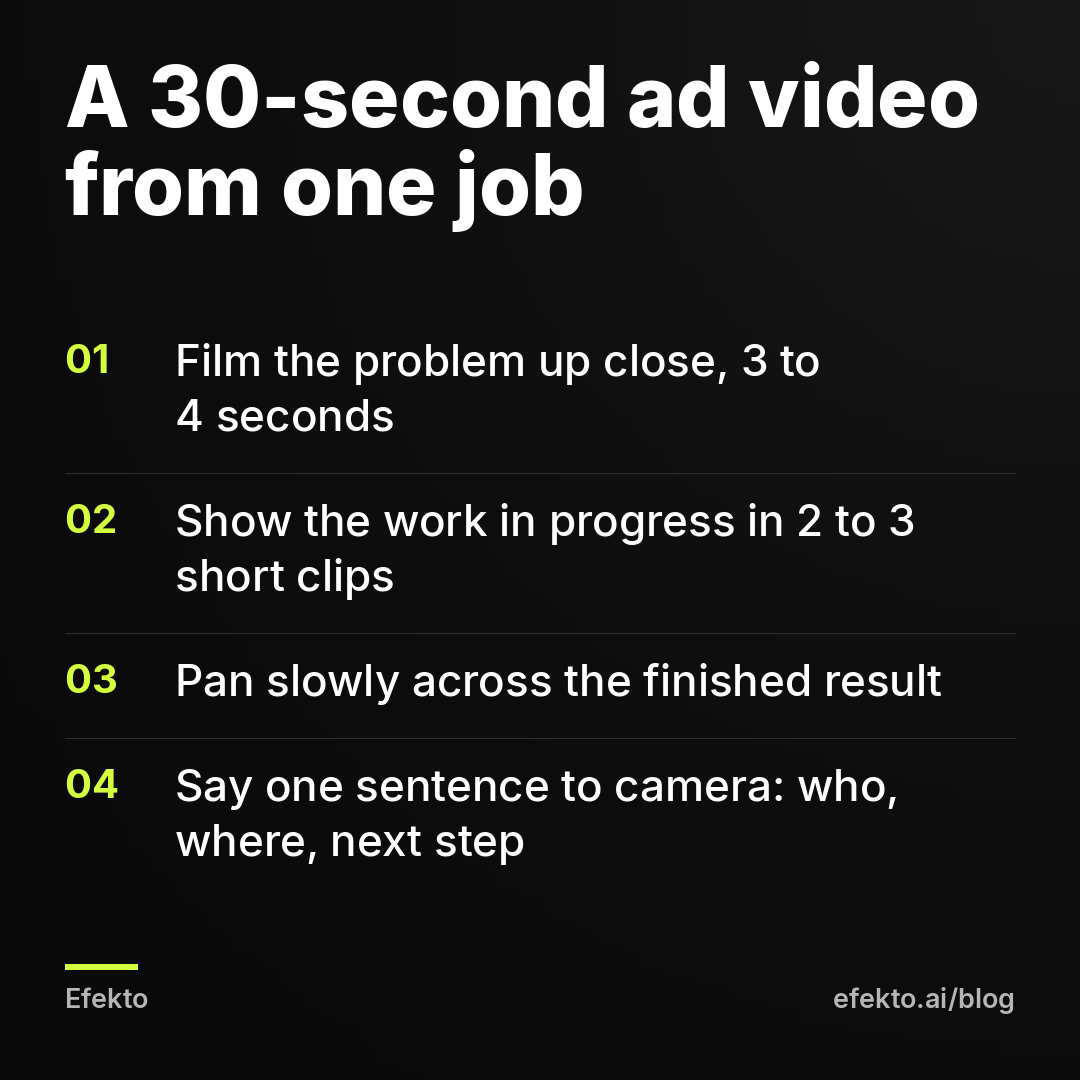
Record four to six short vertical clips on one job, three to six seconds each, and stitch them into a 20 to 30 second video with captions. That's it. No script memorization, no drone, no music licensing.
Video matters because Reels and Stories are mostly video placements. An account running images only leaves a big part of the inventory unused. It also doesn't need to look like a TV commercial. Phone video of a real job reads as more honest than a produced spot.
Here's the shot list we'd hand to any crew:
| Shot | Length | What to film | Tip |
|---|---|---|---|
| 1. The problem | 3 to 4 sec | The dirty seat, the damaged shingles, the dead unit | Start close, the first second decides if people keep watching |
| 2. You arriving | 2 to 3 sec | Van pulling up or you walking to the door | Shows a real company shows up |
| 3. Work in progress | 4 to 6 sec | Hands working, the tool in action | Two or three quick clips beat one long one |
| 4. The result | 4 to 5 sec | Slow pan across the finished job | Move the phone slowly, both hands |
| 5. Owner to camera | 5 to 8 sec | One sentence: who you are, where you work, what to do next | Look at the lens, speak like you would to a neighbor |
Recording settings:
- Vertical, always. Lock rotation on your phone before you start.
- 1080p at 30 frames per second is plenty. 4K files are huge and the quality gain disappears on a phone screen.
- Wipe the lens. A phone that lives in a work pocket has a smudged lens. This one habit fixes half of all "blurry" videos.
- Hold each shot two seconds longer than you think. You'll trim it later, but you can't add footage you didn't record.
- Audio: if you talk to camera, stand within an arm's length of the phone and away from running equipment. For everything else, plan for no sound.
Editing: CapCut, InShot or the built-in editor on iPhone and Android all do the job. Put the clips in order, cut each to length, and add auto-captions. Many people watch video ads with the sound off, so captions aren't optional. Put the captions in the middle third of the screen so they stay inside the Reels safe zone. Pick the frame with the best result as the cover image.
For the one sentence to camera, keep it plain. Something like: "I'm Mike, I run a detailing shop here in Mesa, and we come to your driveway. Tap below to get a price." Ten seconds, one take is fine, three takes is plenty.
Step 8: How many images and videos do you need to launch, and how do you know which ones work?
Start with five to eight different ads: three or four single images, one or two before-and-after pairs, and one or two videos. Then let them run long enough to get a real answer before you judge them.
"Different" is the important word. Three photos of the same car from slightly different angles are one ad, not three. Variety means different photo types from Step 2: a result, a before-and-after, the owner's face, a video.
Here is how the math usually plays out. For example, say a detailing business spends $20 per day on one campaign with six ads. Over 10 days that's $200. Meta doesn't split the budget evenly. Within a few days it pushes most of the spend toward one or two ads that get cheaper results. Say the before-and-after gets 9 leads at about $14 each, the owner video gets 4 leads at about $19, and the four other images split the remaining spend and bring 2 leads between them. Those are invented numbers to show the mechanism, not a result from any account.
What you do next:
- Keep the two ads that bring leads. Don't touch them while they're working.
- Turn off the ads with zero leads after they've spent roughly twice what you're willing to pay for a lead. In this example, if you'd pay up to $25 per lead, an ad that spent $50 with nothing to show for it is done.
- Make two new ads in the style that won. If the before-and-after won, shoot two more pairs on your next jobs. If the owner video won, record another with a different job.
- Repeat every two to three weeks. Even winning ads wear out as the same people see them again. We explain why and how to spot it in why Facebook ads stop working after two weeks.
That last step is where most owners stop. Making the first batch is fun. Making two new ads every two weeks for a year is the actual job. Build it into your routine: one before-and-after and one short clip per week from real jobs gives you a steady supply without a dedicated shoot.
When doesn't doing your own ad creative make sense?
Doing it yourself stops making sense when you don't have time to keep making new ads every couple of weeks, or when your real job photos are genuinely poor and can't be retaken.
A few honest cases:
- You have no finished work to show yet. A brand new business with no jobs done has no real photos, and stock images won't build trust. Do a few jobs at a discount for friends or neighbors in exchange for photos and a review, then start ads.
- Your work doesn't photograph well. Some services, like drain cleaning, pest control and electrical inspections, have results that are invisible or unpleasant. Lean on the owner's face, the van, the crew and a short to-camera video explaining what you check. A video of a person beats a photo of a pipe.
- You can't get through the editing. If the folder of 60 photos has been sitting on your desktop for a month, the honest answer is that this won't happen on your own. Hand it to a family member, a local freelancer, or a tool.
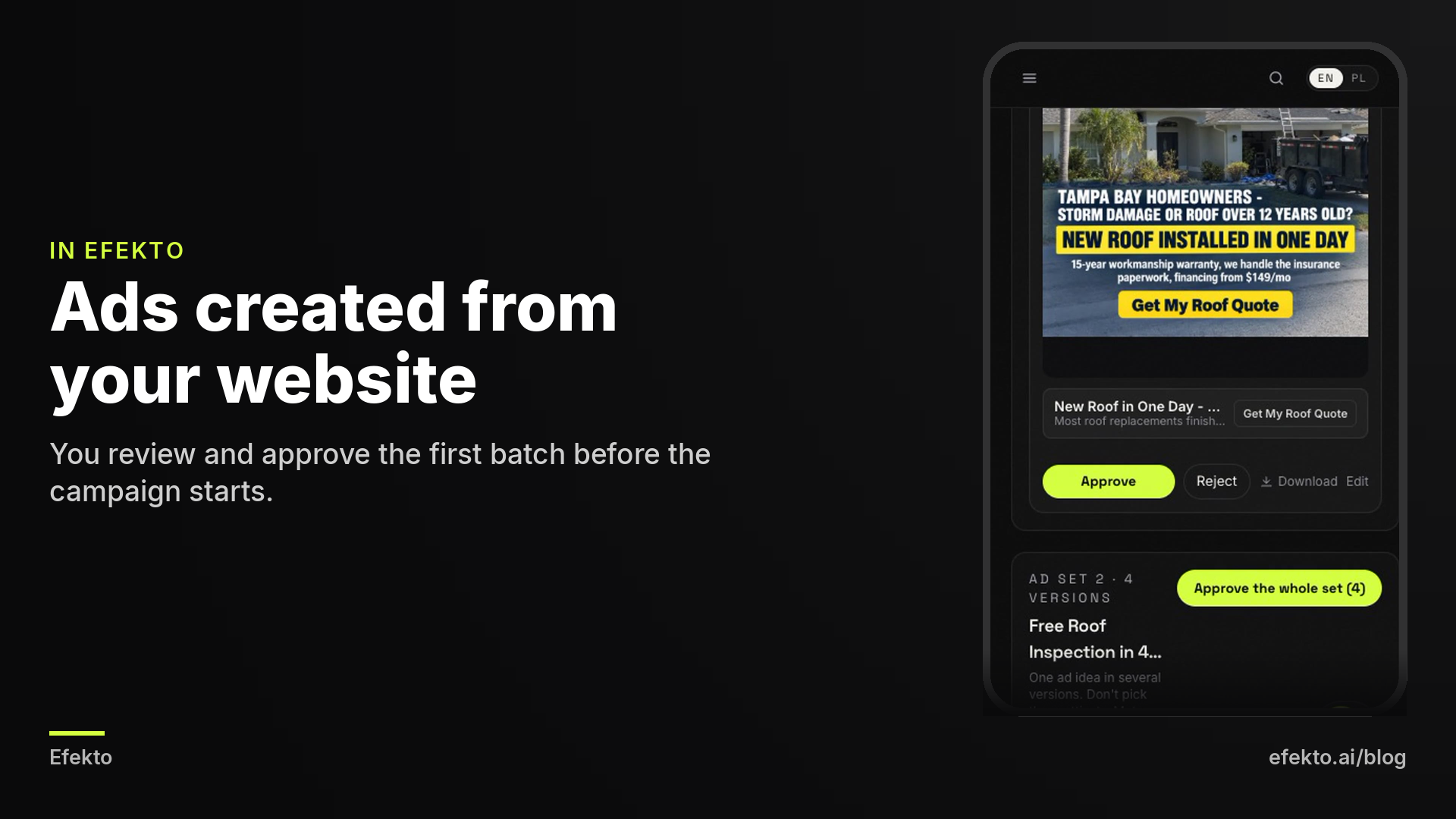
That third case is the one we built for. Efekto creates ads from your website, publishes them on Facebook and Instagram, and optimizes them every day: it turns off the ones that don't bring results and scales the ones that do. You approve the first batch before anything goes live, at least five approved ads before the campaign starts, so your own job photos and your offer stay in your hands. It doesn't replace the photos only you can take, and if you enjoy making ads and have the time to refresh them, you don't need it. If you want to see what it does with your site, here's how Efekto works. The team behind it has run lead generation campaigns for over 300 clients at Lemon Agency, and the steps in this guide are what we do by hand.
What are the most common mistakes with DIY Facebook ad images and videos?
The most common mistake is treating the first batch of ads as finished. The next most common is using images that don't look like they came from a real local business. Here's the full list we see when we audit accounts, with the fix for each:
- Using stock photos. Fix: replace every stock image with a real job photo, even an imperfect one.
- Square images in Reels. A 1:1 image in a 9:16 placement shows up with big blank bars. Fix: export a 9:16 version of every ad.
- Text hidden behind buttons. Fix: keep text in the middle of 9:16 frames and check a preview on your own phone before publishing.
- Too much text on the image. Fix: five to seven words on the image, details in the ad text.
- Over-edited "after" photos. Heavy filters, boosted saturation and a sky swap make the result look fake. Fix: edit both photos in a pair identically and lightly.
- Videos that start with a logo. The first second decides if people keep watching, and nobody stops for a logo. Fix: open with the problem or the result.
- No captions on video. Fix: auto-captions on every video, every time.
- Six ads that are really one ad. Fix: use different photo types, not different angles of the same shot.
- Judging ads after one day. Fix: wait until each ad has spent around twice your acceptable cost per lead before turning it off.
- Never refreshing. Fix: add two new ads every two to three weeks, built on whatever style won last round.
- Customer faces, plates or addresses without permission. Fix: ask in writing, or blur and crop them out.
FAQ
Can I use photos from my website for Facebook ads?
Yes, as long as they're your own photos and large enough. Check that they're at least 1080 pixels wide, because website images are often compressed. If they look soft when you zoom in, ask your web designer for the original files.
Is an iPhone or Android camera good enough for Facebook ads?
Any phone from the last four or five years is more than enough. Light and steady hands matter far more than the phone model. Shoot in daylight, wipe the lens and hold the phone with both hands.
Do Facebook ads with real people perform better than ads with just the work?
We can't promise a specific result, but in local service ads we consistently see that at least one ad with the owner's or crew's face is worth running. The only way to know for your business is to run a face ad next to a result-only ad and compare the cost per lead after both have spent enough.
How long should a Facebook or Instagram video ad be?
For a local service business, 15 to 30 seconds is a good target. Long enough to show the problem, the work and the result, and short enough that people watch to the end. Put the most important visual in the first two seconds.
Do I need music in my ad videos?
No. Many people watch with sound off, so captions do more work than music. If you add music, use the free tracks inside CapCut, Instagram or Meta's own audio library, not a song you don't have rights to.
If you'd rather have ads created from your website and then kept fresh every day, you can try it on efekto.ai.
- Jakub Zwoliński
Founder, Lemon Agency · Efekto · October 25, 2026