How to Read Your Facebook Ads Results in 10 Minutes a Week: The Numbers That Matter
Which Facebook Ads Manager columns to check each week (spend, leads, cost per lead, CTR, frequency) and how to turn them into booked jobs and revenue.

To read your Facebook ads results in 10 minutes a week, open Ads Manager on the same day each week, set the date range to the last 7 days, and look at five columns: amount spent, leads, cost per lead, link click-through rate (CTR) and frequency. Then do the step most owners skip. Compare the leads Facebook counted with the people who actually picked up the phone and booked a job. The five columns tell you whether the ads work as ads. Only your booking notes tell you whether they make you money.
In short:
- Five columns cover almost everything a small service business needs from Ads Manager: amount spent, leads, cost per lead, link CTR and frequency.
- The cost per lead Facebook shows is the cost of a form submission before anyone checked it, so your real cost per customer is always higher.
- The number that decides whether to keep spending is cost per booked job, and you calculate it yourself from a simple lead sheet.
Most owners we talk to fall into one of two habits. They ignore the ads for a month, or they open Ads Manager every day and change something every other day. Both cost money. The first lets a broken ad burn budget for weeks. The second resets Facebook's learning before any ad has had a fair chance. One fixed weekly check fixes both habits.
One disclosure. We make money when businesses advertise on Facebook and Instagram. Lemon Agency has managed more than $1M in ad spend for clients. So read our view with that in mind: if your booked-job math still does not work after a fair test, stop spending, no matter how good the cost per lead looks.
What do you need to set up once before the weekly check?
You need two things: a saved column view in Ads Manager and a lead sheet where you mark what happened to every lead. Without the second one, the weekly check is guesswork.
The column view takes about 5 minutes and you build it once (Step 1 below). The lead sheet can be a Google Sheet, a notebook, or the notes field in your booking software. It just needs to answer the same questions for every lead.
| Column in your lead sheet | What you write | Why it matters |
|---|---|---|
| Date | Day the lead came in | Lets you match leads to the week in Ads Manager |
| Name and phone | From the form | So you can tell duplicates and fake entries apart |
| Reached? | Yes / No | Separates real people from wrong numbers |
| Qualified? | Yes / No (in your area, needs your service) | Gives you the real cost per lead |
| Booked? | Yes / No | Gives you cost per booked job |
| Job value | Dollar amount of the job | Gives you revenue from ads |
Fill it in as leads arrive, not on Friday from memory. If leads come in through a Facebook instant form, download them from your Facebook Page (Meta Business Suite, under the leads section) or connect the form to your email or CRM. Facebook keeps them. It does not send them to you on its own unless you set that up.
Step 1: How do you set up Ads Manager so the numbers are in one place?
Build one saved column preset that holds only the numbers you need, and open it every week. Default views show 15+ columns, and most of them are noise for a local business.
Build the preset
- Open Ads Manager and click the Campaigns tab.
- Click the Columns dropdown (above the table, on the right), then Customize columns.
- Remove everything selected on the right side.
- Search for and tick: Amount spent, Results, Cost per result, CTR (link click-through rate), Frequency and Reach.
- Tick Save as preset, name it "Weekly check" and click Apply.
Set the date range
Click the date picker and choose Last 7 days. This range does not include today, which is what you want: today's numbers are incomplete and look worse than they are. Do the check on the same weekday every week, for example Monday morning, so each week compares cleanly with the last.
Check what "Results" means
In a lead form campaign, Results means leads. If your campaign was set up for traffic, engagement or post boosts, Results counts link clicks or likes instead. If that is your case, the rest of this guide still works, but the first fix is the campaign itself: clicks and likes do not book jobs.
Look at the Ad sets tab first for the totals, then the Ads tab to see which individual ads carry the results.
Step 2: Did you spend what you planned?
Compare amount spent with your daily budget times 7. Spend that is far off plan is the first sign something broke, and you will miss it if you only look at cost per lead.
Say your daily budget is $30. Over 7 days you should see roughly $210. Meta spends more on some days and less on others, but over a full week it should land close to that number.
What the gap usually means:
- Spend well below plan (for example $90 instead of $210): an ad was rejected, the payment method failed, the campaign was paused, or the audience is so narrow that Facebook cannot find enough people. Check the Delivery column and your notifications first.
- Spend at zero on some days: usually a payment problem or an ad stuck in review.
- Spend on plan: move on. This step takes 30 seconds when things are fine.
Do not raise the budget to "fix" low spend. If the ads cannot spend $30 a day, they will not spend $60.
Step 3: How many leads did you get, and what did each one really cost?
Read the Results and Cost per result columns, then correct them with your lead sheet. The number Facebook shows is the cost of a form submission. The number you care about is the cost of a real person in your area who wants your service.
Facebook counts a lead the moment someone submits the form. It does not know whether the phone number works, whether the person lives 60 miles away, or whether they filled it in by accident while scrolling. You do.
For example: you spent $210 this week. Ads Manager shows 8 leads at $26.25 each. In your lead sheet, 2 numbers did not work and 1 person was outside your service area. That leaves 5 real leads. Your real cost per lead is $210 / 5 = $42, not $26.25.
Both numbers are useful. The Facebook number tells you how the ads perform on Facebook and reacts fast when you change an ad. The verified number tells you what you actually pay for a conversation. Track both in your sheet, week by week. If the gap between them grows, your form is letting in junk, and the fix is in the form (more specific questions, a confirmation screen), not in the budget.
If you want a sense of what counts as a normal cost per lead for your trade, we wrote a separate guide on what a good cost per lead on Facebook looks like for a local business. Our short version: the benchmark that matters is your own job value, which Step 6 covers.
Step 4: What does CTR tell you about your ads?
Link CTR tells you what share of people who saw your ad clicked it. It is the best early signal of whether the image and the offer stop anyone mid-scroll.
If 1,000 people saw your ad and 12 clicked the link (or opened the form), link CTR is 1.2%. Use CTR (link click-through rate), not CTR (all). The "all" version also counts clicks on your Page name, on "See more" and on the image itself. It flatters the ad without telling you anything about intent.
Do not compare your CTR with numbers you find online. Compare it with your own ads over the last few weeks. For example: your ads ran at 1.2% link CTR for three weeks, and this week the same ads show 0.7%. People are scrolling past ads they used to stop for. That is usually fatigue (Step 5) or a seasonal dip in interest.
How to read CTR together with leads:
- Low CTR, few leads: the ad is the problem. Change the image, the first line or the offer.
- Good CTR, few leads: people are interested but drop off at the form or landing page. Shorten the form, check that the page loads on a phone, and make sure the ad promises the same thing the form asks for.
- Good CTR, many leads: leave it alone.
CTR alone pays nothing. We have seen plenty of ads with great CTR that brought curious people and no customers. Treat it as a diagnosis tool, not a goal.
Step 5: Is frequency telling you people see your ads too often?
Frequency is the average number of times each person saw your ads during the date range. For a local business with a small service area it climbs fast, and when it climbs together with cost per lead, your ads are wearing out.
Facebook calculates it as impressions divided by reach. If 4,000 people (reach) saw your ads 8,000 times (impressions), frequency is 2.0. In a big city with a broad audience it rises slowly. In a town of 30,000 with a 15-mile radius, the same budget shows the same ads to the same people again and again.
The exact number matters less than the direction. For example: three weeks ago frequency was 1.6 and cost per lead was $28. This week frequency is 3.4 and cost per lead is $45. The people in your area have seen the ads, the ones who were going to respond already did, and the rest have learned to ignore them.
The fix is new ads, not a new audience and not a bigger budget. A bigger budget in a small area pushes frequency up even faster. Add 2 or 3 new images or a short video with a different angle, and pause the oldest ads once the new ones get results. We explain the mechanism in more detail in our post on why Facebook ads stop working after two weeks.
Step 6: How do you turn leads into booked jobs and revenue?
Divide what you spent by the number of jobs you booked from those leads. That is your cost per booked job, and it is the only number that tells you whether to keep spending.
Here is a full example for one week, with every number made up for illustration. Say you run a home cleaning business, your daily budget is $30, and your average job is worth $450.
| Line | Example number | How you get it |
|---|---|---|
| Amount spent | $210 | Ads Manager, last 7 days |
| Leads (Facebook count) | 8 | Ads Manager, Results |
| Cost per lead (Facebook) | $26.25 | $210 / 8 |
| Real leads after checking | 5 | Lead sheet, "Qualified? Yes" |
| Real cost per lead | $42 | $210 / 5 |
| Booked jobs | 2 | Lead sheet, "Booked? Yes" |
| Cost per booked job | $105 | $210 / 2 |
| Revenue from booked jobs | $900 | 2 x $450 |
| Gross profit at 50% margin | $450 | $900 x 0.5 |
| Profit after ad spend | $240 | $450 - $210 |
In this example, $210 of ads turned into $240 of profit after paying for the ads, before counting repeat visits. That is a campaign worth keeping.
Work out your break-even point once
You only need two numbers you already know: your profit per job and the share of real leads you usually book.
For example: your profit on a $450 job at 50% margin is $225. That is the most you can pay for a booked job and still break even. If you book 1 out of every 3 real leads, the most you can pay per real lead is $225 / 3 = $75.
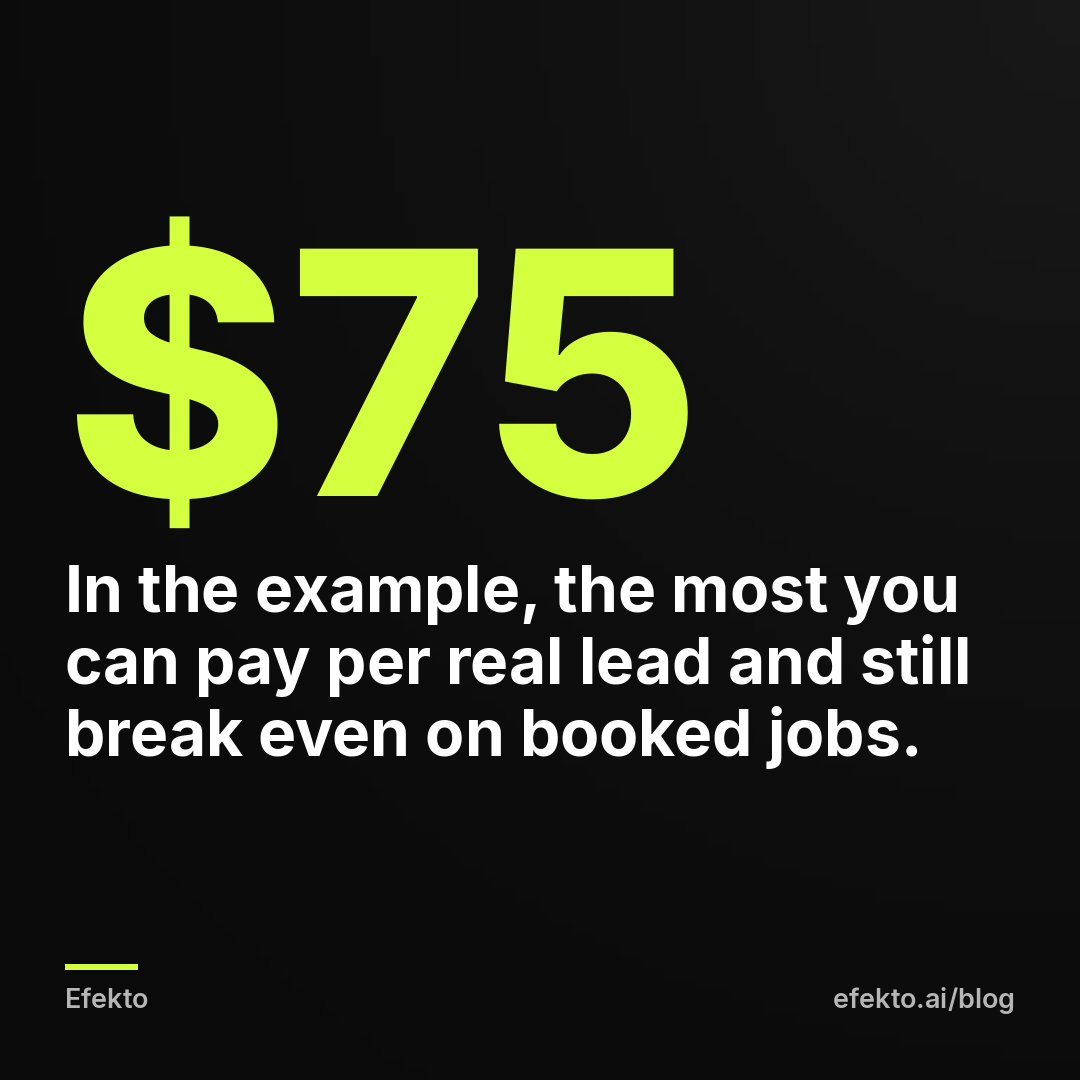
Write your own version of that number on a sticky note. Each week, compare your real cost per lead with it. Below it, you are making money. Above it for 3 or 4 weeks in a row, something has to change.
If you book far fewer leads than you expected, look at the phone before you look at the ads. A lead called back in 5 minutes and a lead called back the next day are not the same lead. We cover this in how to follow up on Facebook leads fast enough to book the job.
What should you change based on what you see?
Match what you see to one of a handful of patterns and make one change at a time. Changing the ad, the audience and the budget in the same week means you will never know which change worked.
| What you see | What it usually means | What to do this week |
|---|---|---|
| Spend far below plan | Ad rejected, payment issue or audience too narrow | Check notifications and delivery; widen the area if it is very small |
| Low link CTR, few leads | The ad does not stop people | Replace the image or first line; test a clearer offer |
| Good CTR, few leads | People drop off at the form or page | Shorten the form; match the form to the ad's promise |
| Many leads, few real ones | The form lets in junk | Add a qualifying question or a review screen to the form |
| Real leads, few bookings | Slow or missed follow-up | Call back within minutes; track missed calls |
| Frequency and cost per lead both rising | Ads are worn out in your area | Add 2 or 3 new ads; pause the oldest after the new ones run |
| Real cost per lead under break-even | It works | Change nothing; consider raising the budget by 20 to 30% |
The last row matters as much as the others. When it works, the hardest thing is to leave it alone. Every edit to a running ad set restarts part of Facebook's learning, and a good week followed by a "small tweak" is one of the most common ways we see owners break a working campaign.
What does the 10-minute routine look like, minute by minute?
It is five checks in a fixed order, and the order matters: spend first, then volume, then quality, then the ad signals, then the decision.
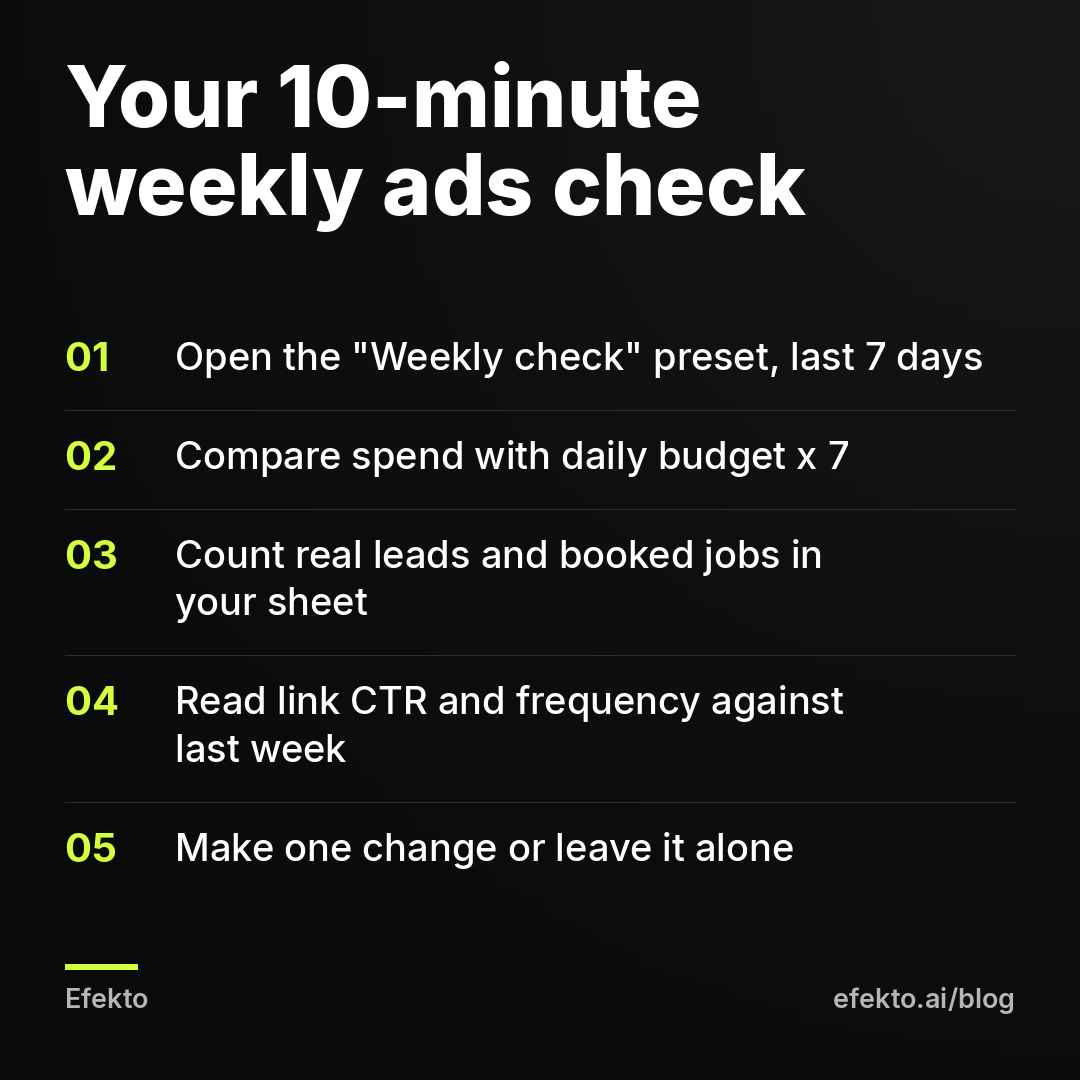
- Minutes 0 to 1: open Ads Manager, load the "Weekly check" preset, set Last 7 days.
- Minutes 1 to 2: compare amount spent with your daily budget times 7.
- Minutes 2 to 5: write the Facebook lead count in your sheet, next to the number of real leads and booked jobs for the same 7 days. Calculate real cost per lead and cost per booked job.
- Minutes 5 to 8: open the Ads tab. Note link CTR and frequency, and which 1 or 2 ads bring most of the leads. Compare with last week's row.
- Minutes 8 to 10: pick one action from the table above, or decide to change nothing. Write the decision in your sheet so you can see next week whether it helped.
After 4 to 6 weeks, that sheet becomes the most useful document you have about your marketing. It shows what a customer from Facebook costs you, which months are slow and which ads people respond to.
How long should you wait before judging the results?
Give a new campaign at least 7 days before you change anything, and judge small budgets over 3 to 4 weeks rather than one. A single week with few leads is mostly noise.
The first days of any campaign are the noisiest. Facebook is still testing who to show the ads to, and cost per lead often starts high and settles later. Owners who pause on day 3 never see where it would have settled.
Volume matters too. For example: at $15 a day and a cost per lead around $35, you get about 3 leads a week. One week with 1 lead and one with 5 is normal variation at that level, not a trend. With numbers that small, add up the last 3 or 4 weeks and judge the total. With a budget that brings 15 or 20 leads a week, one week already tells you something.
Seasons change the picture as well. An HVAC company in a mild month or a roofer after storm season will see costs rise no matter how good the ads are. Compare with the same weeks last year if you have them, not only with last week.
Where does Efekto fit, and when does it not make sense?
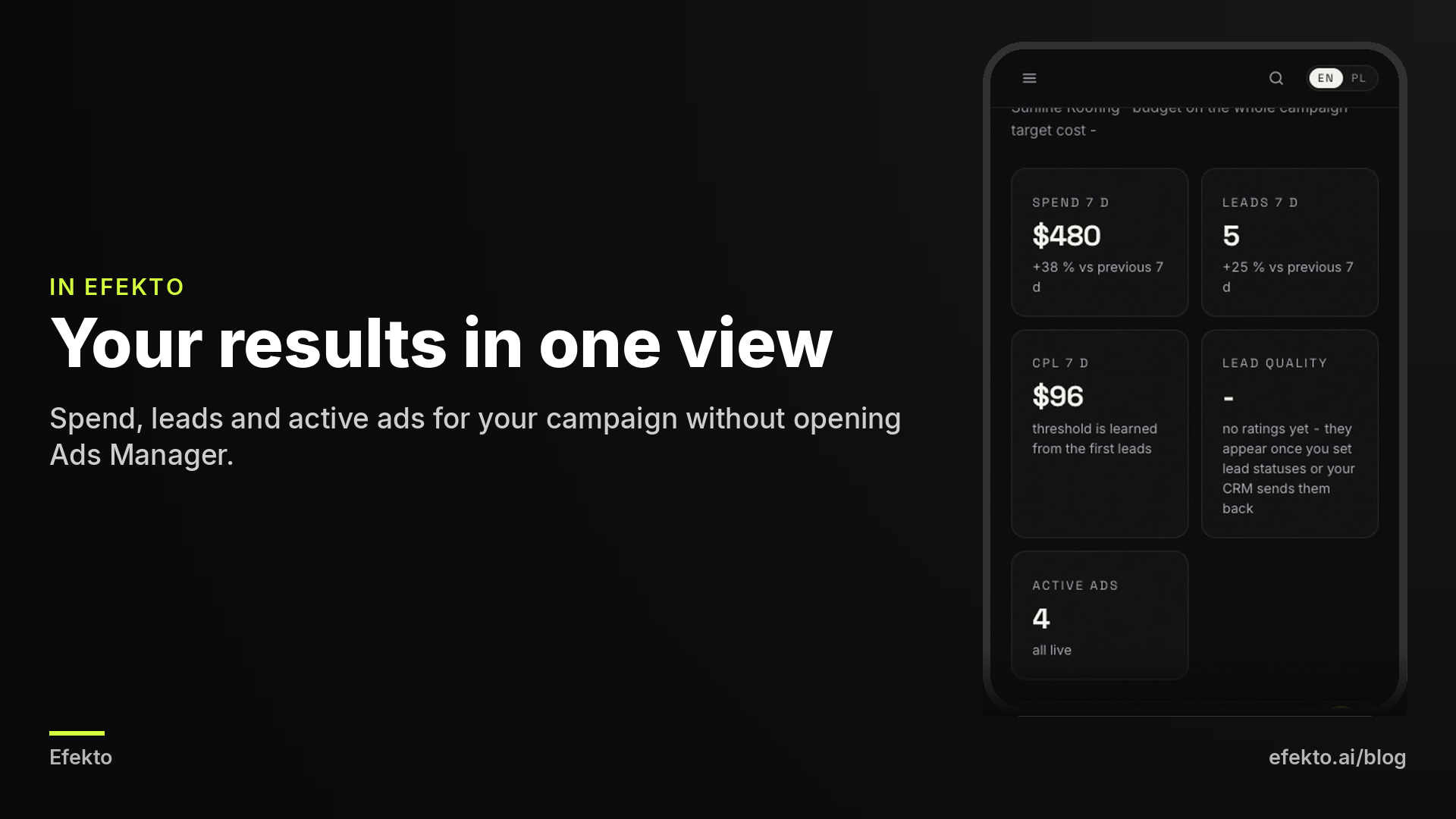
Efekto takes over the part of this routine that happens inside the ad account. Efekto creates ads from your website, publishes them, and optimizes them every day: it turns off the ones that don't bring results and scales the ones that do. That covers the work behind Steps 4 and 5, spotting ads that stopped working and replacing them, without you opening Ads Manager. You approve the first batch of ads (at least 5 before the campaign starts), and the minimum daily budget is $15. You can see the full flow on our page about how Efekto works.
It does not replace your lead sheet. No ad tool knows which caller booked a job and which one only asked for a price, so Step 6 stays with you whether you use Efekto, an agency or do it yourself. Efekto also makes little sense if you enjoy working in Ads Manager and already have time for it every week, or if your budget is below $15 a day. In that case, the routine above is enough, and you do not need to pay anyone to follow it.
What are the most common mistakes when reading Facebook ads results?
The most common mistake is treating Facebook's cost per lead as the cost of a customer. Here are the others we see most often, with the fix for each.
- Judging by Facebook's lead count alone. Fix: check every lead in your sheet and calculate real cost per lead and cost per booked job.
- Looking at "CTR (all)" instead of link CTR. Fix: use the link version in your preset; the "all" version counts clicks that are not interest in your offer.
- Checking daily and changing things daily. Fix: one check a week, one change a week, at least 7 days for anything new.
- Raising the budget when results drop. Fix: if frequency is rising, add new ads first; more budget in a small area only wears the ads out faster.
- Comparing your numbers with benchmarks from other trades or cities. Fix: compare with your own last 4 weeks and with your break-even number.
- Not downloading leads from Facebook. Fix: connect the form to email or a CRM, or download leads at least every day; a lead you see 3 days late is often already booked with someone else.
- Mixing different date ranges. Fix: the Ads Manager range and the lead sheet range must be the same 7 days, or the cost per booked job is wrong.
FAQ
What is a good CTR for Facebook ads for a local business?
There is no single good number, because CTR depends on the trade, the area and the ad format. Use your own ads as the benchmark: if link CTR drops noticeably compared with your last 3 or 4 weeks, the ad needs refreshing. A high CTR with no booked jobs is not a good result.
How often should I check my Facebook ads?
Once a week for the full review, on the same weekday. Check daily only that leads are arriving and that someone calls them back, not the ad numbers. Daily changes to the ads usually make results worse.
Why does Facebook show more leads than I actually received?
Usually the leads exist but sit in your Facebook Page's lead center because the form is not connected to your email or CRM. The rest are often duplicates or fake entries. Download the leads and compare them with your sheet.
Should I turn off an ad after one bad day?
No. One day of data on a small budget means almost nothing, and pausing restarts part of the learning. Look at the last 7 days, and with small budgets at the last 3 to 4 weeks.
What matters more, cost per lead or number of leads?
Neither on its own. A low cost per lead with no bookings is worse than a higher cost with steady bookings. Cost per booked job, compared with your profit per job, is the number that decides.
If you would rather keep the lead sheet and leave the ad account to an app that creates and optimizes your ads every day, you can try it at efekto.ai.
- Jakub Zwoliński
Founder, Lemon Agency · Efekto · October 25, 2026