How to Leave a Facebook Ads Agency Without Losing Your Ad Account and Data
A step-by-step checklist for leaving a Facebook ads agency: check who owns the ad account, pixel and Page, take back access, export your data and switch safely.

To leave a Facebook ads agency without losing anything, do it in this order. First, confirm that your own business portfolio owns the ad account, pixel, Facebook Page and Instagram account. Then get full admin access to each of them, put your own payment method on the ad account, and export your reports, leads and creative files. Remove the agency as a partner only after all of that is done. The order is the whole point. Meta generally does not move an ad account from one business portfolio to another. If the agency's portfolio owns the account and you cut ties first, the account's history and pixel data stay with them.
In short:
- Your business should own the ad account, pixel and Page, and an agency should only have partner access to them.
- Export reports, lead form data, customer lists and creative files before you announce you're leaving, not after.
- Make the switch early in the week, because on the accounts we run, weekends bring 32% of all lead form leads.
We have an interest on both sides of this. We run Lemon Agency, which has worked with more than 300 clients, and we build Efekto, an app that some businesses use instead of an agency. Our position is the same either way: the business owns its assets, and the agency borrows them. When an agency sets everything up inside its own portfolio, it's usually for speed, not bad faith. Fix it anyway, and fix it before the relationship ends, not after.
Step 1: Who owns your Facebook ad account, pixel and Page right now?
Whichever business portfolio is listed as the owner in Meta Business Settings owns the asset. A login, an invoice or a contract doesn't change that. Go to business.facebook.com/settings, or Meta Business Suite > Settings, and check every row below. If you have never logged in there, see our guide to setting up a Meta business account and ad account first.
| Asset | Where to check | What you want to see | Red flag |
|---|---|---|---|
| Business portfolio (formerly Business Manager) | Business info | It carries your business name and you have full control | You have no login, or only employee access |
| Ad account | Accounts > Ad accounts | Owned by your business, agency listed as partner | Account sits in the agency's portfolio and you only see it as shared |
| Pixel / dataset | Data sources > Datasets | Owned by your business, connected to your ad account | Owned by the agency and shared with you |
| Facebook Page | Accounts > Pages | Owned by your business, you are a full admin | Page sits in the agency's portfolio |
| Instagram account | Accounts > Instagram accounts | Connected to your business, you hold the password | Only the agency knows the password |
| Domain | Brand safety > Domains | Verified in your portfolio | Verified only in the agency's portfolio |
| Payment method | Billing & payments | Your card or your line of credit | Agency's card, ads billed only through their invoice |
| Custom audiences | Ads Manager > Audiences | Saved in your ad account | Saved only in an agency ad account |
How to read the 'Ad accounts' screen
Click each ad account and look at the detail panel. Your own account shows your business as the owner. If the agency is listed as a partner with access, that's the healthy setup. If you see the account only because it was shared with you by another business, the agency owns it. Write down the ad account ID (a long number) for every account. You'll need it in every conversation that follows.
Screenshot everything
Take screenshots of every screen in the table above. They take five minutes. They also settle any later argument about who owned what on the day you started the handover.
Step 2: How do you get full admin access before you give notice?
Ask the agency for full control of every asset you own, as a routine request, before any talk of ending the contract. Most agencies grant it the same day, because it's a normal request and many clients make it.
Here's what to ask for, word for word:
- Full control (admin) of the business portfolio for you and for one more person in your company, such as a co-owner or office manager. With two admins, one lost login or locked personal profile doesn't lock the business out.
- Full control of the ad account, not 'view performance' or 'advertise' only.
- Full control of the Page and the dataset (pixel).
- The Instagram password, or confirmation that the account is connected to your portfolio and that you can log in.
Then put your own payment method on the ad account under Billing & payments, and make it the primary one. This step is easy to forget, and it matters. If the agency's card is on the account and they remove it when the contract ends, every ad stops within hours. A stopped campaign doesn't cost you ad money. It costs you the leads you don't get and the days the campaign needs to relearn after it restarts.
Step 3: What should you download before you leave the agency?
Download everything you'd want to show the next person who runs your ads, while your access is still friendly and complete. Some data is only available for a limited time, and some lives in places you won't find again once the agency's tools are disconnected.
| What to save | How to get it | Why you need it |
|---|---|---|
| Performance reports | Ads Manager > Reports, lifetime date range, broken down by campaign, ad set and ad, exported as CSV | Shows which ads, audiences and offers actually brought leads |
| Ad text and headlines | Ads Manager > select all ads > Export (bulk export to spreadsheet) | Your best copy, ready to reuse |
| Lead form submissions | Meta Business Suite > Instant Forms library > Download, for every form | Contact details of people who already asked about your service |
| Lead form settings | Screenshots of every question, intro screen and thank-you screen | Lets you rebuild a working form in minutes |
| Creative source files | Ask the agency for the original images and videos, including versions without text | Ad previews are compressed and often cropped |
| Customer lists | The original files you or the agency uploaded | Custom audiences rarely move cleanly between accounts |
| Targeting setup | Screenshots of each active ad set: location radius, ages, exclusions | Saves you from guessing what worked |
| Integrations | A list of every tool that sends leads to your email, phone or CRM | When the agency disconnects its tools, leads can stop arriving silently |
| Invoices | Billing & payments > Payment activity, downloaded as PDF | Taxes and bookkeeping |
Download lead form data right away. Meta does not keep form submissions available for download forever. If the agency has been forwarding leads to you by email, assume the full history is only in the forms library and save it.
Customer lists deserve their own note. If your past customers were uploaded as an audience, keep the source file and re-upload it to your own account later. Our guide on uploading your customer list to Facebook Ads covers the file format and how to use the list once it's in.
Step 4: What if the agency owns the ad account or the pixel?
If the agency's portfolio owns the ad account, you most likely can't take it. Meta generally does not transfer ad account ownership between business portfolios. Plan on a new ad account inside your own portfolio. That's not a disaster. Here's what moves with you and what doesn't:
- Facebook Page: it can usually move. The agency removes the Page from its portfolio, and you claim it in yours. Followers, reviews and posts stay with the Page.
- Pixel / dataset: the agency can share it with your portfolio, but a shared pixel stays under their control. We'd install your own pixel on the website and run it next to the old one for at least two to three weeks before the switch, so it collects site visits and form events before your new campaigns rely on it.
- Custom audiences and lookalikes: rebuild them from your customer file and your new pixel.
- Ad history and learning: they stay in the old account. Your new campaigns start from zero, which means a few days of learning.
Here's how to think about the cost, in leads and days instead of dollars. For example: say the agency's account brings you 10 leads a week. If you stop it on Friday and your new account goes live 10 days later, you've missed roughly 14 leads, and the new campaigns still need a few days to settle. If you build the new account while the old one is still running and switch on a Monday, the gap shrinks to a day or two.
One hard rule. If the agency's ad account is restricted or disabled, don't open a new account to get around the restriction. Meta treats that as circumventing its systems and can ban the business permanently. Appeal the restriction, get your documents in order, and use another channel, such as Google, in the meantime.
When is the best day to switch your ads to the new account?
Switch on a Monday or Tuesday, and have the new campaigns verified and spending before Saturday. The reason is in the data.
From our accounts: Of 3,733 Meta lead form leads collected in the 90 days to Nov 8, 2026 on the accounts we run, the most came in on Sunday (19.2%), the fewest on Monday (12.6%), and Saturday plus Sunday brought 32% of all leads.
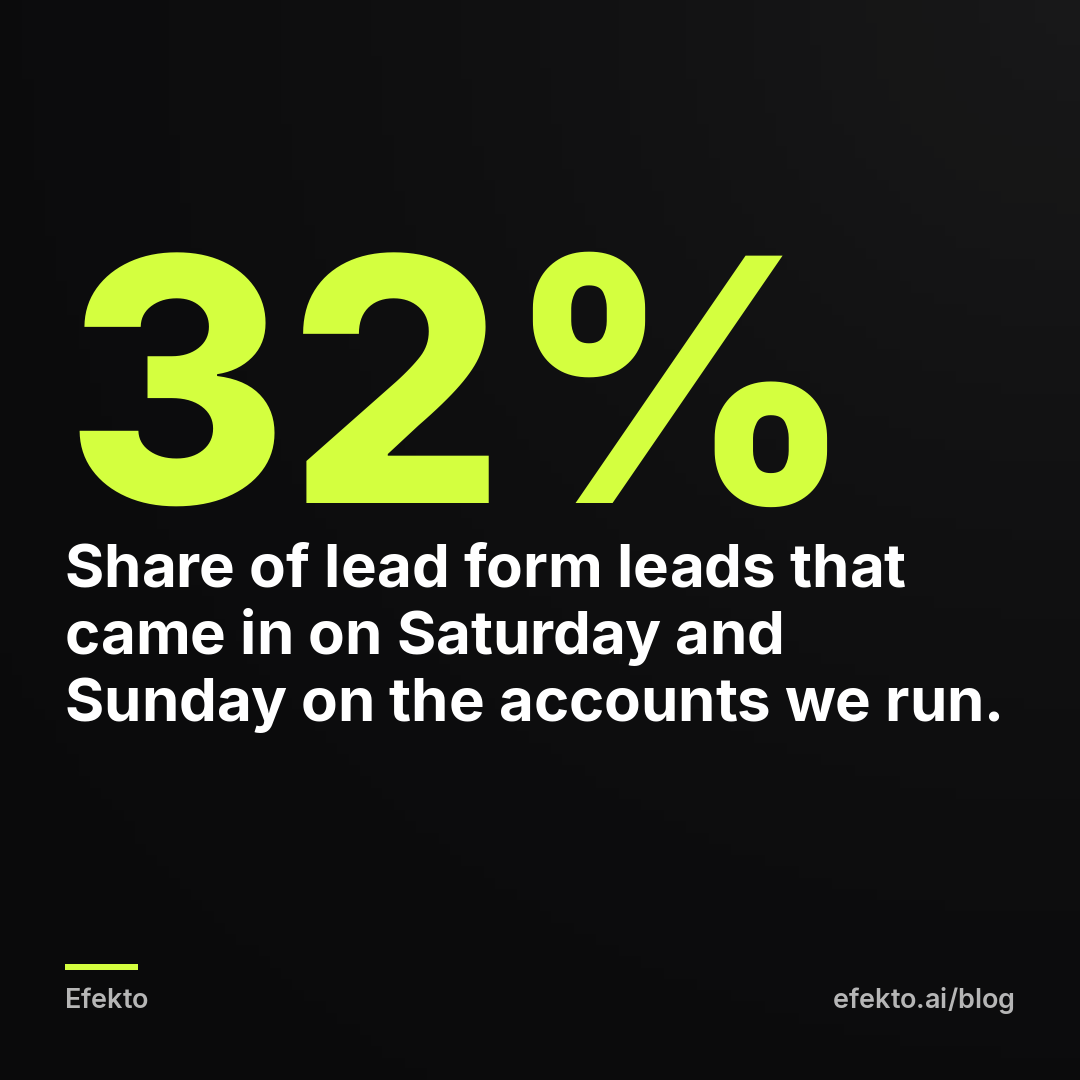
Here's what that means for a handover. The common instinct is to end things on a Friday, take the weekend, and start fresh on Monday. On these numbers, that's the worst timing. You'd switch off the old ads just before the two days that brought almost a third of the leads. Monday is the quietest day, so it's the cheapest day to have something go wrong.
Here's how we'd schedule it:
- Monday: new campaigns go live in your own account. The old ones keep running.
- Tuesday: send a test lead through every form. Check that it reaches your phone or inbox within minutes.
- Wednesday: if test leads arrive and the new ads are spending, pause the old campaigns.
- Thursday-Friday: remove the agency's access (Step 5).
- Saturday-Sunday: the new campaigns handle the busiest days with a working setup already behind them.
If you can't run both accounts at the same time, still go live on a Monday. Don't let your first weekend on the new account also be its first day.
Step 5: How do you remove the agency's access without breaking anything?
Remove the agency only after your payment method is on the account, your exports are saved and your new campaigns are delivering leads. Then work through Business Settings in this order.
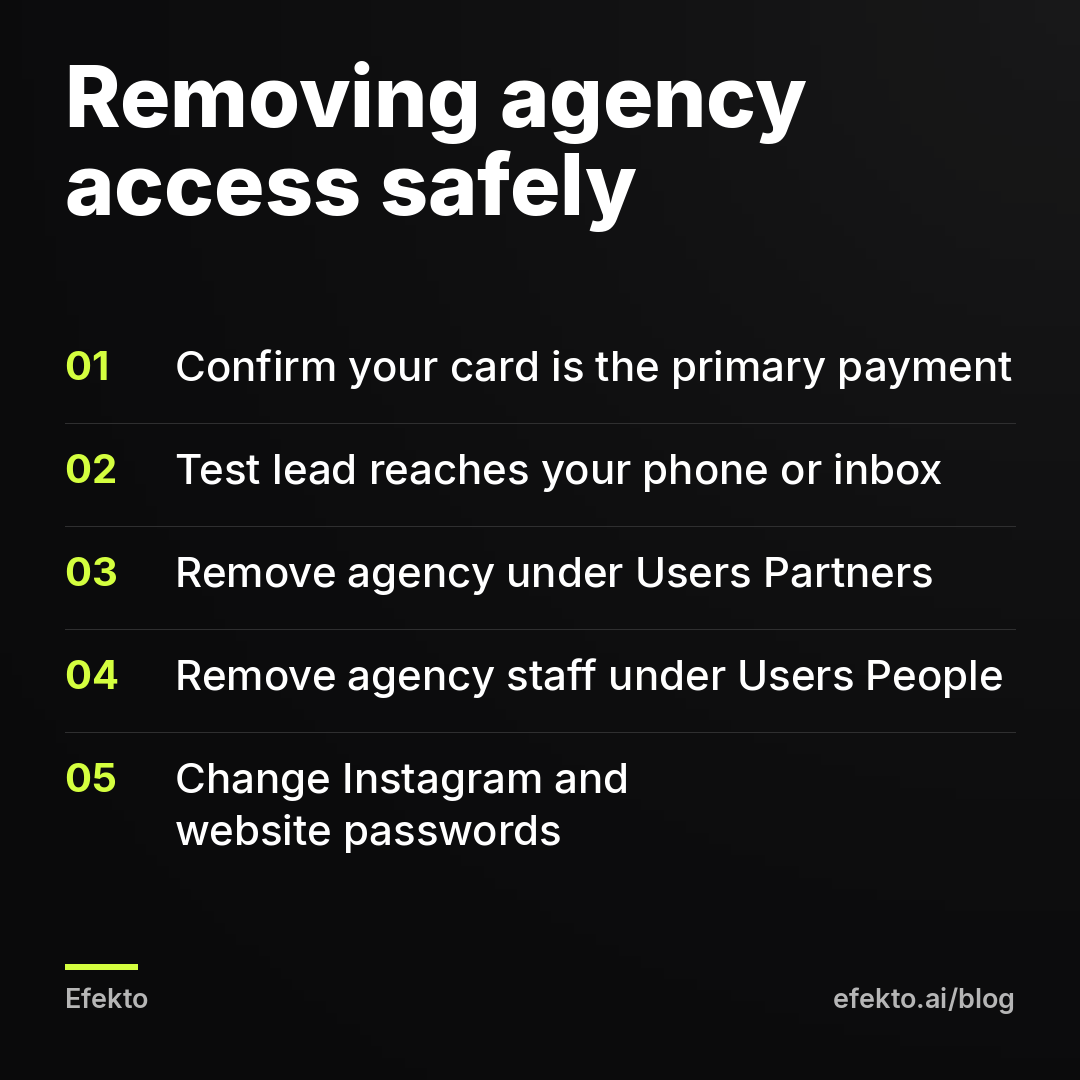
- Users > Partners: remove the agency's business from each asset you own. This removes all of their staff at once.
- Users > People: remove individual agency employees who were added directly to your portfolio.
- Users > System users: delete any system users the agency created for its tools.
- Integrations > Leads access: check which apps and CRMs can read your lead forms. Keep your own CRM. Remove tools you don't recognize, but only after you've confirmed that your own lead delivery works.
- Outside Meta: change the Instagram password, remove the agency from your website admin, Google Tag Manager, and any automation tool, such as Zapier, that forwards leads.
Then send the agency a short, polite email listing what you removed and asking them to confirm they hold no other access. Keep it factual. Most agencies handle offboarding all the time and will reply the same day.
Step 6: What should you do in the first two weeks after the handover?
Leave the new campaigns alone for the first 7 days, apart from checking that leads arrive. Every change to budget, audience or ads sends a campaign back into learning. In the first week, that's the most common way owners turn a smooth handover into a slow one.
A short checklist for days 1-14:
- Every morning, compare the leads shown in Ads Manager with the leads that actually reached you. If the numbers differ, fix delivery before anything else.
- Call every lead within the hour. On a fresh account, slow follow-up hides a working campaign.
- Keep the 3-5 ads that performed best in the agency's reports. Don't rewrite everything.
- On day 14, compare cost per lead and, more importantly, booked jobs per week with the agency's last month.
After that, you have three realistic options: run the ads yourself, hire another agency, or use an app. If you hire another agency, insist on partner access to assets owned by your portfolio from day one. If you'd rather not hire anyone, Efekto is one option. It connects to your own Facebook ad account, so the account and pixel stay yours, and it creates ads from your website, publishes them, and optimizes them every day: it turns off the ones that don't bring results and scales the ones that do. You approve the first batch (at least 5 ads) before anything goes live. The minimum budget is $15 per day, plans start at $149 per month, and the 7-day free trial counts from your first campaign launch, with no card at sign-up. It's not a fit if you need someone on the phone shaping your offer every week, or if your budget is below $15 a day. In those cases, a person is the better hire. More on that trade-off is on our page about using Efekto instead of an agency.
What are the most common mistakes when leaving a Facebook ads agency?
The expensive mistakes are almost always about order, not about the agency.
- Giving notice before checking ownership. Once the relationship is tense, simple requests take longer. Do Step 1 quietly, as a routine check.
- Leaving the agency's card on the account. Ads stop the day the card is removed. Put yours on first.
- Removing the partner before exporting. Lost lead history doesn't come back. Export first.
- Forgetting where leads are routed. If the agency's tool was forwarding leads to your inbox, removing it stops delivery, while Ads Manager still shows new leads. Send a test lead after every change.
- Rebuilding everything at once. New account, new ads, new audiences and a new offer in the same week means you can't tell what broke. Reuse the winners from the old reports.
- Opening a new account to escape a restricted one. That can lead to a permanent ban. Appeal instead.
- Switching on a Friday. On the accounts we run, the weekend brings 32% of leads. Go live early in the week.
From now on, we'd treat ownership as a day-one item, not an offboarding item. If you sign with anyone new, an agency or a tool, check Business Settings in the first week, make sure your portfolio owns everything, and keep the screenshots.
FAQ
Can an agency keep my Facebook Page after I leave?
If the agency added your Page to its own portfolio, it controls the Page until it removes it, but the Page is still your business's public profile. Ask in writing for the Page to be released so you can claim it in your portfolio. Followers, posts and reviews stay with the Page when it moves.
Will I lose my data if I create a new pixel?
The old pixel's history stays where it is, and the new pixel starts empty. That's why we recommend installing your own pixel on your website two to three weeks before the switch. By launch day it already has visits and form events to work with.
Can I transfer an ad account from the agency's Business Manager to mine?
In most cases, no. Meta generally doesn't move ad account ownership between business portfolios. The practical route is a new ad account in your own portfolio, using the reports, ads and customer lists you exported.
Should I just keep using the agency's ad account as a partner?
It works for a while, but you're building results on an asset you don't control, and the agency can remove your access at any time. We'd move to your own account during a calm week, rather than being forced to move on someone else's schedule.
Do I need to tell the agency before removing their access?
Check your contract for the notice period and any terms about who owns creative files, and follow them. Practically, ask for full access and your source files before you give notice, then remove access after your new campaigns are delivering leads.
If you'd like your ads running on an account you own from day one, you can see how it works at efekto.ai.
- Jakub Zwoliński
Founder, Lemon Agency · Efekto · November 13, 2026