How to Upload Your Customer List to Facebook Ads and Use It the Right Way
Prepare a customer list file Meta can match, upload it in Ads Manager, and use it for three jobs: excluding current customers, repeat sales and seasonal offers.

To upload your customer list to Facebook Ads, export your customers' emails and phone numbers into a CSV file. Format the file the way Meta expects, then add it in Ads Manager under Audiences > Create audience > Custom audience > Customer list. The upload is the easy part. The list pays off when you use it for three jobs: keeping current customers out of ads meant for new ones, bringing past customers back, and sending seasonal offers to people who already know your work.
We make money running ads on Meta, with more than 300 clients at Lemon Agency since 2022, so we have every reason to sell you another campaign. Even so, the first thing we'd build from a customer list is an exclusion. A new campaign comes after that.
1. Where do you export a customer list from?
Export it from the system where you invoice or book jobs. Contact forms are the wrong source because they include people who never paid you. For most local service businesses that means QuickBooks, Jobber, Housecall Pro, Square, ServiceTitan, your email tool, or a spreadsheet you have kept for years.
Pull these fields if you have them:
- phone number
- first name and last name
- ZIP code, city, state
- date of the last job
- type of service (for example AC tune-up, full detail, cleaning and exam)
The last two don't go to Facebook. You use them in step 4 to split the list into segments.
When it makes sense: you have years of paying customers sitting in a system, and you have never done anything with them except send invoices.
When it doesn't: your whole customer history fits on one or two pages. A list that small won't reach the size Meta needs to deliver ads (more on that in step 6). Use the alternatives listed there instead.
2. Are you allowed to upload your customers to Facebook?
Usually yes, if these are people who gave you their contact details while doing business with you. When you upload, Meta asks you to accept its Custom Audience terms. Accepting means you confirm you have the right to use that data for advertising. Read those terms once. Don't click through them.
Our rules for what goes into the file:
- Only your own customers. No purchased lists, no scraped contacts, no leads you bought from a lead vendor, no partner's contest entries. Using data you have no right to is how ad accounts get restricted, and we won't help anyone do it.
- Check your privacy policy. It should say you may use contact information for marketing, including advertising on social platforms. If it doesn't, fix the policy before you upload.
- Remove people who asked not to be contacted. The law may not strictly require this for ads, but a person who unsubscribed and then sees your ad on Instagram will be annoyed with good reason.
- Healthcare is different. Patient lists may count as protected health information under HIPAA. That covers dental offices, med spas, chiropractors and physical therapists. Talk to whoever handles your compliance before you upload anything. Many practices decide to skip customer lists and use other audiences.
Here's a simple test. If you would be embarrassed explaining to a customer how they ended up seeing your ad, leave them off the list.
3. How do you format the file so Facebook can match it?
Save a CSV (UTF-8) with one row per customer and one column per identifier. Meta matches your rows to Facebook and Instagram accounts. Every extra identifier you include gives it another chance to find the person.
| Field | Column header | Format | Example |
|---|---|---|---|
| lowercase, no spaces | jane.doe@gmail.com | ||
| Phone | phone | digits only, with country code 1 | 15125550147 |
| First name | fn | plain text | jane |
| Last name | ln | plain text | doe |
| ZIP code | zip | 5 digits | 78704 |
| City | ct | plain text | austin |
| State | st | 2-letter code | tx |
| Country | country | 2-letter code | us |
Three problems ruin most files we see:
- Excel breaks phone numbers. It converts long numbers to formats like 1.51E+10 and drops leading zeros in ZIP codes. Set those columns to Text before you paste data in, then open the CSV in a text editor to check it.
- Business emails match poorly. People sign up for Facebook with personal addresses. If a customer gave you an office email, the phone number is what will find them, so keep both.
- Duplicates and junk rows. Remove test entries, your own staff, and rows that only say "cash customer".
You can add a second email or phone column for customers who gave you two. Ads Manager will let you map each one.
4. Should you upload one list or several?
Upload several lists, but only as many as your customer count supports. Each segment serves a different job, and you can't split one uploaded audience by service later inside Ads Manager.
The split we'd make for a typical local service business:
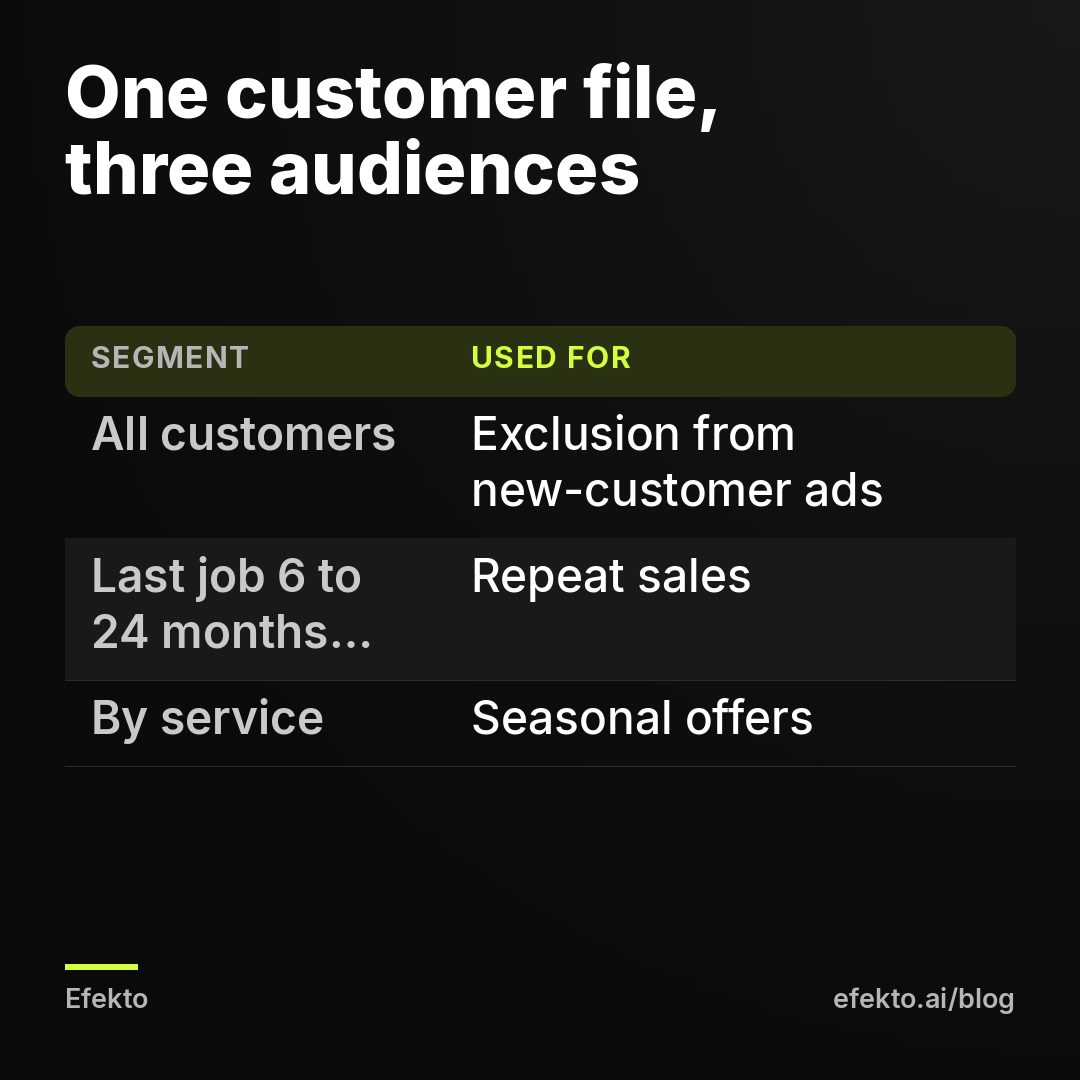
- All customers ever. Used for exclusion. This one should be as large as possible.
- Customers whose last job was 6 to 24 months ago. Used for repeat sales.
- Customers by service. Used for seasonal offers. An HVAC company would upload AC tune-up customers separately from furnace customers. A detailer would upload ceramic coating customers separately from wash-and-wax customers.
When it doesn't make sense: splitting a modest list into five tiny pieces. Each piece falls under the minimum size and none of them deliver. If your list is small, upload it once and change the ad, not the audience.
5. How do you upload the list in Ads Manager?
You create a Custom Audience from a file. The steps:
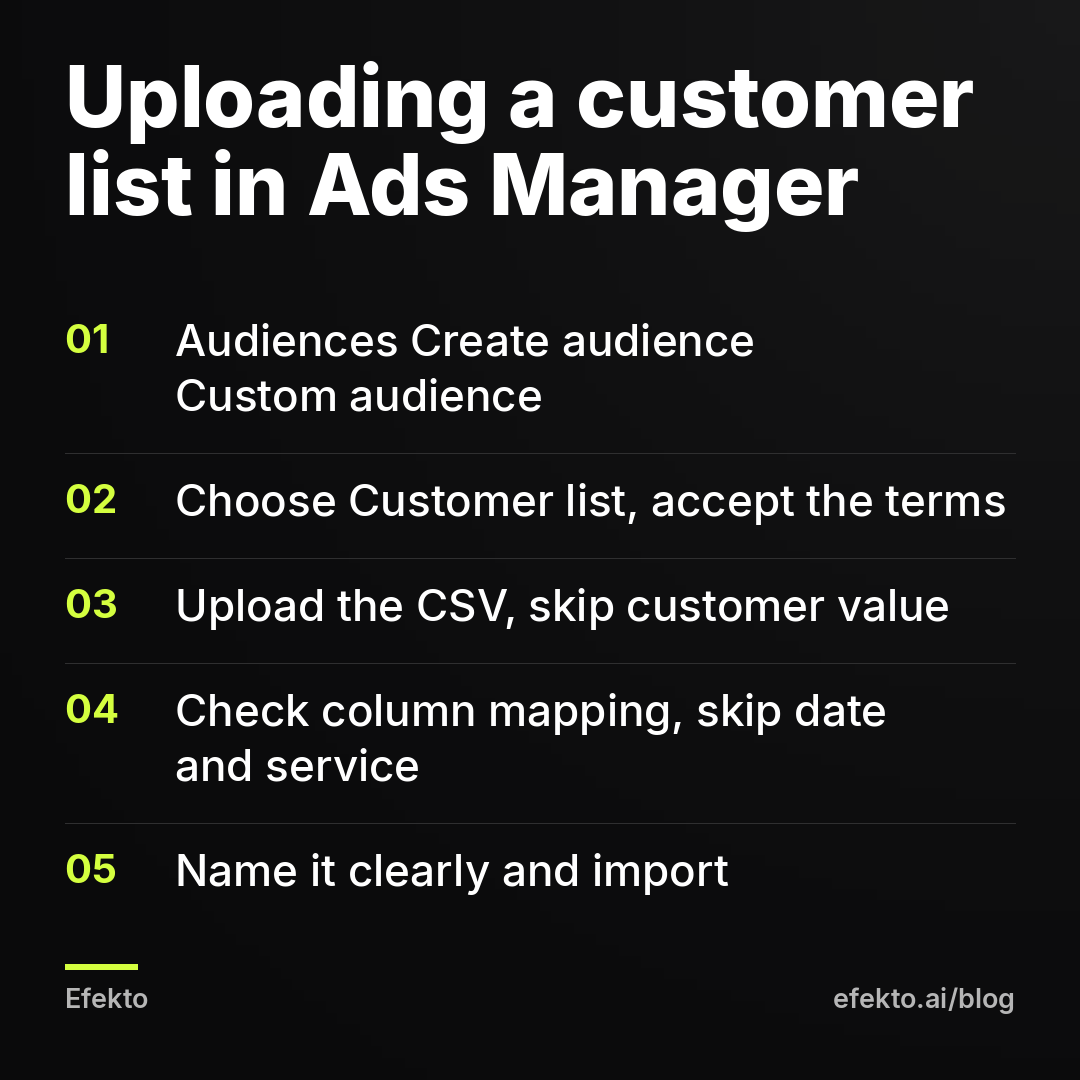
- Open Ads Manager, go to Audiences (in the main menu under All tools), and click Create audience > Custom audience.
- Choose Customer list as the source and accept the Custom Audience terms if asked.
- Upload your CSV. When asked about a customer value column, choose no. You don't need it for these three uses.
- Check the column mapping. Ads Manager guesses which column is email, phone and so on. Fix anything marked as unrecognized, and set your date and service columns to "Do not upload".
- Name the audience so you can tell it apart six months from now, for example "Customers ALL 2026-11" or "Customers AC tune-up 2026-11".
- Click Import and create. The audience shows as populating for a while before you can use it.
Ads Manager hashes the identifiers in your browser before sending them. Meta receives scrambled versions it uses for matching, not a readable spreadsheet of your customers.
6. How big does the list need to be, and what if yours is too small?
It needs to be big enough that Meta will deliver to the matched part of it. Meta doesn't use your row count. It counts how many rows it actually matched to accounts. Expect a noticeable share of your rows not to match: people who use a different email, people with no account, outdated phone numbers. If the matched audience is below Meta's minimum, Ads Manager flags it as too small and ad sets aimed at it won't spend. Meta changes the exact threshold and the way it reports sizes, so check the warning in your own account rather than trusting a number from a blog.
For example: say you upload 800 rows and Meta matches about half. You now have roughly 400 people to work with. That's an illustration, not a benchmark.
To raise the match:
- include phone, first name, last name and ZIP next to every email
- prefer personal emails over business ones
- add customers from older systems you stopped using
If it's still too small, here is what we'd do instead. For repeat sales, retarget people who visited your site or engaged with your Facebook page and Instagram profile; our guide to retargeting website visitors on a small local budget covers that setup. For exclusions, a small list still helps, because an exclusion doesn't need to deliver anything. It only has to remove people.
We're leaving lookalike audiences out of this guide on purpose. Whether they still help a local business is a separate question, and we answer it in what a lookalike audience is and whether it still works locally.
7. Use 1: How do you keep current customers out of ads meant for new ones?
Exclude the "all customers" audience in every ad set whose goal is new business. Meta's delivery system looks for people likely to respond. Your existing customers already follow your page, already click your posts, and already know your name, so they are the easiest people for it to find. They fill out your lead form to reschedule an appointment or ask about an invoice, and Ads Manager counts that as a new lead you paid for.
For example: say you spend $30 a day and one in eight leads turns out to be someone already on your books. That's roughly $3.75 a day, or about $112 a month, spent reaching people who would have called you anyway. The ratio is made up. The leak is real. You won't see it until you compare lead names with your customer list, and our guide on tracking which Facebook leads turned into paid jobs without a CRM shows a simple way to do that comparison.
To set it up, open the ad set, go to the audience section, find the Exclude option for custom audiences, and pick your customer list. Do it in every new-customer ad set, including ones you create later.
When it makes sense: always for campaigns aimed at new customers. That's most lead campaigns for roofing, HVAC, detailing, dental and home services.
When it doesn't: in campaigns built for existing customers, such as a maintenance plan offer or a second service. Also skip it if your business sells something that existing customers buy again on their own schedule and you want those repeat buyers too. Even then, we'd rather reach them in a separate campaign with its own message.
The tool we build works on the new-customer side of this. Efekto creates ads from your website, publishes them, and optimizes them every day: it turns off the ones that don't bring results and scales the ones that do. It can run on your own Facebook ad account, so any audiences you upload there stay in the same account. Everything in this guide can be done by hand in Ads Manager with or without it. If you want to see what the app does day to day, here's how Efekto works.
8. Use 2: How do you bring past customers back with Facebook ads?
Run a small, separate campaign to customers whose last job was 6 to 24 months ago. Give them a specific offer with a price and a deadline. "We miss you" is not an offer. "Interior refresh for returning customers, $149, book by March 31" is.
For example: say you run $15 a day for 14 days to that segment, $210 in total. Six returning customers book a $180 service, which brings in $1,080. You would have reached some of them with an email for free, which is why we treat this as an addition to email, not a replacement. The ad catches the people who never open your emails.
How we'd set it up:
- Audience: only the 6 to 24 month segment, with no extra interest targeting. The list is the targeting.
- Ad: a photo of your actual work, the price, the deadline and one button. Write "returning customers get..." rather than lines that sound like you're watching them. For health-related businesses, Meta's personal attributes rules also limit what the ad can imply about the person seeing it.
- Budget and length: small and short. The audience is limited, so a big budget just shows the same ad to the same people over and over. If frequency keeps climbing and nobody books, stop the campaign.
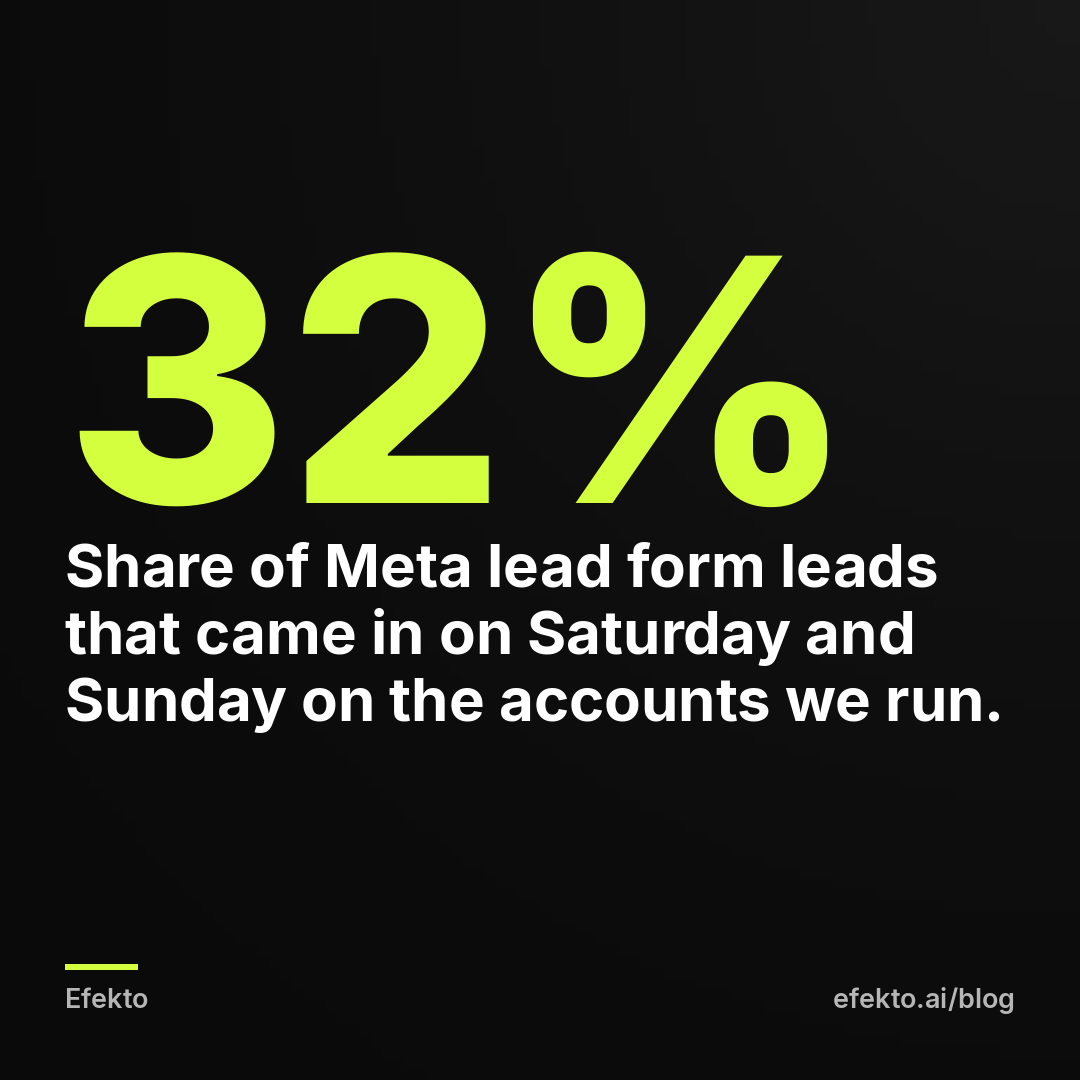
From our accounts: Of 3,733 Meta lead form leads collected in the 90 days to Nov 8, 2026 on the accounts we run, the most came in on Sunday (19.2%) and the fewest on Monday (12.6%). Saturday plus Sunday brought 32% of all leads. For a reactivation campaign, that means two things. Don't schedule the ads for weekdays only, and make sure someone answers weekend leads by Monday morning at the latest. A returning customer who filled out your form on Sunday and hears nothing until Wednesday will book with whoever answers first.
When it doesn't make sense: one-time purchases with long cycles. A homeowner who replaced their roof last year won't buy another one. For roofing, use the list for exclusion and possibly for a gutter or inspection offer, and skip a general "come back" campaign.
9. Use 3: How do you run seasonal offers to past customers?
Upload a segment by service and run a short campaign 2 to 4 weeks before the season starts. The point is to fill your calendar early, not to give away margin during peak weeks.
Examples of how we'd time it:
- HVAC: AC tune-up customers in early spring, furnace customers in early fall.
- Detailing: ceramic coating and undercarriage customers before road salt season.
- Lawn care and landscaping: last season's customers before spring, with a season contract instead of a single visit.
- Gutter cleaning, pressure washing, pest control: last year's customers just before your busy months.
For example: say you have 40 open slots in the three weeks before your peak. You offer them to last year's tune-up customers at your regular price with a "book early, pick your time" angle, and 12 of them book. Those 12 jobs now sit on otherwise slow days, and your peak weeks stay open for new customers who pay full price.
Our position on discounts: if your peak season is already full, a seasonal discount to past customers just moves money from your pocket to theirs. Offer priority scheduling, not a lower price. Save discounts for the weeks you actually struggle to fill.
When it doesn't make sense: when you can't handle more work in that window, or when your service isn't seasonal at all. In that case the repeat-sales campaign from step 8 does the same job.
10. How do you keep the list useful, and which mistakes waste it?
Refresh it on a schedule. A list uploaded once and forgotten slowly turns into an exclusion that misses every customer you won since then. In Ads Manager you can open an existing customer list audience and add new customers or replace the whole list, which keeps the same audience in your ad sets. We'd do it monthly if you book many jobs, quarterly if you book few.
The mistakes we see most often:
- Mixing leads with customers. People who filled out a form but never paid belong in a separate list. If they sit in "all customers", your exclusion removes prospects you still want to reach.
- Using the list as the only targeting for new-customer campaigns. A list of people who already bought from you can't bring you new people.
- Uploading the file Excel broke. Scientific-notation phone numbers match nothing. Check the CSV in a text editor first.
- Uploading contacts you have no right to use. Bought lists and vendor leads put your whole ad account at risk for a few extra rows.
- Too many tiny segments. Five audiences under the minimum means five ad sets that never spend.
- Personal-sounding ad copy. "We noticed you haven't been in" feels creepy and may break Meta's rules. "Returning customers get..." does the same job.
- Forgetting the exclusion in new ad sets. Every time you duplicate or create an ad set, check that the customer list is still excluded.
Summary: three uses of one customer list
| Use | Who is in the audience | When it makes sense | When it doesn't | Budget approach |
|---|---|---|---|---|
| Exclusion | All customers ever | Every campaign aimed at new customers | Campaigns built for existing customers | No budget, it only removes people |
| Repeat sales | Last job 6 to 24 months ago | Services people buy again (detailing, cleaning, maintenance) | One-time, long-cycle purchases like roof replacement | Small and short, stop when frequency climbs with no bookings |
| Seasonal offers | Customers of one service | 2 to 4 weeks before your season | Calendar already full, or a non-seasonal service | Short burst, priority over discounts |
If we set this up for a local service business tomorrow, here's what we'd do. The exclusion would go in the same day, before anything else. We'd build one reactivation campaign with a priced offer, schedule the list refresh on the calendar, and wait until the season to add anything more. Most businesses do it the other way around: they launch a "remarketing" campaign to their customers and never exclude them from the ads meant for strangers.
FAQ
Does Facebook get to see my customers' emails and phone numbers?
Ads Manager hashes the identifiers in your browser before uploading, so Meta receives scrambled values used for matching, not your readable spreadsheet. You also can't see which individual people from your list matched or saw your ad.
How long does it take before I can use an uploaded customer list?
The audience shows as populating after upload, and it is usually ready the same day. If it still isn't ready after a day, check the audience for an error message, which usually points to a formatting problem in the file.
Can I upload people who filled out my lead form but never bought?
Yes, as long as they gave you their details through your own form, but upload them as a separate audience. Don't put them in your customer list. Keeping them apart lets you exclude buyers without excluding prospects.
Is a customer list worth it if I only have a small number of customers?
As an exclusion, yes, because an exclusion works even when the audience is too small to advertise to. For repeat sales or seasonal offers, a small list usually won't deliver, so retargeting website visitors and page engagers is the better route.
If you'd rather have the new-customer side of your Facebook and Instagram ads created and optimized for you, you can start a 7-day free trial at efekto.ai.
- Jakub Zwoliński
Founder, Lemon Agency · Efekto · November 12, 2026