Why Facebook Ads Bring Leads From Outside Your Service Area
Leads from towns you don't serve usually come from five settings. These include the default 'living in or recently in' option, Advantage+ audience, a wide radius, Audience Network, and a form that never asks for a ZIP code. Here is how to check and fix each one.

From our accounts: Of the 33 brands that launched a campaign in Efekto in the 180 days to Nov 1, 2026, 20 have already received a lead. The median time from launch to the first lead was 11.2 hours, and 14 of them got one within 24 hours.
Those figures cover how fast leads arrive, not where they come from. Still, they set the timing for this problem. If your location settings leak, you will know on day one, often before you have even opened Ads Manager again. That is why the first thing we would check on a new campaign is not the cost per lead. It is the ZIP code of the first three leads. A lead from 60 miles away in the first 24 hours is not bad luck. It is a setting telling on itself early.
First, the default location option shows your ads to people who were recently in your area, not only to people who live there. Second, Advantage+ audience widens everything except the map. Third, a radius drawn around a city center covers towns you don't serve. Fourth, cheap placements like Audience Network collect quick form fills from anywhere. Fifth, your lead form never asks where the job is. All five can be checked in about 15 minutes, and most can be fixed in the same sitting.
The default location setting counts visitors as locals
When you add a location to an ad set, Meta's default is 'People living in or recently in this location'. For a restaurant or a hotel, that makes sense. For a roofer, a med spa or an HVAC company, it means your budget also goes to commuters who work in your county but live two counties over. It goes to people who drove in for a football game, and to tourists checking their phone at a gas station.
We make money when businesses run ads on Meta, and Lemon Agency has run lead generation campaigns for 300+ clients. We still think this default favors Meta's volume over your fit. A wider pool makes delivery easier and cost per lead lower, and the cost of that lower number lands on your phone.
How to check: open the ad set, go to the Audience section and click into Locations. Look at the dropdown just above or below the map. If it reads 'People living in or recently in this location', you have found your most likely leak.
How to fix: switch it to 'People living in this location'. Meta works out where someone lives from their profile and from where their devices usually spend the night. It is not perfect, but it is much tighter than 'recently in'.
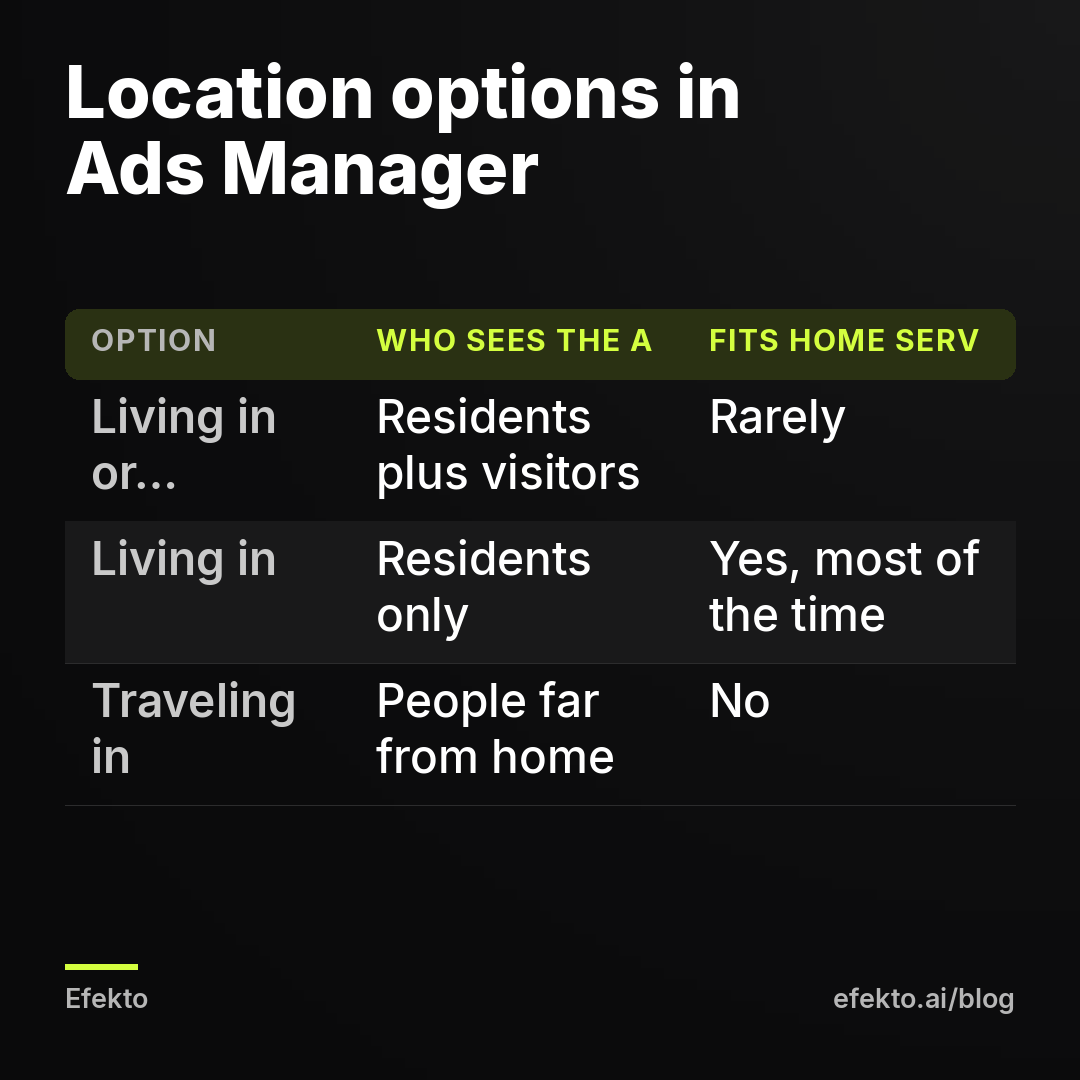
The only home service businesses that should keep 'recently in' are mobile services that work where people are. Examples are a mobile detailer working office parks, or a mobile IV service at events. Even then, we'd run that as a separate ad set so you can see what it costs on its own.
Advantage+ audience widens everything except the map you draw
Advantage+ audience treats your age range and interests as suggestions, not limits. Your location stays a hard limit: Meta will not show the ad to someone in Ohio if your map covers Dallas. The problem is that on some accounts, the 'People living in this location' choice is harder to find once Advantage+ audience is on. Owners then leave the default without knowing a choice existed.
How to check: in the ad set, see whether the audience section says 'Advantage+ audience' at the top. Then look for the location dropdown under the audience controls. If you cannot find the 'living in' option, switch to 'Use original audience options'. Set the location type there, then decide whether to turn Advantage+ back on.
How to fix: our recommendation for a local service business on a small budget is this. Keep Advantage+ audience on for age and interests, because a $20-a-day ad set does not have the volume to beat Meta's guessing. Set the location type by hand, though. We cover the rest of this setting in what Advantage+ does and whether a small business should turn it on.
A radius around a city center covers towns you don't serve
Typing 'Austin' into the location box gives you the city plus a 25-mile radius by default in many accounts. That radius does not care about rivers, county lines, toll roads or the fact that your crew won't drive past a certain exit. A 25-mile circle covers roughly 1,960 square miles. Your real service area is rarely a circle.
How to check: zoom out on the map in the ad set and compare the shaded area with the list of towns you actually quote. Then run a breakdown on the ad set: Breakdown, then By Delivery, then Region or DMA region. If spend shows up in a region you never work in, the circle is too big.
How to fix: pick one of these, in order of precision:
- Enter ZIP codes one by one. It is tedious for 40 ZIPs, but it is the tightest map you can get.
- Drop a pin on your shop or on the middle of your real service area and set the radius by hand, for example 12 miles instead of 25.
- Keep the radius and add exclusions. In the Locations field, switch from 'Include' to 'Exclude' and add the towns or ZIPs on the far side of the river.
One exception: if your ads fall under a Special Ad Category such as housing, Meta sets a minimum 15-mile radius and does not allow ZIP targeting. In that case the map cannot be tightened, and the lead form has to do the filtering. We explain who falls under these rules in what a Special Ad Category is and which local businesses need one.
Cheap placements bring cheap form fills from anywhere
Audience Network is Meta's network of third-party apps and sites, mostly mobile games and utility apps. Ads there are cheap, and taps there are often accidental. Instant forms prefill name, email and phone from the profile, so an accidental tap followed by an accidental 'Submit' produces a lead. It does not have to be a real person who wants a quote.
How to check: Breakdown, then By Delivery, then Placement. Look at the share of leads from Audience Network and compare the answer rate on those leads with the rest. If you can't call them back because the number is wrong or nobody remembers filling in a form, that placement is the source.
How to fix: in the ad set, switch from Advantage+ placements to manual placements. Untick Audience Network. Keep Facebook and Instagram feeds, Stories and Reels. Your cost per lead in Ads Manager will probably go up. That is fine, because the number you are paying for changes from 'form fills' to 'people who can be reached'.
Your lead form never asks where the job is
This is the fix most owners skip, and it is the one that works even when every targeting setting is perfect. Targeting decides who sees the ad. The form decides who gets through. A form that asks only for name, phone and email lets everyone through.
How to fix: add one question to the instant form. We'd set it up like this:
- Question: 'What is the ZIP code of the job address?' Use a short-answer custom question, not the prefilled ZIP field. The prefilled field pulls from the profile, people submit it without looking, and it may be years out of date.
- Or, if your area is a short list of towns: a multiple-choice question 'Where is the job?' with your 5 to 8 towns plus 'Somewhere else'. Multiple choice takes one tap and is harder to skip past.
- Form type: choose 'Higher intent'. It adds a review screen before submitting, which cuts the accidental leads from the previous section.
- Intro text: state the area in plain words: 'We serve Plano, Frisco, Allen and McKinney.'
Notice the wording: the job address, not 'where do you live'. That difference matters more than it looks, and the next section explains why.
Every extra question lowers the number of leads. One location question is a trade worth making. Five questions are not. If you send leads to a landing page instead of an instant form, the same logic applies to the page's form. We compare the two routes in lead form vs landing page for a local service business.
Some out-of-area leads are real customers
Before you start deleting leads, look at who they are. A homeowner who lives in Chicago but owns a lake house in your county is a real customer. So is an adult son in Denver booking a furnace tune-up for his mother in your town, and a landlord managing three rentals from another state. Meta sees where the person lives. You care where the job is.
This is why we push 'job address ZIP' in the form and why we don't recommend auto-rejecting every lead with an out-of-area phone area code. Area codes follow people for decades. A 312 number can belong to someone who moved to your suburb in 2015.
Sort out-of-area leads into three piles: the job is in your area (call it), the job is outside but close enough to quote at a travel fee (decide case by case), and the job is clearly out of reach (send a polite one-line text and close it). The third pile is the one that tells you which setting leaked.
Out-of-area leads make your cost per lead look better than it is
The cost per lead in Ads Manager is the cost of a form submission before anyone has checked it. Out-of-area leads count in that number exactly like good ones. A campaign that leaks location usually shows a lower cost per lead than a tight one. The owner then concludes the leaky campaign is the better one.
For example, say you spend $30 a day for 30 days:
| Line | Example figure |
|---|---|
| Monthly spend | $900 |
| Leads in Ads Manager | 30 |
| Cost per lead according to Meta | $30.00 |
| Leads with a job outside your area | 9 |
| Leads you can actually serve | 21 |
| Cost per lead you can serve | $42.86 |
| Leads you reach by phone (say 15 of 21) | 15 |
| Jobs booked (say 6 of 15) | 6 |
| Cost per booked job | $150.00 |
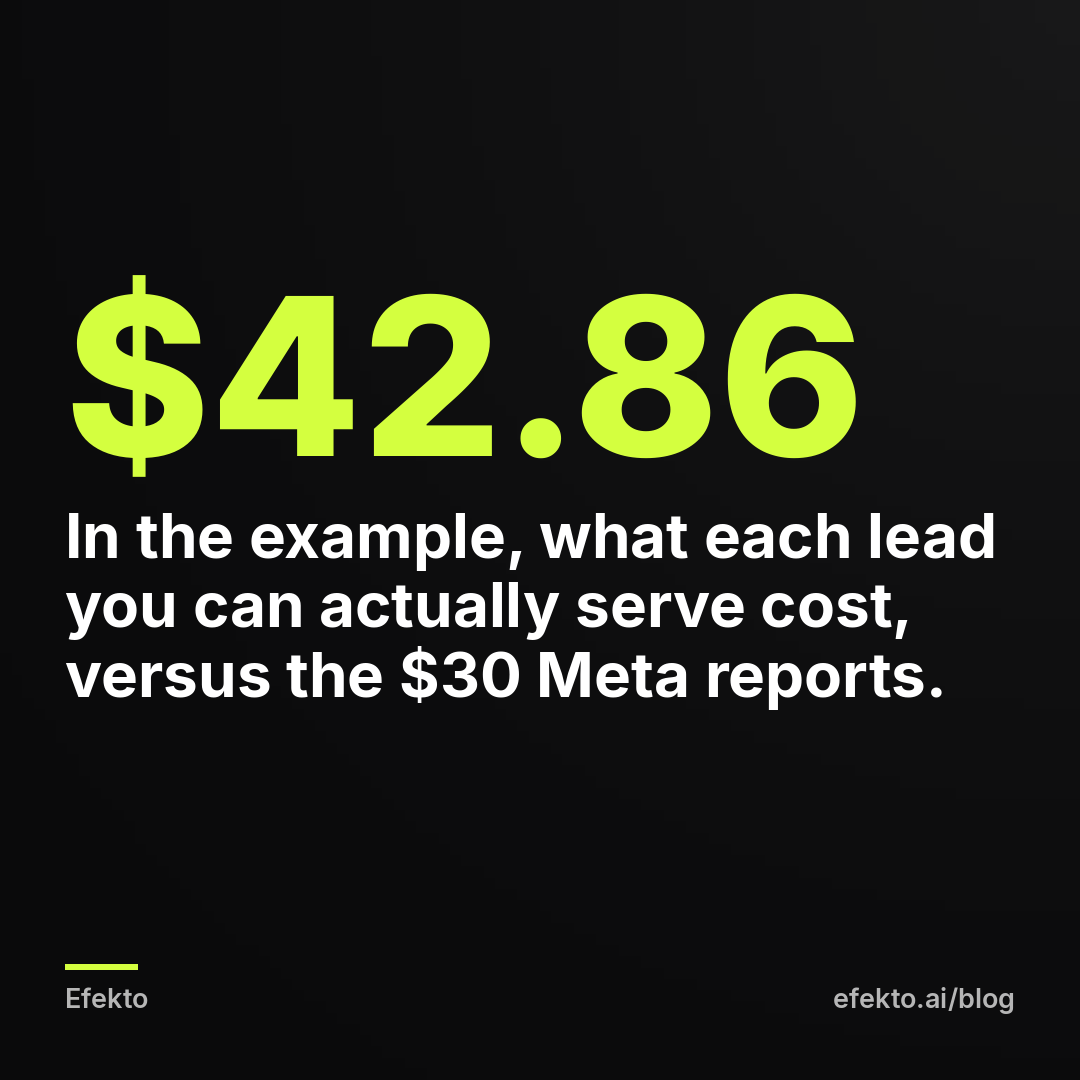
The gap between $30 and $42.86 is the location leak, expressed in dollars. If you only ever look at the $30, you will never see it. Once a month, export your leads, add a column for the job ZIP, and divide spend by the in-area leads only. That second number is the one to compare campaigns on. If you want the full chain from leads to revenue, see what ROAS is and why service businesses should track cost per booked job.
Your ad never says where you work
Most local ads say what the business does and forget to say where. 'Roof replacement, free inspection' reads the same to someone in your town and to someone 80 miles away. Add the area to the first line or the headline:
- 'Serving Plano, Frisco and McKinney: free roof inspection this week'
- 'Mobile detailing in north Scottsdale, we come to your driveway'
- 'Same-week AC repair in Pinellas County'
This costs nothing and filters people before they tap. It won't stop someone who doesn't read, which is why the form question still matters. But it removes a share of honest out-of-area leads, people who would have read 'Plano' and scrolled on.
Check the causes in this order
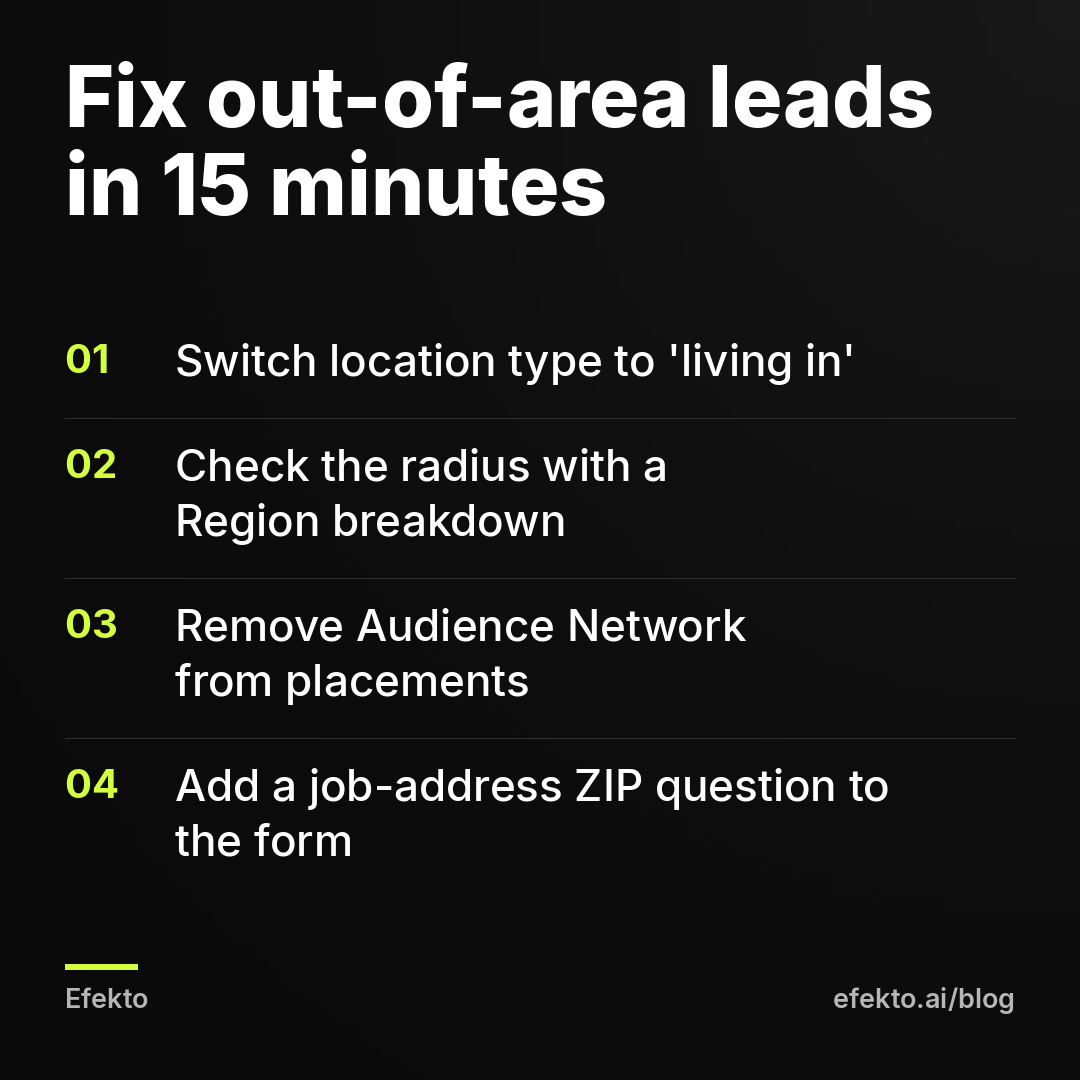
When out-of-area leads show up, go through this list top to bottom and stop when you find the leak. It takes about 15 minutes in total.
| Cause | How to check | Fix | Time |
|---|---|---|---|
| 'Living in or recently in' location type | Ad set, Audience, Locations dropdown | Switch to 'People living in this location' | 2 min |
| Advantage+ audience hiding the option | Look for 'Use original audience options' | Set location type by hand, then decide on Advantage+ | 3 min |
| Radius too wide | Breakdown by Region or DMA region; compare map with your towns | ZIP codes, smaller pin radius, or exclusions | 5 min |
| Audience Network placement | Breakdown by Placement; answer rate per placement | Manual placements without Audience Network | 2 min |
| No location question in the form | Open the instant form | Add 'job address ZIP' question, Higher intent form | 5 min |
Changing the location type or placements edits the ad set and can restart Meta's learning phase. Make all the changes in one sitting, not one per day, so the campaign relearns once.
An app won't fix a form that asks the wrong question
Efekto creates ads from your website, publishes them, and optimizes them every day: it turns off the ones that don't bring results and scales the ones that do. That handles the part of the work most owners don't have time for: making new images and videos and deciding which ads keep their budget. You can see the steps in how Efekto works. It runs on your own Facebook ad account or on an Efekto ad account.
What it does not do is decide for you which towns you serve or which leads are worth calling back. If your service area is one neighborhood, your lead form has no location question, or you never check where leads come from, no tool fixes that. In that case, do the five checks above first, by hand, in Ads Manager. They cost nothing.
What to take from this
- Within 24 hours of launching, open the first leads and check their ZIP codes before you look at cost.
- Switch every ad set for a fixed-location service business to 'People living in this location', and take Audience Network out of placements.
- Add one question to the lead form: the ZIP code of the job address, not the home address.
- Judge campaigns on spend divided by in-area leads, not on the cost per lead Meta reports.
- Make all targeting changes in one sitting so the campaign relearns once, not five times.
If you would rather have the ads created and optimized for you while you keep control of the area and the leads, you can start a campaign at efekto.ai.
- Jakub Zwoliński
Founder, Lemon Agency · Efekto · November 3, 2026