How to Target Homeowners in Your Service Area With Facebook Ads Without Wasting Budget
Facebook won't let you pick homeowners from property records. How to set radius, ZIP codes and exclusions, when to keep the audience broad, and how housing rules change it.

Facebook does not let you pick "homeowners" from property records, so you can't target them directly. You reach them in three layers. First, a location setting that covers only the ZIP codes or radius where you actually take jobs, limited to people who live there. Second, a broad audience inside that area, with no stacked interests. Third, an offer and a lead form that only owners respond to. Most budget we see wasted in service-area campaigns comes from the first layer: the map is drawn too wide, or ads show to people who were only passing through. Audiences that are too broad are rarely the problem.
In short:
- Facebook has no reliable homeowner filter, so geography plus an owner-only offer does the filtering that a targeting option can't.
- Narrow your audience by location and leave age, gender and interests broad unless you have a specific reason not to.
- If your ads fall into Meta's housing or financial special ad categories, ZIP code, age and gender targeting are off the table, and you have to plan the map differently.
Can you target homeowners directly on Facebook?
No, not in any way you should trust with your budget. In 2018 Meta shut down Partner Categories, the third-party data from companies like Acxiom and Experian that most "homeowner" targeting was built on. What remains in detailed targeting are interests like "home improvement" or "DIY". These are guesses based on what people like and click. They are not property records. A renter who watches renovation videos lands in that interest. A 60-year-old who has owned a house for 30 years and never touches home content does not.
We make money running ads on Meta, and we've done it for more than 300 businesses since the start, so take our criticism with that in mind. Still: any tool or agency that promises "we target only homeowners on Facebook" is overselling. They are selling an interest list with a better label on it.
Here is what does work. Location settings are a hard rule in Meta's system. Your ad will not show outside the area you draw, while interests and age ranges are increasingly treated as suggestions. So the map is where your control is real, and the rest of this guide is about drawing it well.
Step 1: How do you define your real service area before opening Ads Manager?
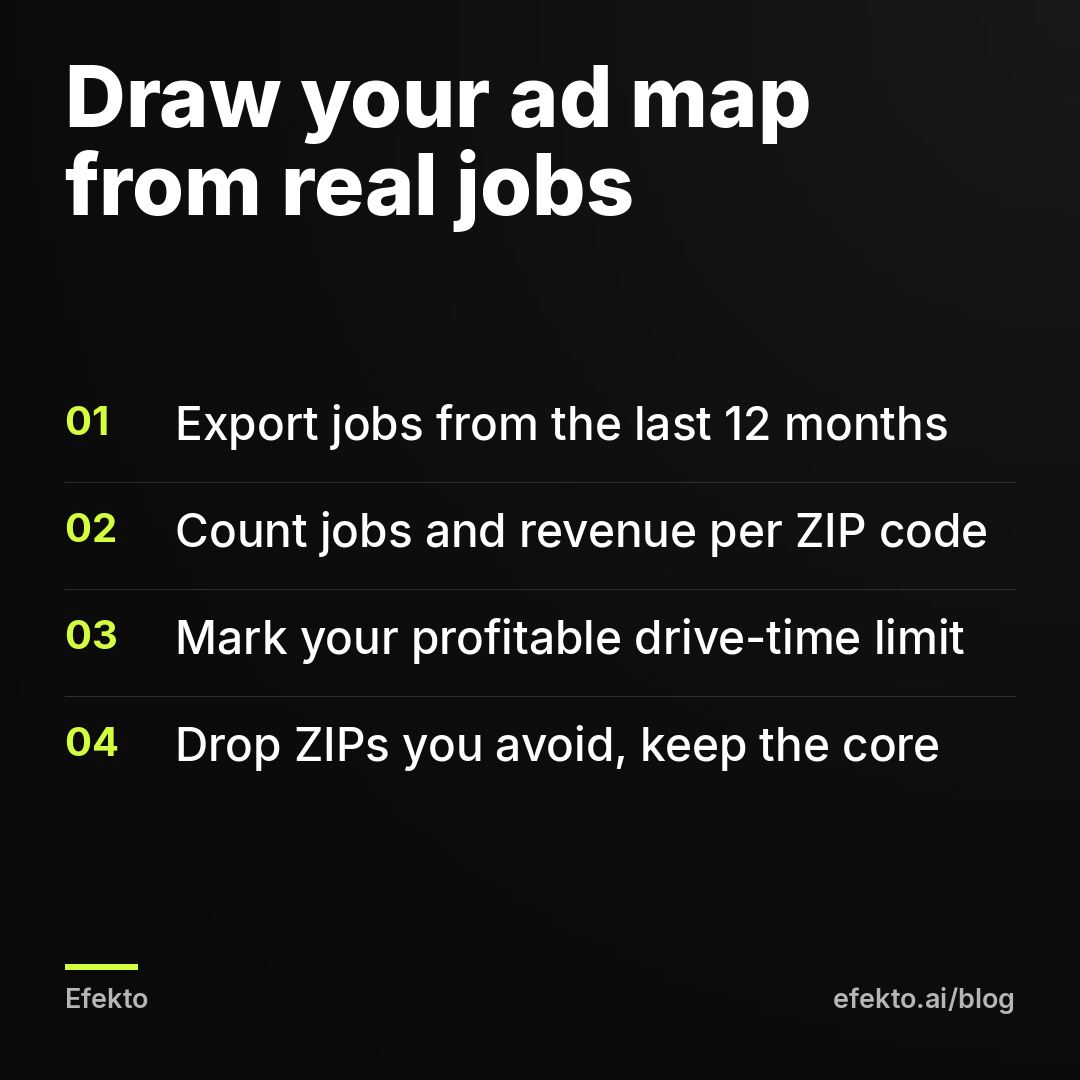
Start from your job records, not from where you'd like to work. Pull every job from the last 12 months with its address or ZIP code and the job value. A spreadsheet export from your CRM, invoicing tool or even your calendar is enough.
Then do three things.
- Count jobs per ZIP code. Sort from most jobs to fewest. For most local service businesses, a handful of ZIP codes carries most of the work.
- Mark the drive-time limit. Find the farthest point where a job still makes money after travel. A detailer doing mobile washes has a much shorter limit than a roofer doing $12,000 replacements.
- Mark the ZIP codes you avoid. Areas with mostly apartments, HOA rules that block your work, or places across a bridge your crews hate crossing.
For example: say a roofing company has 140 jobs in the last 12 months. 119 of them, 85%, came from addresses within 18 miles of the shop. The other 21 were spread over a 40-mile ring and included most of the jobs with travel complaints. The ad map should cover the 18-mile core. Running ads at 40 miles because a few jobs happened there spends most of the budget on the area that produces the fewest profitable jobs.
If you are new and have no job history, use drive time. Draw the area you can reach in 30 to 40 minutes at a normal weekday hour, then trim parts you know are mostly rentals or commercial.
Step 2: Should you use a radius, ZIP codes or cities?
Use ZIP codes if you can, a radius around a pin if your area is a rough circle, and cities only when the city boundary matches where you work. Each method has a different way of leaking budget.
| Method | Best for | Watch out for |
|---|---|---|
| Radius around an address or pin | Businesses where travel is the limit (mobile detailing, HVAC service calls) | A circle ignores rivers, highways and county lines, so you pay for areas you'd never drive to |
| List of ZIP codes | Most home service businesses with job history per ZIP | Not allowed if your ads fall into a special ad category; takes 10 minutes to enter |
| City or county | Businesses licensed or permitted by municipality | City lists can include the city plus a default radius around it; check the radius is set to the city only |
| DMA (TV market) | Almost never for a local service business | DMAs cover many counties and can stretch over 100 miles |
How to set it in Ads Manager. At the ad set level, find Audience, then Locations. Type a ZIP code, city or address. For a pin, use "Drop pin" on the map. Meta lets you set a radius around an address or pin starting at 1 mile. To add many ZIP codes at once, use "Add locations in bulk" and paste the list, one per line.
Our default. For a roofer, HVAC company or any business with job history, we paste the ZIP list from Step 1. For mobile services with no history, we drop a pin at the shop or the owner's home and set a radius that matches the drive-time limit. Then we exclude the ZIP codes inside that circle that we already know we don't want.
One caution on cities: when you add a city, Ads Manager can attach a radius around it (often 10 or more miles). Read the line under the city name. If it says "+10 mi", your ads reach well past the city line.
Step 3: How do you stop ads showing to people who are just passing through?
Check which group of people the location setting includes. Depending on the account and the objective, Meta targets either "people living in this location" or "people living in or recently in this location". The second option includes commuters, visitors and anyone whose phone pinged in your area that week. Meta has been moving this option around, and many accounts now show only the broader version. If your account still offers "people living in this location", pick it for any service delivered at the customer's home.
This matters more than it sounds. A homeowner who works in your city but lives 50 miles away will see your ad, fill in the form and give you an address you won't drive to.
For example: say you spend $30 a day, so $900 a month, and 15% of impressions go to people who don't live in your area. That is $135 a month. At $45 per lead, it's about 3 leads a month you'll have to call back just to tell them no. The money matters less than what those leads do to your data. Meta counts them as successful leads and learns to find more people like them.
Exclusions. Under Locations, switch from "Include" to "Exclude" and add the ZIP codes, cities or pins you don't want. Use them for:
- ZIP codes inside your radius that you don't serve (across a river, a military base, an industrial zone).
- A neighboring city where you lack a license or a permit.
- The area around a competitor's territory if you've agreed to split work, which some franchise owners have to do.
Don't use exclusions to drop neighborhoods because of who you think lives there. That's bad business, and for ads in a special ad category it's exactly the kind of thing the rules exist to block.
Step 4: When should you narrow your audience and when should you leave it broad?
Narrow by geography, and leave almost everything else broad. That's our position after years of testing it in client accounts. Interest stacks like "home improvement + homeowner-related pages + 35 to 65" mostly shrink the audience Meta can learn from. They don't make it better. Inside a tight local map, the delivery system finds people who fill in roofing forms faster than any interest list does, as long as the ad and the form make it obvious who the offer is for.
There are a few real exceptions.
| Situation | Narrow or broad | What to do |
|---|---|---|
| Your area holds more than about 100,000 adults | Broad | Location only, ages 18 to 65+, no interests |
| Your area is small (a single town of 10,000 to 20,000) | Broad, and widen the map if frequency climbs | Never add interests to an already small audience |
| Your offer only makes sense for one language group | Narrow | Add the language setting (for example Spanish) and write the ad in that language |
| You only work with customers 25 and older (financing, contracts) | Slightly narrow | Set minimum age to 25, leave the rest open |
| Your ads are in the housing or financial special ad category | You can't narrow | Age, gender and ZIP targeting are locked, see the section below |
| You've tested broad for 3 to 4 weeks and leads are mostly out of area | Fix the map, not the audience | Check Step 3 before touching interests |
About Advantage+ audience. In newer campaigns, Meta often turns on Advantage+ audience by default. Your age and interest choices then become "suggestions" the system can go beyond. Location stays a hard limit. Inside a well-drawn local map, we leave Advantage+ audience on, because the map is already doing the filtering. If you have a hard age requirement, set it under "Audience controls". There it's a real limit, not a suggestion.
Step 5: How big should your audience be for your daily budget?
Big enough that the same people don't see your ad more than 2 to 3 times a week. Meta shows an estimated audience size on the right side of the ad set screen. Compare it with your budget, not with a generic "ideal size".
Here's the rough math. Daily budget divided by the cost per 1,000 impressions (CPM), times 1,000, gives impressions per day. Compare that with how many people you can reach.
For example: say your area has 180,000 adults, you spend $30 a day, and your CPM is $15. That's 2,000 impressions a day, or 60,000 a month. Even if Meta reaches only 25,000 of those 180,000 people, average frequency is 2.4 a month. That's comfortable.
Now say a detailer targets one small town with 12,000 adults and spends $50 a day at the same $15 CPM. That's about 3,333 impressions a day and 100,000 a month. If Meta can actually reach 9,000 of them, each one sees the ad about 11 times a month. Results fall within two weeks, and it looks like the ad "stopped working". The ad was fine. The audience was used up. We explain the pattern in more detail in our post on why Facebook ads stop working after two weeks.
What to do when the math looks like the second case:
- Lower the daily budget to what the area can absorb. For the town above, $15 to $20 a day is closer.
- Widen the map by a few ZIP codes you can still serve profitably.
- Rotate new ads every 2 to 3 weeks so repeated viewers see something different.
Don't do the opposite and add interests to "refresh" a small audience. That makes it smaller.
Step 6: How do you filter out renters when Facebook can't?
With the offer and the form. Since targeting can't separate owners from renters, the ad has to make renters scroll past and the form has to catch the ones who don't.
In the ad. Write offers that only make sense for an owner: "Free roof inspection for homes in [county]", "Replace your 15-year-old AC before July", "Driveway sealing for single-family homes". Show the house, not a person. An ad for "$49 AC tune-up" will pull in renters who think the landlord pays. An ad for "AC replacement quote, financing available" mostly won't.
In the form. If you use Facebook lead forms (Instant Forms), add two questions:
- "Do you own the home where the work would be done?" with Yes / No / I'm a landlord.
- A ZIP code or full address field, so you can see if the lead is inside your area before calling.
Turn on "Higher intent" form type so people get a review screen before submitting. That costs more per form, but fewer people submit by accident. We cover the full setup in our guide to setting up Facebook lead forms that bring real customers.
Count leads twice. The number Meta shows as "cost per lead" is the cost of a submitted form before anyone has checked it. Your real cost is per verified lead: someone who owns the home, lives in your area and answers the phone. The gap between the two is where poor targeting shows up.
For example, one month of a roofing campaign might look like this:
| Line | Example number |
|---|---|
| Daily budget | $30 ($900 a month) |
| Leads reported by Meta | 30 |
| Cost per lead according to Meta | $30 |
| Leads that own the home, are in the area and answer | 18 |
| Cost per verified lead | $50 |
| Inspections booked | 6 |
| Roofs sold | 2 |
| Revenue at an example $11,000 per roof | $22,000 |
If most of the 12 leads you throw out are out of area, go back to Steps 2 and 3. If most of them are renters, fix the offer and add the ownership question. If you want to judge whether your $50 is good, our post on cost per lead on Facebook for a local business walks through the math by industry.
Do Facebook's special ad categories apply to a home service business?
Usually not, but two common situations put you in one. Meta requires advertisers to declare a special ad category for ads about housing, employment, and credit or financial products. Meta added these restrictions after settling discrimination complaints from civil rights groups in 2019, and it tightened them further in a 2022 settlement with the US Department of Justice under the Fair Housing Act.
When a home service business falls into one:
- Housing. According to Meta's policy, this covers ads for homes for sale or rent, homeowners insurance, mortgages, appraisals and related services. A roofer advertising roof replacement is normally outside it. A contractor who also sells homes, or a company promoting home equity loans for renovations, is inside it.
- Credit or financial products. If your ad leads with financing ("$0 down, 0% APR for 18 months"), Meta can treat it as a credit ad. This catches HVAC, roofing and solar companies more often than any other rule we see.
If you're unsure, check Meta's current definitions in the Ads Manager help center before launching. Running a financing ad without declaring the category gets the ad rejected, and repeated rejections can lead to account restrictions.
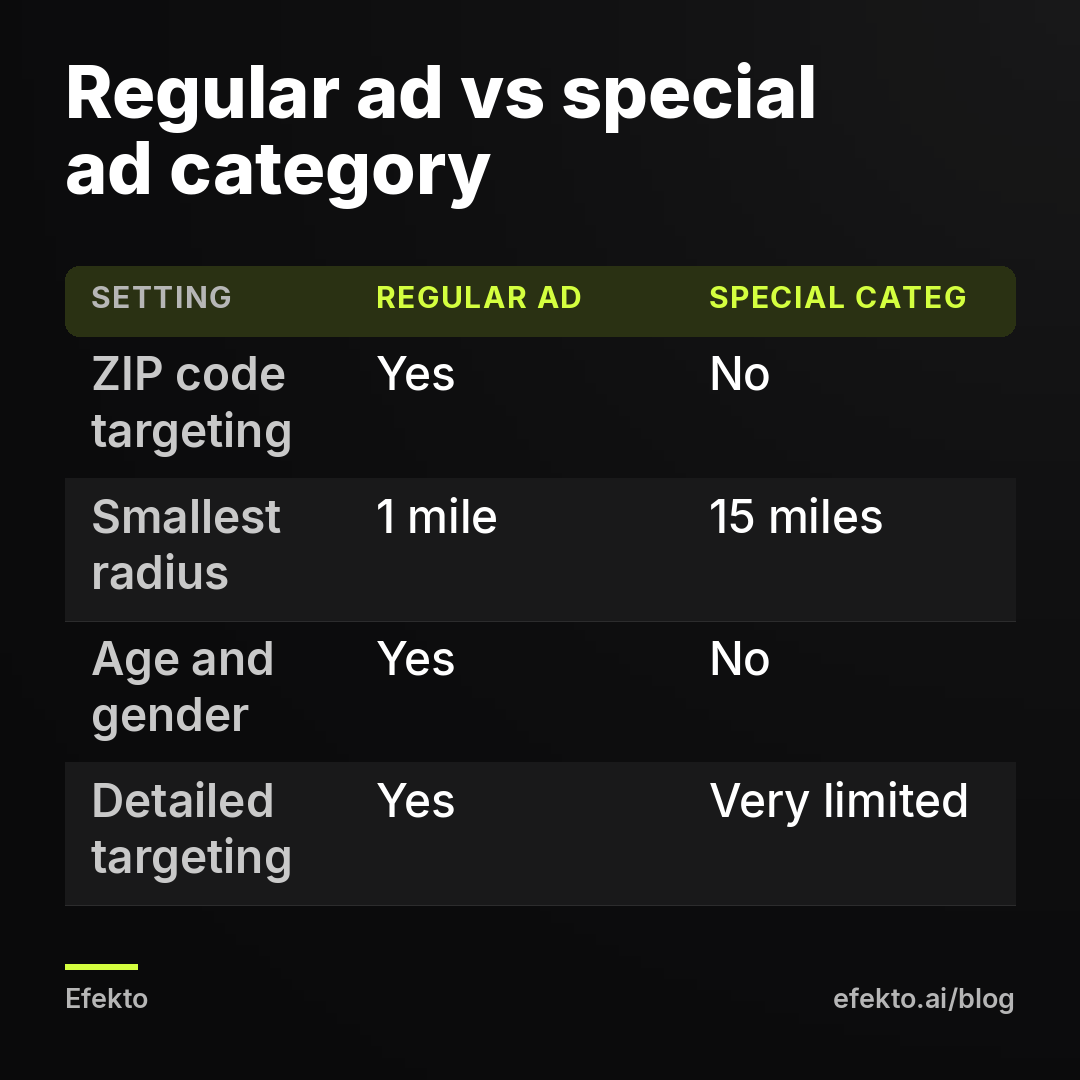
What changes inside a special category. As of our latest check of Meta's rules:
- No targeting by ZIP code.
- The radius around a city, address or pin has a minimum of 15 miles (compared with 1 mile for regular ads around a pin).
- No age or gender targeting. Ads go to 18 to 65+.
- Detailed targeting is heavily limited, and lookalike-style audiences are not available.
How to work inside these limits. Center the 15-mile radius on where most of your jobs are, not on your shop address. If your shop sits at the edge of your area, a 15-mile circle around it puts half the budget in the wrong place. If you can drop several smaller pins, use the minimum allowed radius on each one to roughly trace your area instead of one big circle. Then let the form do the rest: the ZIP code question from Step 6 becomes your main filter.
The simplest fix is often to keep financing out of the main ad. Promote the service and the inspection, and mention financing on the call or on the landing page. One rule to be careful with here: the ad must be honest about what it is. If the offer really is a loan, declare the category. Don't rewrite the ad to slip past the rule. Meta treats that as circumventing its systems, and the account is what you lose.
How do you check where your budget actually went?
Use the breakdown by region in Ads Manager and the ZIP codes in your leads. Meta doesn't report spend by ZIP code, so you need both.
- In Ads Manager, open the campaign, click "Breakdown", then "By Delivery", then "Region" or "DMA Region". You'll see spend and results by state and TV market. If anything shows outside your state, the location setting is wrong.
- In your lead list, sort leads by ZIP code once a week. Count how many fall inside your Step 1 map. If more than 1 in 10 are outside it, check the "living in" setting and any city radius you added.
- On the phone, ask every lead one question: "Do you own the home?" Write the answer next to the lead. After 30 leads you'll know whether the problem is the map, the offer or the form.
Plan for this review to take about 15 minutes a week. It's the cheapest fix in the whole campaign.
Where does an app like Efekto fit, and when doesn't it?
The map, the exclusions and the ownership question are decisions you make once, with your job records in front of you. The daily work is checking which ads bring leads, turning off the ones that don't and putting more budget behind the ones that do, and that's where most owners fall behind. Efekto creates ads from your website, publishes them on Facebook and Instagram, and optimizes them every day: it turns off the ones that don't bring results and scales the ones that do. You approve the first batch of at least 5 ads before anything runs, and it uses your own ad account or an Efekto ad account with the budget topped up in advance. The minimum ad budget is $15 a day, the Starter plan is $149 a month, and the 7-day free trial counts from the launch of your first campaign, with no card required at sign-up. If you run a roofing company, here's how Efekto works for roofing companies.
It doesn't make sense in every case. If your whole service area is one small town and the math from Step 5 says it can only absorb $10 a day, an app built around daily optimization has too little to work with. Run one good ad by hand and refresh it monthly. If your offer needs address-level precision, such as a single subdivision or a list of past customers, direct mail or door hangers will reach those houses more reliably than Facebook's location settings. And if your ads fall into a special ad category and your area is much smaller than a 15-mile circle, expect waste no matter who runs the account.
What are the most common targeting mistakes that waste budget?
These are the ones we find most often when we open a new service business account.
1. A city added with a hidden radius. The owner types the city name, Ads Manager attaches "+25 mi", and a third of the impressions go to the next county. Fix: read the radius line under every location, and set it to the city only or switch to ZIP codes.
2. Targeting the whole state "to give the algorithm room". Room to find people you can't serve isn't useful. Fix: use the map from Step 1. If it's too small for your budget, lower the budget.
3. Interest stacking on top of a local map. "Homeowners + home improvement + 35 to 55 + parents" in a 20-mile radius leaves a few thousand people who see the same ad 15 times. Fix: location only, broad audience, owner-only offer.
4. Ignoring "recently in". Commuters and tourists fill in the form and give addresses outside your area. Fix: pick "people living in" where the option exists, and add a ZIP question to the form either way.
5. Financing in the headline without declaring the category. Rejected ads, then a restricted account. Fix: move financing to the call or the landing page, or declare the category and plan the map around a 15-mile minimum.
6. Judging the campaign by Meta's cost per lead. $30 per form looks great until half the forms are renters in another city. Fix: track cost per verified lead every week.
7. Raising the budget in a small area. Doubling spend in a town of 12,000 adults doesn't double leads. It doubles frequency. Fix: widen the map first, then raise the budget.
What we do on every new account: we build the map from job records before we look at a single interest, we add the ownership and ZIP questions to every form, and we check the region breakdown in the first week. We skip the "homeowner" interest entirely, and we tell owners up front that there's no such thing as Facebook targeting that only reaches homeowners.
FAQ
Can I upload a list of addresses to target specific houses on Facebook?
You can upload a customer list (emails or phone numbers) as a custom audience, but not a list of street addresses to target houses directly. Meta matches the list to profiles, and for a small local list the match rate is often too low to run ads on alone. For reaching specific houses, direct mail is more reliable.
What radius should a local service business use on Facebook?
Use the distance you can drive profitably, based on where your past jobs came from, not a round number. Mobile detailers often end up with 10 to 15 miles, roofers and HVAC companies with 20 to 30. If you're in a special ad category, the minimum is 15 miles.
Is it worth targeting by income or zip code wealth?
Meta no longer offers reliable household income targeting in the US, and picking ZIP codes by assumed wealth tends to cut volume more than it raises job value. Price your offer clearly in the ad instead and let people who can't afford it skip it. If you're in a special ad category, ZIP targeting isn't available anyway.
Should I run separate ad sets for each town I serve?
Only if each town is large enough to support its own budget, for example 100,000+ adults and $20+ a day each. Splitting a small area into several ad sets gives each one too little data to learn from. One ad set with all your ZIP codes usually performs better.
If you want the daily work done for you after you've drawn your map, you can start a free trial at efekto.ai.
- Jakub Zwoliński
Founder, Lemon Agency · Efekto · October 24, 2026